On this page
Still need help?
Our support team is ready to help.
WorkForce365 Documentation
API & Webhooks Documentation
Authenticate external applications, call registered REST APIs, receive webhook events, and monitor each integration safely.
Purpose, Features, and Authentication
API & Webhooks connects trusted external systems to WorkForce365 through registered JSON endpoints and an authenticated event receiver.
REST API Access
Read employee, attendance, salary, and performance data, or create and update employee profiles using JSON requests.
Endpoint Registry
Administrators can copy full URLs, review request guides, enable or disable endpoints, and remove registry entries.
Bearer Access Token
External requests authenticate with the signed access token in the Authorization header. This is not a browser session or a JWT.
Webhook Receiver
External applications can deliver authenticated JSON events to one receiver, then administrators can monitor accepted payloads.
Integration Workflow
Follow this sequence when connecting a new website, mobile app, business system, or automation service.
Generate API Key
Open API Integrations and copy the current access token. Regenerating it immediately invalidates the previous token.
Authenticate Requests
Send Authorization: Bearer <access_token> from the external application's server.
Call API Endpoints
Use the registry method and URL, send required parameters or JSON fields, and parse the JSON response.
Configure Webhooks
Configure the external sender to post selected events to the WorkForce365 receiver URL.
Receive Events
WorkForce365 validates the token, content type, payload size, and lowercase event name before storing the event.
Monitor Logs
Review recent accepted events on the Webhook page and investigate any non-202 response from the sender.
API and Webhook Screens
These screenshots come from the current application templates using synthetic data in the isolated documentation database.
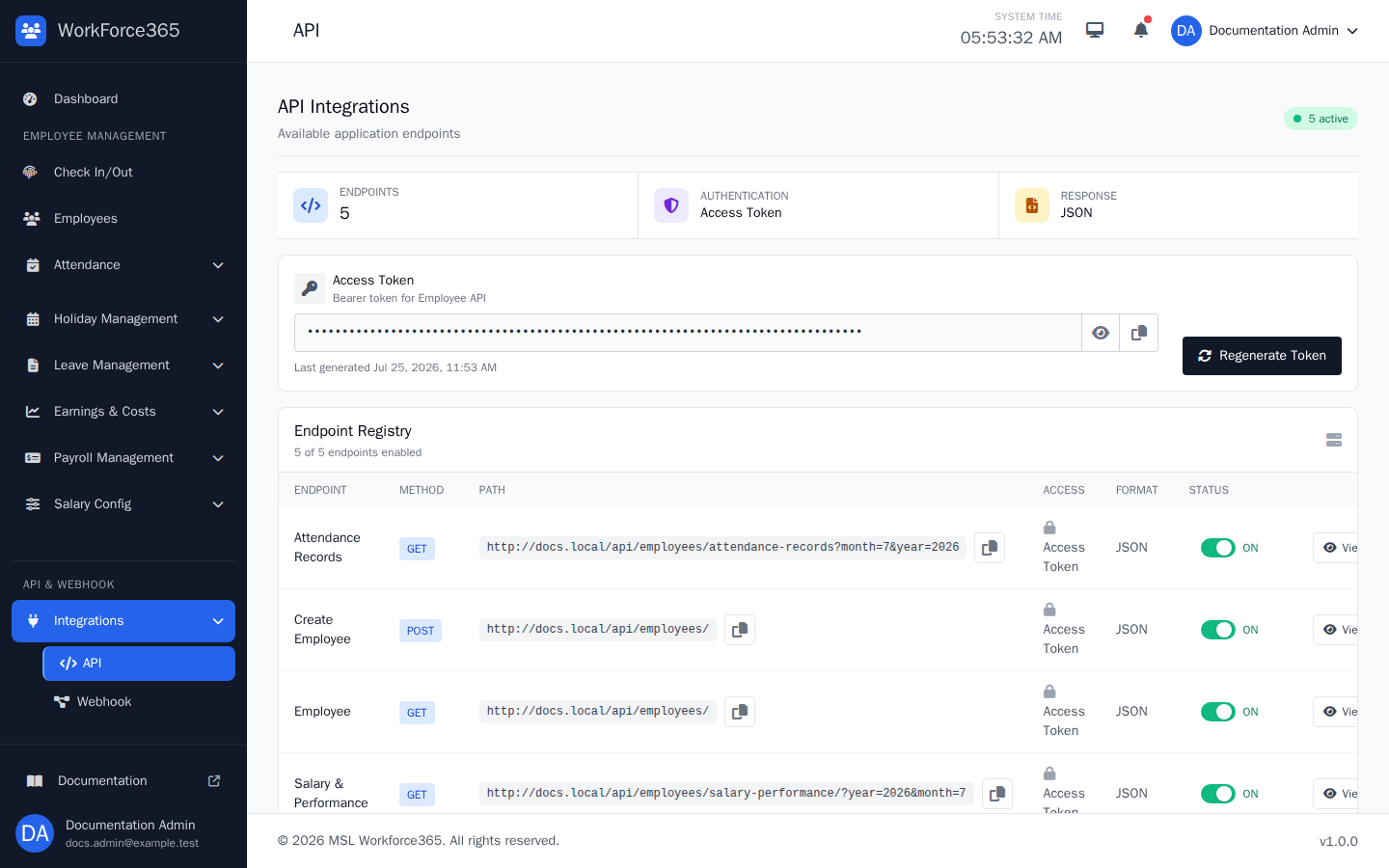
API Overview
Summarizes the number of registered endpoints, the access-token authentication method, and the JSON response format.
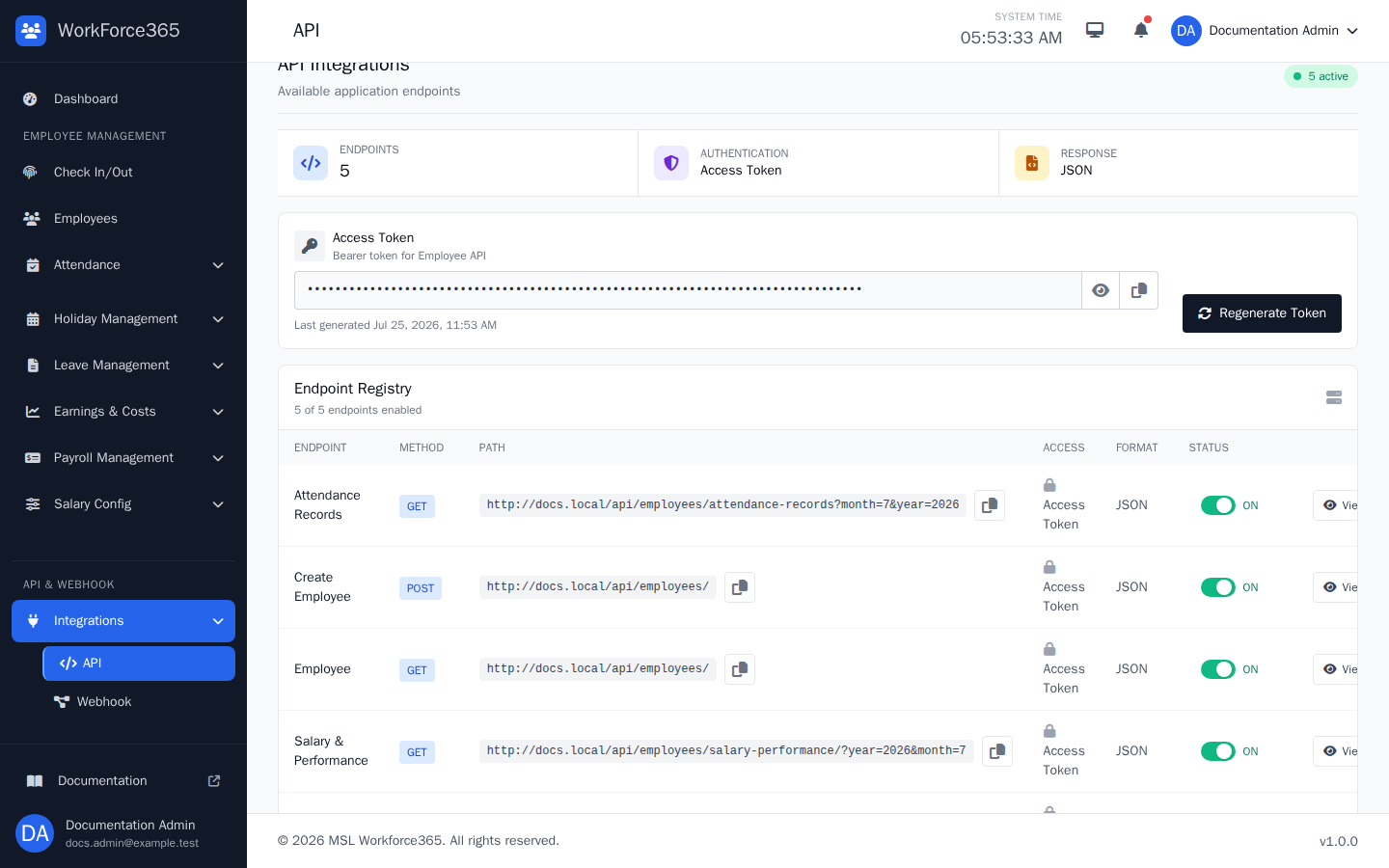
API Keys / Access Token
Shows where administrators reveal or copy the current token and regenerate it when credentials must be rotated.
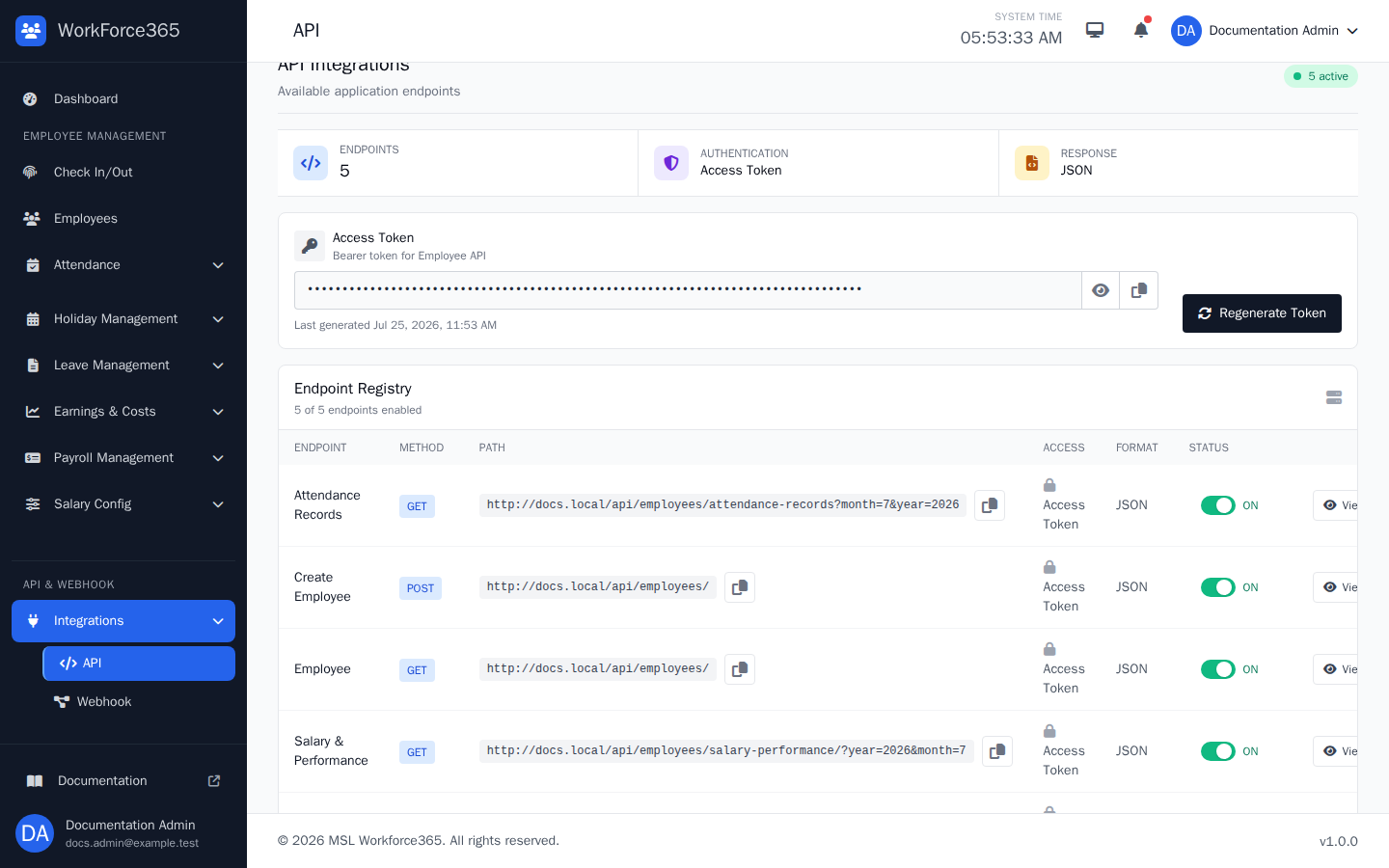
Endpoint Registry
Lists every managed endpoint with its method, full path, access requirement, format, ON/OFF switch, View guide, and Delete action.
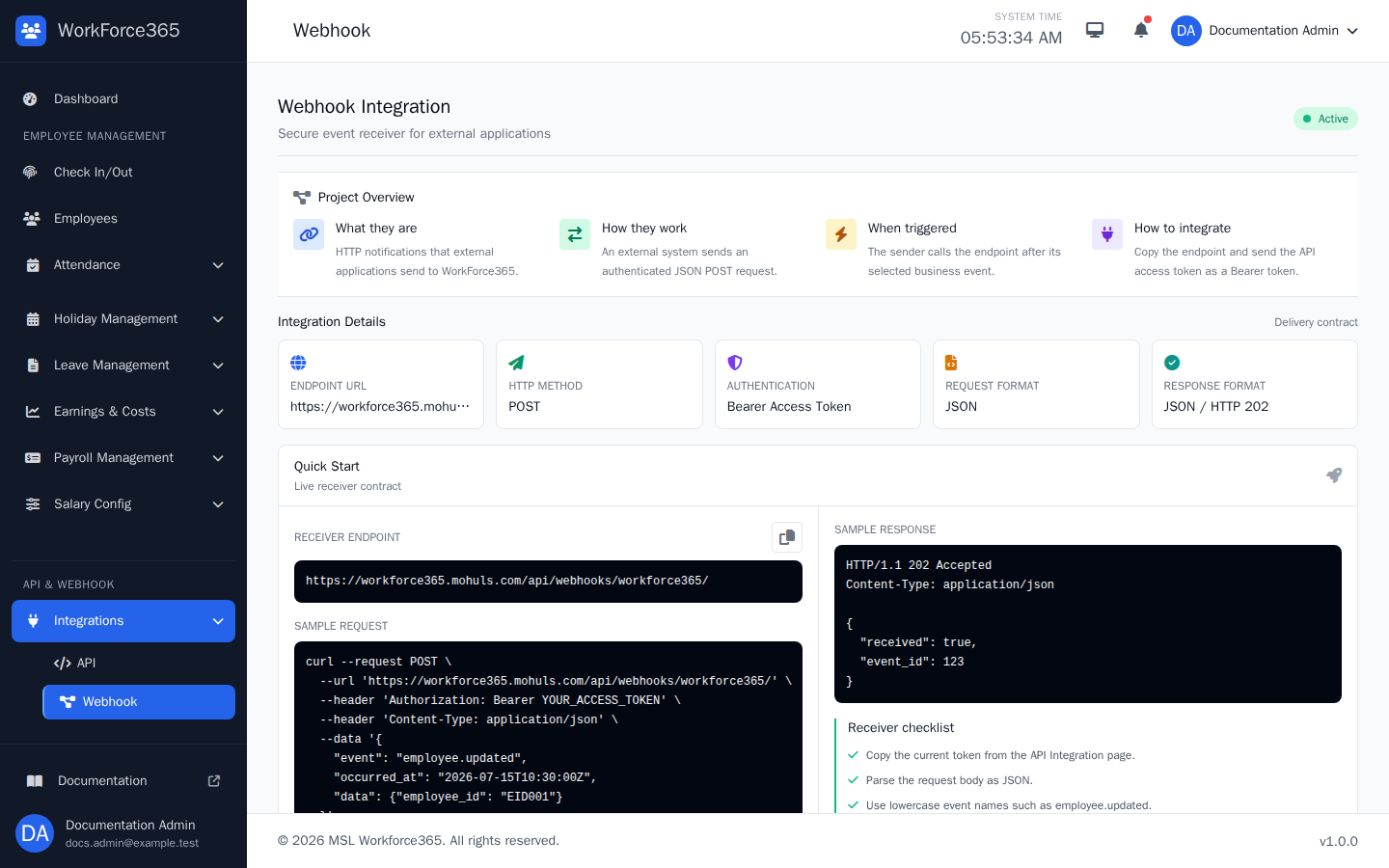
Webhook Configuration
Explains the real receiver URL, POST method, bearer authentication, JSON contract, and quick-start request.
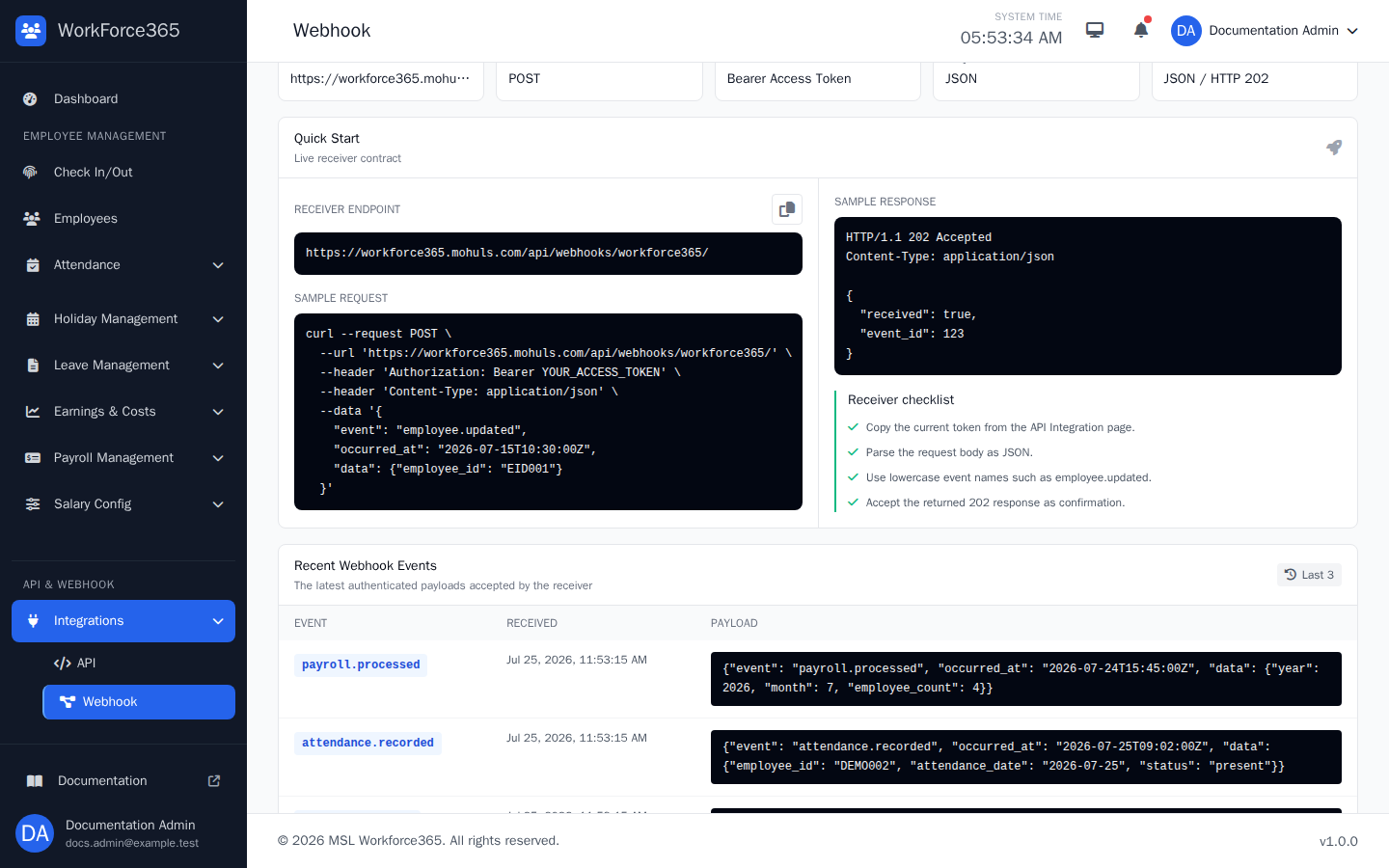
Webhook Logs
Displays the ten most recent authenticated events, when each event arrived, and the accepted JSON payload.
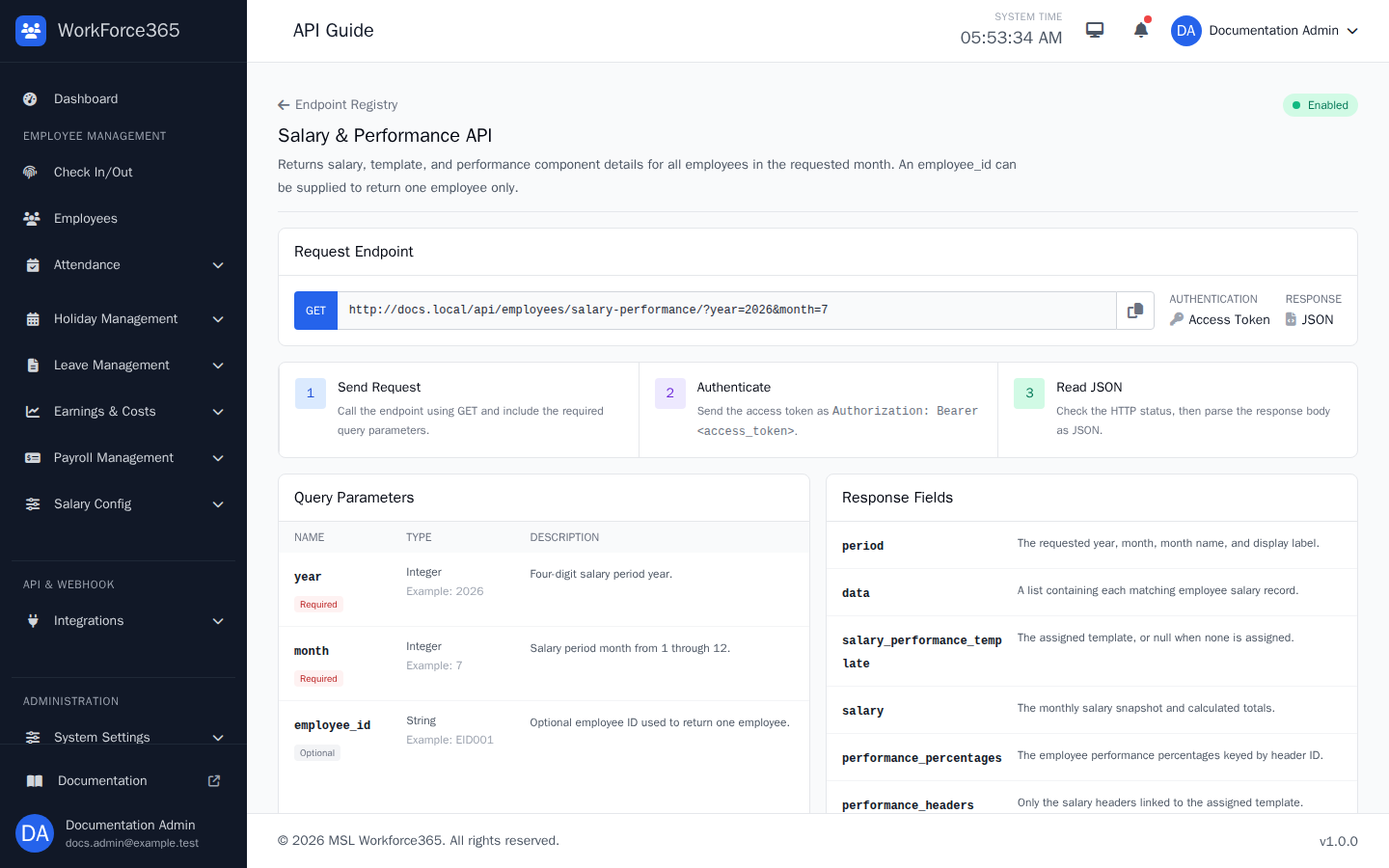
API Documentation / Testing
The View page explains the endpoint URL, parameters, response fields, cURL, Python, JavaScript, sample JSON, and HTTP status codes.
Available API Endpoints
This reference is generated from the live Endpoint Registry. It currently contains 65 endpoints.
| Endpoint | Method | Path | Authentication | Status |
|---|---|---|---|---|
| Approve Earning | POST | /api/v1/finance/earnings/{id}/approve/ |
Access Token | Enabled |
| Approve Expense | POST | /api/v1/finance/expenses/{id}/approve/ |
Access Token | Enabled |
| Approve Leave Application | POST | /api/v1/leave-applications/{id}/approve/ |
Access Token | Enabled |
| Attendance Records | GET | /api/employees/attendance-records?month=7&year=2026 |
Access Token | Enabled |
| Create Earning | POST | /api/v1/finance/earnings/ |
Access Token | Enabled |
| Create Earning Category | POST | /api/v1/finance/earning-categories/ |
Access Token | Enabled |
| Create Employee | POST | /api/employees/ |
Access Token | Enabled |
| Create Expense | POST | /api/v1/finance/expenses/ |
Access Token | Enabled |
| Create Expense Category | POST | /api/v1/finance/expense-categories/ |
Access Token | Enabled |
| Create Holiday | POST | /api/v1/holidays/ |
Access Token | Enabled |
| Create Leave Application | POST | /api/v1/leave-applications/ |
Access Token | Enabled |
| Create Webhook Subscription | POST | /api/v1/webhook-subscriptions/ |
Access Token | Enabled |
| Delete Earning | DELETE | /api/v1/finance/earnings/{id}/ |
Access Token | Enabled |
| Delete Earning Category | DELETE | /api/v1/finance/earning-categories/{id}/ |
Access Token | Enabled |
| Delete Expense | DELETE | /api/v1/finance/expenses/{id}/ |
Access Token | Enabled |
| Delete Expense Category | DELETE | /api/v1/finance/expense-categories/{id}/ |
Access Token | Enabled |
| Delete Holiday | DELETE | /api/v1/holidays/{id}/ |
Access Token | Enabled |
| Delete Webhook Subscription | DELETE | /api/v1/webhook-subscriptions/{id}/ |
Access Token | Enabled |
| Employee Personal Information | GET | /api/employees/ |
Access Token | Enabled |
| Finance Summary | GET | /api/v1/finance/summary/?year=2026&month=7 |
Access Token | Enabled |
| Leave Balances | GET | /api/v1/leave-balances/?employee_id=EID001&year=2026 |
Access Token | Enabled |
| Leave Types | GET | /api/v1/leave-types/ |
Access Token | Enabled |
| List Earning Categories | GET | /api/v1/finance/earning-categories/ |
Access Token | Enabled |
| List Earnings | GET | /api/v1/finance/earnings/ |
Access Token | Enabled |
| List Expense Categories | GET | /api/v1/finance/expense-categories/ |
Access Token | Enabled |
| List Expenses | GET | /api/v1/finance/expenses/ |
Access Token | Enabled |
| List Holidays | GET | /api/v1/holidays/?year=2026 |
Access Token | Enabled |
| List Leave Applications | GET | /api/v1/leave-applications/ |
Access Token | Enabled |
| List Webhook Subscriptions | GET | /api/v1/webhook-subscriptions/ |
Access Token | Enabled |
| Monthly Employee Summaries | GET | /api/v1/monthly-summaries/?year=2026&month=7 |
Access Token | Enabled |
| Payroll Periods | GET | /api/v1/payroll/periods/ |
Access Token | Enabled |
| Payroll Record Details | GET | /api/v1/payroll/records/{id}/ |
Access Token | Enabled |
| Payroll Records | GET | /api/v1/payroll/records/?year=2026&month=7 |
Access Token | Enabled |
| Record Earning Payment | POST | /api/v1/finance/earnings/{id}/payments/ |
Access Token | Enabled |
| Record Expense Payment | POST | /api/v1/finance/expenses/{id}/payments/ |
Access Token | Enabled |
| Record Payroll Payment | POST | /api/v1/payroll/records/{id}/payments/ |
Access Token | Enabled |
| Reference Data | GET | /api/v1/reference-data/ |
Access Token | Enabled |
| Reject Earning | POST | /api/v1/finance/earnings/{id}/reject/ |
Access Token | Enabled |
| Reject Expense | POST | /api/v1/finance/expenses/{id}/reject/ |
Access Token | Enabled |
| Reject Leave Application | POST | /api/v1/leave-applications/{id}/reject/ |
Access Token | Enabled |
| Repay Salary Due | POST | /api/v1/payroll/dues/{id}/payments/ |
Access Token | Enabled |
| Retry Webhook Delivery | POST | /api/v1/webhook-deliveries/{id}/retry/ |
Access Token | Enabled |
| Salary Dues | GET | /api/v1/payroll/dues/ |
Access Token | Enabled |
| Salary & Performance | GET | /api/employees/salary-performance/?year=2026&month=7 |
Access Token | Enabled |
| Submit Earning | POST | /api/v1/finance/earnings/{id}/submit/ |
Access Token | Enabled |
| Submit Expense | POST | /api/v1/finance/expenses/{id}/submit/ |
Access Token | Enabled |
| Test Webhook Subscription | POST | /api/v1/webhook-subscriptions/{id}/test/ |
Access Token | Enabled |
| Update Earning | PATCH | /api/v1/finance/earnings/{id}/ |
Access Token | Enabled |
| Update Earning Category | PATCH | /api/v1/finance/earning-categories/{id}/ |
Access Token | Enabled |
| Update Employee | PATCH | /api/employees/{employee_id}/ |
Access Token | Enabled |
| Update Expense | PATCH | /api/v1/finance/expenses/{id}/ |
Access Token | Enabled |
| Update Expense Category | PATCH | /api/v1/finance/expense-categories/{id}/ |
Access Token | Enabled |
| Update Holiday | PATCH | /api/v1/holidays/{id}/ |
Access Token | Enabled |
| Update Leave Application | PATCH | /api/v1/leave-applications/{id}/ |
Access Token | Enabled |
| Update Webhook Subscription | PATCH | /api/v1/webhook-subscriptions/{id}/ |
Access Token | Enabled |
| Update Weekly Holidays | PUT | /api/v1/weekly-holidays/ |
Access Token | Enabled |
| View Earning | GET | /api/v1/finance/earnings/{id}/ |
Access Token | Enabled |
| View Earning Category | GET | /api/v1/finance/earning-categories/{id}/ |
Access Token | Enabled |
| View Expense | GET | /api/v1/finance/expenses/{id}/ |
Access Token | Enabled |
| View Expense Category | GET | /api/v1/finance/expense-categories/{id}/ |
Access Token | Enabled |
| View Holiday | GET | /api/v1/holidays/{id}/ |
Access Token | Enabled |
| View Leave Application | GET | /api/v1/leave-applications/{id}/ |
Access Token | Enabled |
| View Webhook Subscription | GET | /api/v1/webhook-subscriptions/{id}/ |
Access Token | Enabled |
| Webhook Deliveries | GET | /api/v1/webhook-deliveries/ |
Access Token | Enabled |
| Weekly Holiday Configuration | GET | /api/v1/weekly-holidays/ |
Access Token | Enabled |
REST API Reference
Each entry includes the registered method and URL, authentication headers, parameters or JSON fields, a request example, response example, and possible status codes.
Approve Earning
Approve Earning is part of the versioned WorkForce365 integration surface and returns a standardized JSON response.
Required headers
| Header | Value | When required |
|---|---|---|
Authorization | Bearer <access_token> | Every external API request |
Accept | application/json | Recommended for every request |
No query parameters or request body fields are required.
Request examples
curl --request POST \
  --url 'https://workforce365.mohuls.com/api/v1/finance/earnings/{id}/approve/' \
  --header 'Accept: application/json' \
  --header 'Authorization: Bearer <access_token>' \
  --header 'Content-Type: application/json' \
--data '{}'import os
import requests
api_url = 'https://workforce365.mohuls.com/api/v1/finance/earnings/{id}/approve/'
request_data = {}
response = requests.request(
'POST',
api_url,
json=request_data,
headers={
'Accept': 'application/json',
'Authorization': f"Bearer {os.environ['WORKFORCE365_API_TOKEN']}",
},
timeout=30,
)
response.raise_for_status()
payload = response.json()const apiUrl = "https://workforce365.mohuls.com/api/v1/finance/earnings/{id}/approve/";
const response = await fetch(apiUrl, {
method: 'POST',
headers: {
Accept: 'application/json',
'Content-Type': 'application/json',
Authorization: `Bearer ${process.env.WORKFORCE365_API_TOKEN}`,
},
body: JSON.stringify({}),
});
if (!response.ok) {
throw new Error(`Workforce 365 API error: ${response.status}`);
}
const payload = await response.json();Example JSON response
{
  "success": true,
  "message": "Approve Earning completed successfully.",
  "data": []
}
HTTP status codes
Approve Expense
Approve Expense is part of the versioned WorkForce365 integration surface and returns a standardized JSON response.
Required headers
| Header | Value | When required |
|---|---|---|
Authorization | Bearer <access_token> | Every external API request |
Accept | application/json | Recommended for every request |
No query parameters or request body fields are required.
Request examples
curl --request POST \
  --url 'https://workforce365.mohuls.com/api/v1/finance/expenses/{id}/approve/' \
  --header 'Accept: application/json' \
  --header 'Authorization: Bearer <access_token>' \
  --header 'Content-Type: application/json' \
--data '{}'import os
import requests
api_url = 'https://workforce365.mohuls.com/api/v1/finance/expenses/{id}/approve/'
request_data = {}
response = requests.request(
'POST',
api_url,
json=request_data,
headers={
'Accept': 'application/json',
'Authorization': f"Bearer {os.environ['WORKFORCE365_API_TOKEN']}",
},
timeout=30,
)
response.raise_for_status()
payload = response.json()const apiUrl = "https://workforce365.mohuls.com/api/v1/finance/expenses/{id}/approve/";
const response = await fetch(apiUrl, {
method: 'POST',
headers: {
Accept: 'application/json',
'Content-Type': 'application/json',
Authorization: `Bearer ${process.env.WORKFORCE365_API_TOKEN}`,
},
body: JSON.stringify({}),
});
if (!response.ok) {
throw new Error(`Workforce 365 API error: ${response.status}`);
}
const payload = await response.json();Example JSON response
{
  "success": true,
  "message": "Approve Expense completed successfully.",
  "data": []
}
HTTP status codes
Approve Leave Application
Approve Leave Application is part of the versioned WorkForce365 integration surface and returns a standardized JSON response.
Required headers
| Header | Value | When required |
|---|---|---|
Authorization | Bearer <access_token> | Every external API request |
Accept | application/json | Recommended for every request |
No query parameters or request body fields are required.
Request examples
curl --request POST \
  --url 'https://workforce365.mohuls.com/api/v1/leave-applications/{id}/approve/' \
  --header 'Accept: application/json' \
  --header 'Authorization: Bearer <access_token>' \
  --header 'Content-Type: application/json' \
--data '{}'import os
import requests
api_url = 'https://workforce365.mohuls.com/api/v1/leave-applications/{id}/approve/'
request_data = {}
response = requests.request(
'POST',
api_url,
json=request_data,
headers={
'Accept': 'application/json',
'Authorization': f"Bearer {os.environ['WORKFORCE365_API_TOKEN']}",
},
timeout=30,
)
response.raise_for_status()
payload = response.json()const apiUrl = "https://workforce365.mohuls.com/api/v1/leave-applications/{id}/approve/";
const response = await fetch(apiUrl, {
method: 'POST',
headers: {
Accept: 'application/json',
'Content-Type': 'application/json',
Authorization: `Bearer ${process.env.WORKFORCE365_API_TOKEN}`,
},
body: JSON.stringify({}),
});
if (!response.ok) {
throw new Error(`Workforce 365 API error: ${response.status}`);
}
const payload = await response.json();Example JSON response
{
  "success": true,
  "message": "Approve Leave Application completed successfully.",
  "data": []
}
HTTP status codes
Attendance Records
Returns every employee attendance record in the requested calendar month, ordered by attendance date from earliest to latest.
Required headers
| Header | Value | When required |
|---|---|---|
Authorization | Bearer <access_token> | Every external API request |
Accept | application/json | Recommended for every request |
Query parameters
| Name | Type | Required | Example | Description |
|---|---|---|---|---|
month | Integer | Yes | 7 | Calendar month from 1 through 12. |
year | Integer | Yes | 2026 | Four-digit calendar year. |
Request examples
curl --request GET \
  --url 'https://workforce365.mohuls.com/api/employees/attendance-records?month=7&year=2026' \
  --header 'Accept: application/json' \
--header 'Authorization: Bearer <access_token>'import os
import requests
api_url = 'https://workforce365.mohuls.com/api/employees/attendance-records?month=7&year=2026'
response = requests.request(
'GET',
api_url,
headers={
'Accept': 'application/json',
'Authorization': f"Bearer {os.environ['WORKFORCE365_API_TOKEN']}",
},
timeout=30,
)
response.raise_for_status()
payload = response.json()const apiUrl = "https://workforce365.mohuls.com/api/employees/attendance-records?month=7&year=2026";
const response = await fetch(apiUrl, {
method: 'GET',
headers: {
Accept: 'application/json',
'Content-Type': 'application/json',
Authorization: `Bearer ${process.env.WORKFORCE365_API_TOKEN}`,
},
});
if (!response.ok) {
throw new Error(`Workforce 365 API error: ${response.status}`);
}
const payload = await response.json();Example JSON response
{
  "success": true,
  "message": "Attendance records retrieved successfully.",
  "data": [
    {
      "id": 101,
      "employee_id": "EID001",
      "full_name": "Example Employee",
      "attendance_date": "2026-07-01",
      "status": "present",
      "status_display": "Present",
      "in_time": "09:00:00",
      "out_time": "17:00:00",
      "total_minutes": 420,
      "total_break_minutes": 60,
      "late_minutes": 0,
      "early_leave_minutes": 0,
      "overtime_minutes": 0,
      "source": "fingerprint",
      "source_display": "Fingerprint"
    }
  ],
  "count": 1,
  "period": {
    "year": 2026,
    "month": 7,
    "month_name": "July",
    "label": "July 2026"
  }
}
HTTP status codes
Create Earning
Create Earning is part of the versioned WorkForce365 integration surface and returns a standardized JSON response.
Required headers
| Header | Value | When required |
|---|---|---|
Authorization | Bearer <access_token> | Every external API request |
Accept | application/json | Recommended for every request |
Content-Type | application/json | Requests with a JSON body |
JSON request body
| Field | Type | Required | Description |
|---|---|---|---|
category_id | Integer | Yes | Active earning category ID. |
title | String | Yes | Earning title. |
client_name | String | No | Client or payer name. |
amount | Decimal | Yes | Total earning amount. |
earning_date | Date | Yes | Earning date in YYYY-MM-DD format. |
due_date | Date/null | No | Optional due date. |
reference_number | String | No | External reference. |
description | String | No | Optional earning notes. |
Request examples
curl --request POST \
  --url 'https://workforce365.mohuls.com/api/v1/finance/earnings/' \
  --header 'Accept: application/json' \
  --header 'Authorization: Bearer <access_token>' \
  --header 'Content-Type: application/json' \
  --data '{
  "category_id": 1,
  "title": "Client Project",
  "amount": "12000.00",
  "earning_date": "2026-07-26",
  "client_name": "Example Client"
}'import os
import requests
api_url = 'https://workforce365.mohuls.com/api/v1/finance/earnings/'
request_data = {'category_id': 1, 'title': 'Client Project', 'amount': '12000.00', 'earning_date': '2026-07-26', 'client_name': 'Example Client'}
response = requests.request(
'POST',
api_url,
json=request_data,
headers={
'Accept': 'application/json',
'Authorization': f"Bearer {os.environ['WORKFORCE365_API_TOKEN']}",
},
timeout=30,
)
response.raise_for_status()
payload = response.json()const apiUrl = "https://workforce365.mohuls.com/api/v1/finance/earnings/";
const response = await fetch(apiUrl, {
method: 'POST',
headers: {
Accept: 'application/json',
'Content-Type': 'application/json',
Authorization: `Bearer ${process.env.WORKFORCE365_API_TOKEN}`,
},
body: JSON.stringify({
"category_id": 1,
"title": "Client Project",
"amount": "12000.00",
"earning_date": "2026-07-26",
"client_name": "Example Client"
}),
});
if (!response.ok) {
throw new Error(`Workforce 365 API error: ${response.status}`);
}
const payload = await response.json();Example JSON response
{
  "success": true,
  "message": "Create Earning completed successfully.",
  "data": []
}
HTTP status codes
Create Earning Category
Create Earning Category is part of the versioned WorkForce365 integration surface and returns a standardized JSON response.
Required headers
| Header | Value | When required |
|---|---|---|
Authorization | Bearer <access_token> | Every external API request |
Accept | application/json | Recommended for every request |
Content-Type | application/json | Requests with a JSON body |
JSON request body
| Field | Type | Required | Description |
|---|---|---|---|
name | String | Yes | Unique category name. |
description | String | No | Optional category description. |
is_active | Boolean | No | Whether the category can be selected. |
Request examples
curl --request POST \
  --url 'https://workforce365.mohuls.com/api/v1/finance/earning-categories/' \
  --header 'Accept: application/json' \
  --header 'Authorization: Bearer <access_token>' \
  --header 'Content-Type: application/json' \
  --data '{
  "name": "Software Services",
  "description": "Approved category",
  "is_active": true
}'import os
import requests
api_url = 'https://workforce365.mohuls.com/api/v1/finance/earning-categories/'
request_data = {'name': 'Software Services', 'description': 'Approved category', 'is_active': True}
response = requests.request(
'POST',
api_url,
json=request_data,
headers={
'Accept': 'application/json',
'Authorization': f"Bearer {os.environ['WORKFORCE365_API_TOKEN']}",
},
timeout=30,
)
response.raise_for_status()
payload = response.json()const apiUrl = "https://workforce365.mohuls.com/api/v1/finance/earning-categories/";
const response = await fetch(apiUrl, {
method: 'POST',
headers: {
Accept: 'application/json',
'Content-Type': 'application/json',
Authorization: `Bearer ${process.env.WORKFORCE365_API_TOKEN}`,
},
body: JSON.stringify({
"name": "Software Services",
"description": "Approved category",
"is_active": true
}),
});
if (!response.ok) {
throw new Error(`Workforce 365 API error: ${response.status}`);
}
const payload = await response.json();Example JSON response
{
  "success": true,
  "message": "Create Earning Category completed successfully.",
  "data": []
}
HTTP status codes
Create Employee
Creates a linked user account and employee profile in one atomic operation. The response never includes the submitted password.
Required headers
| Header | Value | When required |
|---|---|---|
Authorization | Bearer <access_token> | Every external API request |
Accept | application/json | Recommended for every request |
Content-Type | application/json | Requests with a JSON body |
JSON request body
| Field | Type | Required | Description |
|---|---|---|---|
employee_id | String | Yes | Unique employee identifier. |
username | String | Yes | Unique login username. |
email | Yes | Unique employee email address. | |
first_name | String | Yes | Employee first name. |
last_name | String | Yes | Employee last name. |
password | String | Yes | Initial account password. Never returned. |
department | String | Yes | Employee department. |
position | String | Yes | Employee position. |
hire_date | Date | Yes | Hire date in YYYY-MM-DD format. |
work_type | String | No | FT, HT, or SIX. Defaults to FT. |
status | String | No | active, inactive, or on_leave. |
salary_template_id | Integer/null | No | Assignable salary template ID. |
performance_percentages | Object | No | Performance values keyed by salary header ID. |
Request examples
curl --request POST \
  --url 'https://workforce365.mohuls.com/api/employees/' \
  --header 'Accept: application/json' \
  --header 'Authorization: Bearer <access_token>' \
  --header 'Content-Type: application/json' \
  --data '{
  "employee_id": "EID010",
  "username": "example.employee",
  "email": "employee@example.com",
  "first_name": "Example",
  "last_name": "Employee",
  "password": "SecurePassword123!",
  "department": "Engineering",
  "position": "Developer",
  "work_type": "FT",
  "hire_date": "2026-07-23",
  "phone": "01700000000",
  "status": "active"
}'import os
import requests
api_url = 'https://workforce365.mohuls.com/api/employees/'
request_data = {'employee_id': 'EID010', 'username': 'example.employee', 'email': 'employee@example.com', 'first_name': 'Example', 'last_name': 'Employee', 'password': 'SecurePassword123!', 'department': 'Engineering', 'position': 'Developer', 'work_type': 'FT', 'hire_date': '2026-07-23', 'phone': '01700000000', 'status': 'active'}
response = requests.request(
'POST',
api_url,
json=request_data,
headers={
'Accept': 'application/json',
'Authorization': f"Bearer {os.environ['WORKFORCE365_API_TOKEN']}",
},
timeout=30,
)
response.raise_for_status()
payload = response.json()const apiUrl = "https://workforce365.mohuls.com/api/employees/";
const response = await fetch(apiUrl, {
method: 'POST',
headers: {
Accept: 'application/json',
'Content-Type': 'application/json',
Authorization: `Bearer ${process.env.WORKFORCE365_API_TOKEN}`,
},
body: JSON.stringify({
"employee_id": "EID010",
"username": "example.employee",
"email": "employee@example.com",
"first_name": "Example",
"last_name": "Employee",
"password": "SecurePassword123!",
"department": "Engineering",
"position": "Developer",
"work_type": "FT",
"hire_date": "2026-07-23",
"phone": "01700000000",
"status": "active"
}),
});
if (!response.ok) {
throw new Error(`Workforce 365 API error: ${response.status}`);
}
const payload = await response.json();Example JSON response
{
  "success": true,
  "message": "Employee created successfully.",
  "data": {
    "id": 10,
    "employee_id": "EID010",
    "username": "example.employee",
    "first_name": "Example",
    "last_name": "Employee",
    "full_name": "Example Employee",
    "email": "employee@example.com",
    "department": "Engineering",
    "position": "Developer",
    "work_type": "FT",
    "hire_date": "2026-07-23",
    "status": "active"
  }
}
HTTP status codes
Create Expense
Create Expense is part of the versioned WorkForce365 integration surface and returns a standardized JSON response.
Required headers
| Header | Value | When required |
|---|---|---|
Authorization | Bearer <access_token> | Every external API request |
Accept | application/json | Recommended for every request |
Content-Type | application/json | Requests with a JSON body |
JSON request body
| Field | Type | Required | Description |
|---|---|---|---|
category_id | Integer | Yes | Active expense category ID. |
title | String | Yes | Expense title. |
amount | Decimal | Yes | Total expense amount. |
expense_date | Date | Yes | Expense date in YYYY-MM-DD format. |
due_date | Date/null | No | Optional due date. |
payee | String | No | Payee or supplier name. |
reference_number | String | No | External reference. |
unit | String | No | piece, kg, or liter. |
quantity | Decimal | No | Positive quantity for the selected unit. |
description | String | No | Optional expense notes. |
Request examples
curl --request POST \
  --url 'https://workforce365.mohuls.com/api/v1/finance/expenses/' \
  --header 'Accept: application/json' \
  --header 'Authorization: Bearer <access_token>' \
  --header 'Content-Type: application/json' \
  --data '{
  "category_id": 1,
  "title": "Internet Bill",
  "amount": "2500.00",
  "expense_date": "2026-07-26",
  "payee": "Example ISP",
  "unit": "piece",
  "quantity": "1"
}'import os
import requests
api_url = 'https://workforce365.mohuls.com/api/v1/finance/expenses/'
request_data = {'category_id': 1, 'title': 'Internet Bill', 'amount': '2500.00', 'expense_date': '2026-07-26', 'payee': 'Example ISP', 'unit': 'piece', 'quantity': '1'}
response = requests.request(
'POST',
api_url,
json=request_data,
headers={
'Accept': 'application/json',
'Authorization': f"Bearer {os.environ['WORKFORCE365_API_TOKEN']}",
},
timeout=30,
)
response.raise_for_status()
payload = response.json()const apiUrl = "https://workforce365.mohuls.com/api/v1/finance/expenses/";
const response = await fetch(apiUrl, {
method: 'POST',
headers: {
Accept: 'application/json',
'Content-Type': 'application/json',
Authorization: `Bearer ${process.env.WORKFORCE365_API_TOKEN}`,
},
body: JSON.stringify({
"category_id": 1,
"title": "Internet Bill",
"amount": "2500.00",
"expense_date": "2026-07-26",
"payee": "Example ISP",
"unit": "piece",
"quantity": "1"
}),
});
if (!response.ok) {
throw new Error(`Workforce 365 API error: ${response.status}`);
}
const payload = await response.json();Example JSON response
{
  "success": true,
  "message": "Create Expense completed successfully.",
  "data": []
}
HTTP status codes
Create Expense Category
Create Expense Category is part of the versioned WorkForce365 integration surface and returns a standardized JSON response.
Required headers
| Header | Value | When required |
|---|---|---|
Authorization | Bearer <access_token> | Every external API request |
Accept | application/json | Recommended for every request |
Content-Type | application/json | Requests with a JSON body |
JSON request body
| Field | Type | Required | Description |
|---|---|---|---|
name | String | Yes | Unique category name. |
description | String | No | Optional category description. |
is_active | Boolean | No | Whether the category can be selected. |
Request examples
curl --request POST \
  --url 'https://workforce365.mohuls.com/api/v1/finance/expense-categories/' \
  --header 'Accept: application/json' \
  --header 'Authorization: Bearer <access_token>' \
  --header 'Content-Type: application/json' \
  --data '{
  "name": "Software Services",
  "description": "Approved category",
  "is_active": true
}'import os
import requests
api_url = 'https://workforce365.mohuls.com/api/v1/finance/expense-categories/'
request_data = {'name': 'Software Services', 'description': 'Approved category', 'is_active': True}
response = requests.request(
'POST',
api_url,
json=request_data,
headers={
'Accept': 'application/json',
'Authorization': f"Bearer {os.environ['WORKFORCE365_API_TOKEN']}",
},
timeout=30,
)
response.raise_for_status()
payload = response.json()const apiUrl = "https://workforce365.mohuls.com/api/v1/finance/expense-categories/";
const response = await fetch(apiUrl, {
method: 'POST',
headers: {
Accept: 'application/json',
'Content-Type': 'application/json',
Authorization: `Bearer ${process.env.WORKFORCE365_API_TOKEN}`,
},
body: JSON.stringify({
"name": "Software Services",
"description": "Approved category",
"is_active": true
}),
});
if (!response.ok) {
throw new Error(`Workforce 365 API error: ${response.status}`);
}
const payload = await response.json();Example JSON response
{
  "success": true,
  "message": "Create Expense Category completed successfully.",
  "data": []
}
HTTP status codes
Create Holiday
Create Holiday is part of the versioned WorkForce365 integration surface and returns a standardized JSON response.
Required headers
| Header | Value | When required |
|---|---|---|
Authorization | Bearer <access_token> | Every external API request |
Accept | application/json | Recommended for every request |
Content-Type | application/json | Requests with a JSON body |
JSON request body
| Field | Type | Required | Description |
|---|---|---|---|
name | String | Yes | Holiday name. |
holiday_type | String | No | public, govt, company, or optional. |
date | Date | Yes | Holiday date in YYYY-MM-DD format. |
is_recurring | Boolean | No | Repeat the holiday each year. |
description | String | No | Optional holiday notes. |
Request examples
curl --request POST \
  --url 'https://workforce365.mohuls.com/api/v1/holidays/' \
  --header 'Accept: application/json' \
  --header 'Authorization: Bearer <access_token>' \
  --header 'Content-Type: application/json' \
  --data '{
  "name": "Company Anniversary",
  "holiday_type": "company",
  "date": "2026-09-15",
  "is_recurring": true
}'import os
import requests
api_url = 'https://workforce365.mohuls.com/api/v1/holidays/'
request_data = {'name': 'Company Anniversary', 'holiday_type': 'company', 'date': '2026-09-15', 'is_recurring': True}
response = requests.request(
'POST',
api_url,
json=request_data,
headers={
'Accept': 'application/json',
'Authorization': f"Bearer {os.environ['WORKFORCE365_API_TOKEN']}",
},
timeout=30,
)
response.raise_for_status()
payload = response.json()const apiUrl = "https://workforce365.mohuls.com/api/v1/holidays/";
const response = await fetch(apiUrl, {
method: 'POST',
headers: {
Accept: 'application/json',
'Content-Type': 'application/json',
Authorization: `Bearer ${process.env.WORKFORCE365_API_TOKEN}`,
},
body: JSON.stringify({
"name": "Company Anniversary",
"holiday_type": "company",
"date": "2026-09-15",
"is_recurring": true
}),
});
if (!response.ok) {
throw new Error(`Workforce 365 API error: ${response.status}`);
}
const payload = await response.json();Example JSON response
{
  "success": true,
  "message": "Create Holiday completed successfully.",
  "data": []
}
HTTP status codes
Create Leave Application
Create Leave Application is part of the versioned WorkForce365 integration surface and returns a standardized JSON response.
Required headers
| Header | Value | When required |
|---|---|---|
Authorization | Bearer <access_token> | Every external API request |
Accept | application/json | Recommended for every request |
Content-Type | application/json | Requests with a JSON body |
JSON request body
| Field | Type | Required | Description |
|---|---|---|---|
employee_id | String | Yes | WorkForce365 employee identifier. |
leave_type_id | Integer | No | Leave type database ID; use this or leave_type_code. |
leave_type_code | String | No | Leave type code; use this or leave_type_id. |
start_date | Date | Yes | First leave date in YYYY-MM-DD format. |
end_date | Date | Yes | Last leave date in YYYY-MM-DD format. |
reason | String | Yes | Reason for the leave request. |
is_unpaid | Boolean | No | Override the request as unpaid leave. |
Request examples
curl --request POST \
  --url 'https://workforce365.mohuls.com/api/v1/leave-applications/' \
  --header 'Accept: application/json' \
  --header 'Authorization: Bearer <access_token>' \
  --header 'Content-Type: application/json' \
  --data '{
  "employee_id": "EID001",
  "leave_type_code": "ANNUAL",
  "start_date": "2026-08-10",
  "end_date": "2026-08-11",
  "reason": "Family event",
  "is_unpaid": false
}'import os
import requests
api_url = 'https://workforce365.mohuls.com/api/v1/leave-applications/'
request_data = {'employee_id': 'EID001', 'leave_type_code': 'ANNUAL', 'start_date': '2026-08-10', 'end_date': '2026-08-11', 'reason': 'Family event', 'is_unpaid': False}
response = requests.request(
'POST',
api_url,
json=request_data,
headers={
'Accept': 'application/json',
'Authorization': f"Bearer {os.environ['WORKFORCE365_API_TOKEN']}",
},
timeout=30,
)
response.raise_for_status()
payload = response.json()const apiUrl = "https://workforce365.mohuls.com/api/v1/leave-applications/";
const response = await fetch(apiUrl, {
method: 'POST',
headers: {
Accept: 'application/json',
'Content-Type': 'application/json',
Authorization: `Bearer ${process.env.WORKFORCE365_API_TOKEN}`,
},
body: JSON.stringify({
"employee_id": "EID001",
"leave_type_code": "ANNUAL",
"start_date": "2026-08-10",
"end_date": "2026-08-11",
"reason": "Family event",
"is_unpaid": false
}),
});
if (!response.ok) {
throw new Error(`Workforce 365 API error: ${response.status}`);
}
const payload = await response.json();Example JSON response
{
  "success": true,
  "message": "Create Leave Application completed successfully.",
  "data": []
}
HTTP status codes
Create Webhook Subscription
Create Webhook Subscription is part of the versioned WorkForce365 integration surface and returns a standardized JSON response.
Required headers
| Header | Value | When required |
|---|---|---|
Authorization | Bearer <access_token> | Every external API request |
Accept | application/json | Recommended for every request |
Content-Type | application/json | Requests with a JSON body |
JSON request body
| Field | Type | Required | Description |
|---|---|---|---|
name | String | Yes | Unique integration name. |
url | HTTPS URL | Yes | Public HTTPS destination. |
events | Array | Yes | Event names, or * for every event. |
is_active | Boolean | No | Enable or pause deliveries. |
timeout_seconds | Integer | No | Request timeout from 1 through 30 seconds. |
secret | String | No | Optional signing secret of at least 16 characters. |
Request examples
curl --request POST \
  --url 'https://workforce365.mohuls.com/api/v1/webhook-subscriptions/' \
  --header 'Accept: application/json' \
  --header 'Authorization: Bearer <access_token>' \
  --header 'Content-Type: application/json' \
  --data '{
  "name": "External HR",
  "url": "https://example.com/workforce-webhook",
  "events": [
    "employee.created",
    "leave.approved"
  ],
  "timeout_seconds": 10
}'import os
import requests
api_url = 'https://workforce365.mohuls.com/api/v1/webhook-subscriptions/'
request_data = {'name': 'External HR', 'url': 'https://example.com/workforce-webhook', 'events': ['employee.created', 'leave.approved'], 'timeout_seconds': 10}
response = requests.request(
'POST',
api_url,
json=request_data,
headers={
'Accept': 'application/json',
'Authorization': f"Bearer {os.environ['WORKFORCE365_API_TOKEN']}",
},
timeout=30,
)
response.raise_for_status()
payload = response.json()const apiUrl = "https://workforce365.mohuls.com/api/v1/webhook-subscriptions/";
const response = await fetch(apiUrl, {
method: 'POST',
headers: {
Accept: 'application/json',
'Content-Type': 'application/json',
Authorization: `Bearer ${process.env.WORKFORCE365_API_TOKEN}`,
},
body: JSON.stringify({
"name": "External HR",
"url": "https://example.com/workforce-webhook",
"events": [
"employee.created",
"leave.approved"
],
"timeout_seconds": 10
}),
});
if (!response.ok) {
throw new Error(`Workforce 365 API error: ${response.status}`);
}
const payload = await response.json();Example JSON response
{
  "success": true,
  "message": "Create Webhook Subscription completed successfully.",
  "data": []
}
HTTP status codes
Delete Earning
Delete Earning is part of the versioned WorkForce365 integration surface and returns a standardized JSON response.
Required headers
| Header | Value | When required |
|---|---|---|
Authorization | Bearer <access_token> | Every external API request |
Accept | application/json | Recommended for every request |
No query parameters or request body fields are required.
Request examples
curl --request DELETE \
  --url 'https://workforce365.mohuls.com/api/v1/finance/earnings/{id}/' \
  --header 'Accept: application/json' \
--header 'Authorization: Bearer <access_token>'import os
import requests
api_url = 'https://workforce365.mohuls.com/api/v1/finance/earnings/{id}/'
response = requests.request(
'DELETE',
api_url,
headers={
'Accept': 'application/json',
'Authorization': f"Bearer {os.environ['WORKFORCE365_API_TOKEN']}",
},
timeout=30,
)
response.raise_for_status()
payload = response.json()const apiUrl = "https://workforce365.mohuls.com/api/v1/finance/earnings/{id}/";
const response = await fetch(apiUrl, {
method: 'DELETE',
headers: {
Accept: 'application/json',
'Content-Type': 'application/json',
Authorization: `Bearer ${process.env.WORKFORCE365_API_TOKEN}`,
},
});
if (!response.ok) {
throw new Error(`Workforce 365 API error: ${response.status}`);
}
const payload = await response.json();Example JSON response
{
  "success": true,
  "message": "Delete Earning completed successfully.",
  "data": []
}
HTTP status codes
Delete Earning Category
Delete Earning Category is part of the versioned WorkForce365 integration surface and returns a standardized JSON response.
Required headers
| Header | Value | When required |
|---|---|---|
Authorization | Bearer <access_token> | Every external API request |
Accept | application/json | Recommended for every request |
No query parameters or request body fields are required.
Request examples
curl --request DELETE \
  --url 'https://workforce365.mohuls.com/api/v1/finance/earning-categories/{id}/' \
  --header 'Accept: application/json' \
--header 'Authorization: Bearer <access_token>'import os
import requests
api_url = 'https://workforce365.mohuls.com/api/v1/finance/earning-categories/{id}/'
response = requests.request(
'DELETE',
api_url,
headers={
'Accept': 'application/json',
'Authorization': f"Bearer {os.environ['WORKFORCE365_API_TOKEN']}",
},
timeout=30,
)
response.raise_for_status()
payload = response.json()const apiUrl = "https://workforce365.mohuls.com/api/v1/finance/earning-categories/{id}/";
const response = await fetch(apiUrl, {
method: 'DELETE',
headers: {
Accept: 'application/json',
'Content-Type': 'application/json',
Authorization: `Bearer ${process.env.WORKFORCE365_API_TOKEN}`,
},
});
if (!response.ok) {
throw new Error(`Workforce 365 API error: ${response.status}`);
}
const payload = await response.json();Example JSON response
{
  "success": true,
  "message": "Delete Earning Category completed successfully.",
  "data": []
}
HTTP status codes
Delete Expense
Delete Expense is part of the versioned WorkForce365 integration surface and returns a standardized JSON response.
Required headers
| Header | Value | When required |
|---|---|---|
Authorization | Bearer <access_token> | Every external API request |
Accept | application/json | Recommended for every request |
No query parameters or request body fields are required.
Request examples
curl --request DELETE \
  --url 'https://workforce365.mohuls.com/api/v1/finance/expenses/{id}/' \
  --header 'Accept: application/json' \
--header 'Authorization: Bearer <access_token>'import os
import requests
api_url = 'https://workforce365.mohuls.com/api/v1/finance/expenses/{id}/'
response = requests.request(
'DELETE',
api_url,
headers={
'Accept': 'application/json',
'Authorization': f"Bearer {os.environ['WORKFORCE365_API_TOKEN']}",
},
timeout=30,
)
response.raise_for_status()
payload = response.json()const apiUrl = "https://workforce365.mohuls.com/api/v1/finance/expenses/{id}/";
const response = await fetch(apiUrl, {
method: 'DELETE',
headers: {
Accept: 'application/json',
'Content-Type': 'application/json',
Authorization: `Bearer ${process.env.WORKFORCE365_API_TOKEN}`,
},
});
if (!response.ok) {
throw new Error(`Workforce 365 API error: ${response.status}`);
}
const payload = await response.json();Example JSON response
{
  "success": true,
  "message": "Delete Expense completed successfully.",
  "data": []
}
HTTP status codes
Delete Expense Category
Delete Expense Category is part of the versioned WorkForce365 integration surface and returns a standardized JSON response.
Required headers
| Header | Value | When required |
|---|---|---|
Authorization | Bearer <access_token> | Every external API request |
Accept | application/json | Recommended for every request |
No query parameters or request body fields are required.
Request examples
curl --request DELETE \
  --url 'https://workforce365.mohuls.com/api/v1/finance/expense-categories/{id}/' \
  --header 'Accept: application/json' \
--header 'Authorization: Bearer <access_token>'import os
import requests
api_url = 'https://workforce365.mohuls.com/api/v1/finance/expense-categories/{id}/'
response = requests.request(
'DELETE',
api_url,
headers={
'Accept': 'application/json',
'Authorization': f"Bearer {os.environ['WORKFORCE365_API_TOKEN']}",
},
timeout=30,
)
response.raise_for_status()
payload = response.json()const apiUrl = "https://workforce365.mohuls.com/api/v1/finance/expense-categories/{id}/";
const response = await fetch(apiUrl, {
method: 'DELETE',
headers: {
Accept: 'application/json',
'Content-Type': 'application/json',
Authorization: `Bearer ${process.env.WORKFORCE365_API_TOKEN}`,
},
});
if (!response.ok) {
throw new Error(`Workforce 365 API error: ${response.status}`);
}
const payload = await response.json();Example JSON response
{
  "success": true,
  "message": "Delete Expense Category completed successfully.",
  "data": []
}
HTTP status codes
Delete Holiday
Delete Holiday is part of the versioned WorkForce365 integration surface and returns a standardized JSON response.
Required headers
| Header | Value | When required |
|---|---|---|
Authorization | Bearer <access_token> | Every external API request |
Accept | application/json | Recommended for every request |
No query parameters or request body fields are required.
Request examples
curl --request DELETE \
  --url 'https://workforce365.mohuls.com/api/v1/holidays/{id}/' \
  --header 'Accept: application/json' \
--header 'Authorization: Bearer <access_token>'import os
import requests
api_url = 'https://workforce365.mohuls.com/api/v1/holidays/{id}/'
response = requests.request(
'DELETE',
api_url,
headers={
'Accept': 'application/json',
'Authorization': f"Bearer {os.environ['WORKFORCE365_API_TOKEN']}",
},
timeout=30,
)
response.raise_for_status()
payload = response.json()const apiUrl = "https://workforce365.mohuls.com/api/v1/holidays/{id}/";
const response = await fetch(apiUrl, {
method: 'DELETE',
headers: {
Accept: 'application/json',
'Content-Type': 'application/json',
Authorization: `Bearer ${process.env.WORKFORCE365_API_TOKEN}`,
},
});
if (!response.ok) {
throw new Error(`Workforce 365 API error: ${response.status}`);
}
const payload = await response.json();Example JSON response
{
  "success": true,
  "message": "Delete Holiday completed successfully.",
  "data": []
}
HTTP status codes
Delete Webhook Subscription
Delete Webhook Subscription is part of the versioned WorkForce365 integration surface and returns a standardized JSON response.
Required headers
| Header | Value | When required |
|---|---|---|
Authorization | Bearer <access_token> | Every external API request |
Accept | application/json | Recommended for every request |
No query parameters or request body fields are required.
Request examples
curl --request DELETE \
  --url 'https://workforce365.mohuls.com/api/v1/webhook-subscriptions/{id}/' \
  --header 'Accept: application/json' \
--header 'Authorization: Bearer <access_token>'import os
import requests
api_url = 'https://workforce365.mohuls.com/api/v1/webhook-subscriptions/{id}/'
response = requests.request(
'DELETE',
api_url,
headers={
'Accept': 'application/json',
'Authorization': f"Bearer {os.environ['WORKFORCE365_API_TOKEN']}",
},
timeout=30,
)
response.raise_for_status()
payload = response.json()const apiUrl = "https://workforce365.mohuls.com/api/v1/webhook-subscriptions/{id}/";
const response = await fetch(apiUrl, {
method: 'DELETE',
headers: {
Accept: 'application/json',
'Content-Type': 'application/json',
Authorization: `Bearer ${process.env.WORKFORCE365_API_TOKEN}`,
},
});
if (!response.ok) {
throw new Error(`Workforce 365 API error: ${response.status}`);
}
const payload = await response.json();Example JSON response
{
  "success": true,
  "message": "Delete Webhook Subscription completed successfully.",
  "data": []
}
HTTP status codes
Employee Personal Information
Returns the personal information for all employees as JSON. Salary and payroll values are intentionally excluded from this endpoint.
Required headers
| Header | Value | When required |
|---|---|---|
Authorization | Bearer <access_token> | Every external API request |
Accept | application/json | Recommended for every request |
No query parameters or request body fields are required.
Request examples
curl --request GET \
  --url 'https://workforce365.mohuls.com/api/employees/' \
  --header 'Accept: application/json' \
--header 'Authorization: Bearer <access_token>'import os
import requests
api_url = 'https://workforce365.mohuls.com/api/employees/'
response = requests.request(
'GET',
api_url,
headers={
'Accept': 'application/json',
'Authorization': f"Bearer {os.environ['WORKFORCE365_API_TOKEN']}",
},
timeout=30,
)
response.raise_for_status()
payload = response.json()const apiUrl = "https://workforce365.mohuls.com/api/employees/";
const response = await fetch(apiUrl, {
method: 'GET',
headers: {
Accept: 'application/json',
'Content-Type': 'application/json',
Authorization: `Bearer ${process.env.WORKFORCE365_API_TOKEN}`,
},
});
if (!response.ok) {
throw new Error(`Workforce 365 API error: ${response.status}`);
}
const payload = await response.json();Example JSON response
{
  "count": 1,
  "data": [
    {
      "id": 1,
      "employee_id": "EID001",
      "full_name": "Example Employee",
      "email": "employee@example.com",
      "phone": "01700000000",
      "address": "Dhaka",
      "department": "Engineering",
      "position": "Developer",
      "work_type": "FT",
      "hire_date": "2026-01-15",
      "status": "active"
    }
  ]
}
HTTP status codes
Finance Summary
Finance Summary is part of the versioned WorkForce365 integration surface and returns a standardized JSON response.
Required headers
| Header | Value | When required |
|---|---|---|
Authorization | Bearer <access_token> | Every external API request |
Accept | application/json | Recommended for every request |
Query parameters
| Name | Type | Required | Example | Description |
|---|---|---|---|---|
year | Integer | Yes | 2026 | Value used to filter the finance summary response. |
month | Integer | Yes | 7 | Value used to filter the finance summary response. |
Request examples
curl --request GET \
  --url 'https://workforce365.mohuls.com/api/v1/finance/summary/?year=2026&month=7' \
  --header 'Accept: application/json' \
--header 'Authorization: Bearer <access_token>'import os
import requests
api_url = 'https://workforce365.mohuls.com/api/v1/finance/summary/?year=2026&month=7'
response = requests.request(
'GET',
api_url,
headers={
'Accept': 'application/json',
'Authorization': f"Bearer {os.environ['WORKFORCE365_API_TOKEN']}",
},
timeout=30,
)
response.raise_for_status()
payload = response.json()const apiUrl = "https://workforce365.mohuls.com/api/v1/finance/summary/?year=2026&month=7";
const response = await fetch(apiUrl, {
method: 'GET',
headers: {
Accept: 'application/json',
'Content-Type': 'application/json',
Authorization: `Bearer ${process.env.WORKFORCE365_API_TOKEN}`,
},
});
if (!response.ok) {
throw new Error(`Workforce 365 API error: ${response.status}`);
}
const payload = await response.json();Example JSON response
{
  "success": true,
  "message": "Finance Summary completed successfully.",
  "data": []
}
HTTP status codes
Leave Balances
Leave Balances is part of the versioned WorkForce365 integration surface and returns a standardized JSON response.
Required headers
| Header | Value | When required |
|---|---|---|
Authorization | Bearer <access_token> | Every external API request |
Accept | application/json | Recommended for every request |
Query parameters
| Name | Type | Required | Example | Description |
|---|---|---|---|---|
employee_id | String | Yes | EID001 | Value used to filter the leave balances response. |
year | Integer | Yes | 2026 | Value used to filter the leave balances response. |
Request examples
curl --request GET \
  --url 'https://workforce365.mohuls.com/api/v1/leave-balances/?employee_id=EID001&year=2026' \
  --header 'Accept: application/json' \
--header 'Authorization: Bearer <access_token>'import os
import requests
api_url = 'https://workforce365.mohuls.com/api/v1/leave-balances/?employee_id=EID001&year=2026'
response = requests.request(
'GET',
api_url,
headers={
'Accept': 'application/json',
'Authorization': f"Bearer {os.environ['WORKFORCE365_API_TOKEN']}",
},
timeout=30,
)
response.raise_for_status()
payload = response.json()const apiUrl = "https://workforce365.mohuls.com/api/v1/leave-balances/?employee_id=EID001&year=2026";
const response = await fetch(apiUrl, {
method: 'GET',
headers: {
Accept: 'application/json',
'Content-Type': 'application/json',
Authorization: `Bearer ${process.env.WORKFORCE365_API_TOKEN}`,
},
});
if (!response.ok) {
throw new Error(`Workforce 365 API error: ${response.status}`);
}
const payload = await response.json();Example JSON response
{
  "success": true,
  "message": "Leave Balances completed successfully.",
  "data": []
}
HTTP status codes
Leave Types
Leave Types is part of the versioned WorkForce365 integration surface and returns a standardized JSON response.
Required headers
| Header | Value | When required |
|---|---|---|
Authorization | Bearer <access_token> | Every external API request |
Accept | application/json | Recommended for every request |
Query parameters
| Name | Type | Required | Example | Description |
|---|---|---|---|---|
page | Integer | No | 1 | Result page number. |
page_size | Integer | No | 50 | Rows per page, up to 100. |
Request examples
curl --request GET \
  --url 'https://workforce365.mohuls.com/api/v1/leave-types/' \
  --header 'Accept: application/json' \
--header 'Authorization: Bearer <access_token>'import os
import requests
api_url = 'https://workforce365.mohuls.com/api/v1/leave-types/'
response = requests.request(
'GET',
api_url,
headers={
'Accept': 'application/json',
'Authorization': f"Bearer {os.environ['WORKFORCE365_API_TOKEN']}",
},
timeout=30,
)
response.raise_for_status()
payload = response.json()const apiUrl = "https://workforce365.mohuls.com/api/v1/leave-types/";
const response = await fetch(apiUrl, {
method: 'GET',
headers: {
Accept: 'application/json',
'Content-Type': 'application/json',
Authorization: `Bearer ${process.env.WORKFORCE365_API_TOKEN}`,
},
});
if (!response.ok) {
throw new Error(`Workforce 365 API error: ${response.status}`);
}
const payload = await response.json();Example JSON response
{
  "success": true,
  "message": "Leave Types completed successfully.",
  "data": []
}
HTTP status codes
List Earning Categories
List Earning Categories is part of the versioned WorkForce365 integration surface and returns a standardized JSON response.
Required headers
| Header | Value | When required |
|---|---|---|
Authorization | Bearer <access_token> | Every external API request |
Accept | application/json | Recommended for every request |
Query parameters
| Name | Type | Required | Example | Description |
|---|---|---|---|---|
page | Integer | No | 1 | Result page number. |
page_size | Integer | No | 50 | Rows per page, up to 100. |
Request examples
curl --request GET \
  --url 'https://workforce365.mohuls.com/api/v1/finance/earning-categories/' \
  --header 'Accept: application/json' \
--header 'Authorization: Bearer <access_token>'import os
import requests
api_url = 'https://workforce365.mohuls.com/api/v1/finance/earning-categories/'
response = requests.request(
'GET',
api_url,
headers={
'Accept': 'application/json',
'Authorization': f"Bearer {os.environ['WORKFORCE365_API_TOKEN']}",
},
timeout=30,
)
response.raise_for_status()
payload = response.json()const apiUrl = "https://workforce365.mohuls.com/api/v1/finance/earning-categories/";
const response = await fetch(apiUrl, {
method: 'GET',
headers: {
Accept: 'application/json',
'Content-Type': 'application/json',
Authorization: `Bearer ${process.env.WORKFORCE365_API_TOKEN}`,
},
});
if (!response.ok) {
throw new Error(`Workforce 365 API error: ${response.status}`);
}
const payload = await response.json();Example JSON response
{
  "success": true,
  "message": "List Earning Categories completed successfully.",
  "data": []
}
HTTP status codes
List Earnings
List Earnings is part of the versioned WorkForce365 integration surface and returns a standardized JSON response.
Required headers
| Header | Value | When required |
|---|---|---|
Authorization | Bearer <access_token> | Every external API request |
Accept | application/json | Recommended for every request |
Query parameters
| Name | Type | Required | Example | Description |
|---|---|---|---|---|
page | Integer | No | 1 | Result page number. |
page_size | Integer | No | 50 | Rows per page, up to 100. |
Request examples
curl --request GET \
  --url 'https://workforce365.mohuls.com/api/v1/finance/earnings/' \
  --header 'Accept: application/json' \
--header 'Authorization: Bearer <access_token>'import os
import requests
api_url = 'https://workforce365.mohuls.com/api/v1/finance/earnings/'
response = requests.request(
'GET',
api_url,
headers={
'Accept': 'application/json',
'Authorization': f"Bearer {os.environ['WORKFORCE365_API_TOKEN']}",
},
timeout=30,
)
response.raise_for_status()
payload = response.json()const apiUrl = "https://workforce365.mohuls.com/api/v1/finance/earnings/";
const response = await fetch(apiUrl, {
method: 'GET',
headers: {
Accept: 'application/json',
'Content-Type': 'application/json',
Authorization: `Bearer ${process.env.WORKFORCE365_API_TOKEN}`,
},
});
if (!response.ok) {
throw new Error(`Workforce 365 API error: ${response.status}`);
}
const payload = await response.json();Example JSON response
{
  "success": true,
  "message": "List Earnings completed successfully.",
  "data": []
}
HTTP status codes
List Expense Categories
List Expense Categories is part of the versioned WorkForce365 integration surface and returns a standardized JSON response.
Required headers
| Header | Value | When required |
|---|---|---|
Authorization | Bearer <access_token> | Every external API request |
Accept | application/json | Recommended for every request |
Query parameters
| Name | Type | Required | Example | Description |
|---|---|---|---|---|
page | Integer | No | 1 | Result page number. |
page_size | Integer | No | 50 | Rows per page, up to 100. |
Request examples
curl --request GET \
  --url 'https://workforce365.mohuls.com/api/v1/finance/expense-categories/' \
  --header 'Accept: application/json' \
--header 'Authorization: Bearer <access_token>'import os
import requests
api_url = 'https://workforce365.mohuls.com/api/v1/finance/expense-categories/'
response = requests.request(
'GET',
api_url,
headers={
'Accept': 'application/json',
'Authorization': f"Bearer {os.environ['WORKFORCE365_API_TOKEN']}",
},
timeout=30,
)
response.raise_for_status()
payload = response.json()const apiUrl = "https://workforce365.mohuls.com/api/v1/finance/expense-categories/";
const response = await fetch(apiUrl, {
method: 'GET',
headers: {
Accept: 'application/json',
'Content-Type': 'application/json',
Authorization: `Bearer ${process.env.WORKFORCE365_API_TOKEN}`,
},
});
if (!response.ok) {
throw new Error(`Workforce 365 API error: ${response.status}`);
}
const payload = await response.json();Example JSON response
{
  "success": true,
  "message": "List Expense Categories completed successfully.",
  "data": []
}
HTTP status codes
List Expenses
List Expenses is part of the versioned WorkForce365 integration surface and returns a standardized JSON response.
Required headers
| Header | Value | When required |
|---|---|---|
Authorization | Bearer <access_token> | Every external API request |
Accept | application/json | Recommended for every request |
Query parameters
| Name | Type | Required | Example | Description |
|---|---|---|---|---|
page | Integer | No | 1 | Result page number. |
page_size | Integer | No | 50 | Rows per page, up to 100. |
Request examples
curl --request GET \
  --url 'https://workforce365.mohuls.com/api/v1/finance/expenses/' \
  --header 'Accept: application/json' \
--header 'Authorization: Bearer <access_token>'import os
import requests
api_url = 'https://workforce365.mohuls.com/api/v1/finance/expenses/'
response = requests.request(
'GET',
api_url,
headers={
'Accept': 'application/json',
'Authorization': f"Bearer {os.environ['WORKFORCE365_API_TOKEN']}",
},
timeout=30,
)
response.raise_for_status()
payload = response.json()const apiUrl = "https://workforce365.mohuls.com/api/v1/finance/expenses/";
const response = await fetch(apiUrl, {
method: 'GET',
headers: {
Accept: 'application/json',
'Content-Type': 'application/json',
Authorization: `Bearer ${process.env.WORKFORCE365_API_TOKEN}`,
},
});
if (!response.ok) {
throw new Error(`Workforce 365 API error: ${response.status}`);
}
const payload = await response.json();Example JSON response
{
  "success": true,
  "message": "List Expenses completed successfully.",
  "data": []
}
HTTP status codes
List Holidays
List Holidays is part of the versioned WorkForce365 integration surface and returns a standardized JSON response.
Required headers
| Header | Value | When required |
|---|---|---|
Authorization | Bearer <access_token> | Every external API request |
Accept | application/json | Recommended for every request |
Query parameters
| Name | Type | Required | Example | Description |
|---|---|---|---|---|
year | Integer | Yes | 2026 | Value used to filter the list holidays response. |
page | Integer | No | 1 | Result page number. |
page_size | Integer | No | 50 | Rows per page, up to 100. |
Request examples
curl --request GET \
  --url 'https://workforce365.mohuls.com/api/v1/holidays/?year=2026' \
  --header 'Accept: application/json' \
--header 'Authorization: Bearer <access_token>'import os
import requests
api_url = 'https://workforce365.mohuls.com/api/v1/holidays/?year=2026'
response = requests.request(
'GET',
api_url,
headers={
'Accept': 'application/json',
'Authorization': f"Bearer {os.environ['WORKFORCE365_API_TOKEN']}",
},
timeout=30,
)
response.raise_for_status()
payload = response.json()const apiUrl = "https://workforce365.mohuls.com/api/v1/holidays/?year=2026";
const response = await fetch(apiUrl, {
method: 'GET',
headers: {
Accept: 'application/json',
'Content-Type': 'application/json',
Authorization: `Bearer ${process.env.WORKFORCE365_API_TOKEN}`,
},
});
if (!response.ok) {
throw new Error(`Workforce 365 API error: ${response.status}`);
}
const payload = await response.json();Example JSON response
{
  "success": true,
  "message": "List Holidays completed successfully.",
  "data": []
}
HTTP status codes
List Leave Applications
List Leave Applications is part of the versioned WorkForce365 integration surface and returns a standardized JSON response.
Required headers
| Header | Value | When required |
|---|---|---|
Authorization | Bearer <access_token> | Every external API request |
Accept | application/json | Recommended for every request |
Query parameters
| Name | Type | Required | Example | Description |
|---|---|---|---|---|
page | Integer | No | 1 | Result page number. |
page_size | Integer | No | 50 | Rows per page, up to 100. |
Request examples
curl --request GET \
  --url 'https://workforce365.mohuls.com/api/v1/leave-applications/' \
  --header 'Accept: application/json' \
--header 'Authorization: Bearer <access_token>'import os
import requests
api_url = 'https://workforce365.mohuls.com/api/v1/leave-applications/'
response = requests.request(
'GET',
api_url,
headers={
'Accept': 'application/json',
'Authorization': f"Bearer {os.environ['WORKFORCE365_API_TOKEN']}",
},
timeout=30,
)
response.raise_for_status()
payload = response.json()const apiUrl = "https://workforce365.mohuls.com/api/v1/leave-applications/";
const response = await fetch(apiUrl, {
method: 'GET',
headers: {
Accept: 'application/json',
'Content-Type': 'application/json',
Authorization: `Bearer ${process.env.WORKFORCE365_API_TOKEN}`,
},
});
if (!response.ok) {
throw new Error(`Workforce 365 API error: ${response.status}`);
}
const payload = await response.json();Example JSON response
{
  "success": true,
  "message": "List Leave Applications completed successfully.",
  "data": []
}
HTTP status codes
List Webhook Subscriptions
List Webhook Subscriptions is part of the versioned WorkForce365 integration surface and returns a standardized JSON response.
Required headers
| Header | Value | When required |
|---|---|---|
Authorization | Bearer <access_token> | Every external API request |
Accept | application/json | Recommended for every request |
Query parameters
| Name | Type | Required | Example | Description |
|---|---|---|---|---|
page | Integer | No | 1 | Result page number. |
page_size | Integer | No | 50 | Rows per page, up to 100. |
Request examples
curl --request GET \
  --url 'https://workforce365.mohuls.com/api/v1/webhook-subscriptions/' \
  --header 'Accept: application/json' \
--header 'Authorization: Bearer <access_token>'import os
import requests
api_url = 'https://workforce365.mohuls.com/api/v1/webhook-subscriptions/'
response = requests.request(
'GET',
api_url,
headers={
'Accept': 'application/json',
'Authorization': f"Bearer {os.environ['WORKFORCE365_API_TOKEN']}",
},
timeout=30,
)
response.raise_for_status()
payload = response.json()const apiUrl = "https://workforce365.mohuls.com/api/v1/webhook-subscriptions/";
const response = await fetch(apiUrl, {
method: 'GET',
headers: {
Accept: 'application/json',
'Content-Type': 'application/json',
Authorization: `Bearer ${process.env.WORKFORCE365_API_TOKEN}`,
},
});
if (!response.ok) {
throw new Error(`Workforce 365 API error: ${response.status}`);
}
const payload = await response.json();Example JSON response
{
  "success": true,
  "message": "List Webhook Subscriptions completed successfully.",
  "data": []
}
HTTP status codes
Monthly Employee Summaries
Monthly Employee Summaries is part of the versioned WorkForce365 integration surface and returns a standardized JSON response.
Required headers
| Header | Value | When required |
|---|---|---|
Authorization | Bearer <access_token> | Every external API request |
Accept | application/json | Recommended for every request |
Query parameters
| Name | Type | Required | Example | Description |
|---|---|---|---|---|
year | Integer | Yes | 2026 | Value used to filter the monthly employee summaries response. |
month | Integer | Yes | 7 | Value used to filter the monthly employee summaries response. |
Request examples
curl --request GET \
  --url 'https://workforce365.mohuls.com/api/v1/monthly-summaries/?year=2026&month=7' \
  --header 'Accept: application/json' \
--header 'Authorization: Bearer <access_token>'import os
import requests
api_url = 'https://workforce365.mohuls.com/api/v1/monthly-summaries/?year=2026&month=7'
response = requests.request(
'GET',
api_url,
headers={
'Accept': 'application/json',
'Authorization': f"Bearer {os.environ['WORKFORCE365_API_TOKEN']}",
},
timeout=30,
)
response.raise_for_status()
payload = response.json()const apiUrl = "https://workforce365.mohuls.com/api/v1/monthly-summaries/?year=2026&month=7";
const response = await fetch(apiUrl, {
method: 'GET',
headers: {
Accept: 'application/json',
'Content-Type': 'application/json',
Authorization: `Bearer ${process.env.WORKFORCE365_API_TOKEN}`,
},
});
if (!response.ok) {
throw new Error(`Workforce 365 API error: ${response.status}`);
}
const payload = await response.json();Example JSON response
{
  "success": true,
  "message": "Monthly Employee Summaries completed successfully.",
  "data": []
}
HTTP status codes
Payroll Periods
Payroll Periods is part of the versioned WorkForce365 integration surface and returns a standardized JSON response.
Required headers
| Header | Value | When required |
|---|---|---|
Authorization | Bearer <access_token> | Every external API request |
Accept | application/json | Recommended for every request |
No query parameters or request body fields are required.
Request examples
curl --request GET \
  --url 'https://workforce365.mohuls.com/api/v1/payroll/periods/' \
  --header 'Accept: application/json' \
--header 'Authorization: Bearer <access_token>'import os
import requests
api_url = 'https://workforce365.mohuls.com/api/v1/payroll/periods/'
response = requests.request(
'GET',
api_url,
headers={
'Accept': 'application/json',
'Authorization': f"Bearer {os.environ['WORKFORCE365_API_TOKEN']}",
},
timeout=30,
)
response.raise_for_status()
payload = response.json()const apiUrl = "https://workforce365.mohuls.com/api/v1/payroll/periods/";
const response = await fetch(apiUrl, {
method: 'GET',
headers: {
Accept: 'application/json',
'Content-Type': 'application/json',
Authorization: `Bearer ${process.env.WORKFORCE365_API_TOKEN}`,
},
});
if (!response.ok) {
throw new Error(`Workforce 365 API error: ${response.status}`);
}
const payload = await response.json();Example JSON response
{
  "success": true,
  "message": "Payroll Periods completed successfully.",
  "data": []
}
HTTP status codes
Payroll Record Details
Payroll Record Details is part of the versioned WorkForce365 integration surface and returns a standardized JSON response.
Required headers
| Header | Value | When required |
|---|---|---|
Authorization | Bearer <access_token> | Every external API request |
Accept | application/json | Recommended for every request |
No query parameters or request body fields are required.
Request examples
curl --request GET \
  --url 'https://workforce365.mohuls.com/api/v1/payroll/records/{id}/' \
  --header 'Accept: application/json' \
--header 'Authorization: Bearer <access_token>'import os
import requests
api_url = 'https://workforce365.mohuls.com/api/v1/payroll/records/{id}/'
response = requests.request(
'GET',
api_url,
headers={
'Accept': 'application/json',
'Authorization': f"Bearer {os.environ['WORKFORCE365_API_TOKEN']}",
},
timeout=30,
)
response.raise_for_status()
payload = response.json()const apiUrl = "https://workforce365.mohuls.com/api/v1/payroll/records/{id}/";
const response = await fetch(apiUrl, {
method: 'GET',
headers: {
Accept: 'application/json',
'Content-Type': 'application/json',
Authorization: `Bearer ${process.env.WORKFORCE365_API_TOKEN}`,
},
});
if (!response.ok) {
throw new Error(`Workforce 365 API error: ${response.status}`);
}
const payload = await response.json();Example JSON response
{
  "success": true,
  "message": "Payroll Record Details completed successfully.",
  "data": []
}
HTTP status codes
Payroll Records
Payroll Records is part of the versioned WorkForce365 integration surface and returns a standardized JSON response.
Required headers
| Header | Value | When required |
|---|---|---|
Authorization | Bearer <access_token> | Every external API request |
Accept | application/json | Recommended for every request |
Query parameters
| Name | Type | Required | Example | Description |
|---|---|---|---|---|
year | Integer | Yes | 2026 | Value used to filter the payroll records response. |
month | Integer | Yes | 7 | Value used to filter the payroll records response. |
page | Integer | No | 1 | Result page number. |
page_size | Integer | No | 50 | Rows per page, up to 100. |
Request examples
curl --request GET \
  --url 'https://workforce365.mohuls.com/api/v1/payroll/records/?year=2026&month=7' \
  --header 'Accept: application/json' \
--header 'Authorization: Bearer <access_token>'import os
import requests
api_url = 'https://workforce365.mohuls.com/api/v1/payroll/records/?year=2026&month=7'
response = requests.request(
'GET',
api_url,
headers={
'Accept': 'application/json',
'Authorization': f"Bearer {os.environ['WORKFORCE365_API_TOKEN']}",
},
timeout=30,
)
response.raise_for_status()
payload = response.json()const apiUrl = "https://workforce365.mohuls.com/api/v1/payroll/records/?year=2026&month=7";
const response = await fetch(apiUrl, {
method: 'GET',
headers: {
Accept: 'application/json',
'Content-Type': 'application/json',
Authorization: `Bearer ${process.env.WORKFORCE365_API_TOKEN}`,
},
});
if (!response.ok) {
throw new Error(`Workforce 365 API error: ${response.status}`);
}
const payload = await response.json();Example JSON response
{
  "success": true,
  "message": "Payroll Records completed successfully.",
  "data": []
}
HTTP status codes
Record Earning Payment
Record Earning Payment is part of the versioned WorkForce365 integration surface and returns a standardized JSON response.
Required headers
| Header | Value | When required |
|---|---|---|
Authorization | Bearer <access_token> | Every external API request |
Accept | application/json | Recommended for every request |
Content-Type | application/json | Requests with a JSON body |
JSON request body
| Field | Type | Required | Description |
|---|---|---|---|
amount | Decimal | Yes | Payment amount, not exceeding the current balance. |
payment_date | Date | Yes | Payment date in YYYY-MM-DD format. |
payment_method | String | No | cash, bank, mobile, cheque, or other. |
reference_number | String | No | Payment reference number. |
notes | String | No | Optional payment notes. |
Request examples
curl --request POST \
  --url 'https://workforce365.mohuls.com/api/v1/finance/earnings/{id}/payments/' \
  --header 'Accept: application/json' \
  --header 'Authorization: Bearer <access_token>' \
  --header 'Content-Type: application/json' \
  --data '{
  "amount": "2500.00",
  "payment_date": "2026-07-26",
  "payment_method": "bank",
  "reference_number": "BANK-20260726"
}'import os
import requests
api_url = 'https://workforce365.mohuls.com/api/v1/finance/earnings/{id}/payments/'
request_data = {'amount': '2500.00', 'payment_date': '2026-07-26', 'payment_method': 'bank', 'reference_number': 'BANK-20260726'}
response = requests.request(
'POST',
api_url,
json=request_data,
headers={
'Accept': 'application/json',
'Authorization': f"Bearer {os.environ['WORKFORCE365_API_TOKEN']}",
},
timeout=30,
)
response.raise_for_status()
payload = response.json()const apiUrl = "https://workforce365.mohuls.com/api/v1/finance/earnings/{id}/payments/";
const response = await fetch(apiUrl, {
method: 'POST',
headers: {
Accept: 'application/json',
'Content-Type': 'application/json',
Authorization: `Bearer ${process.env.WORKFORCE365_API_TOKEN}`,
},
body: JSON.stringify({
"amount": "2500.00",
"payment_date": "2026-07-26",
"payment_method": "bank",
"reference_number": "BANK-20260726"
}),
});
if (!response.ok) {
throw new Error(`Workforce 365 API error: ${response.status}`);
}
const payload = await response.json();Example JSON response
{
  "success": true,
  "message": "Record Earning Payment completed successfully.",
  "data": []
}
HTTP status codes
Record Expense Payment
Record Expense Payment is part of the versioned WorkForce365 integration surface and returns a standardized JSON response.
Required headers
| Header | Value | When required |
|---|---|---|
Authorization | Bearer <access_token> | Every external API request |
Accept | application/json | Recommended for every request |
Content-Type | application/json | Requests with a JSON body |
JSON request body
| Field | Type | Required | Description |
|---|---|---|---|
amount | Decimal | Yes | Payment amount, not exceeding the current balance. |
payment_date | Date | Yes | Payment date in YYYY-MM-DD format. |
payment_method | String | No | cash, bank, mobile, cheque, or other. |
reference_number | String | No | Payment reference number. |
notes | String | No | Optional payment notes. |
Request examples
curl --request POST \
  --url 'https://workforce365.mohuls.com/api/v1/finance/expenses/{id}/payments/' \
  --header 'Accept: application/json' \
  --header 'Authorization: Bearer <access_token>' \
  --header 'Content-Type: application/json' \
  --data '{
  "amount": "2500.00",
  "payment_date": "2026-07-26",
  "payment_method": "bank",
  "reference_number": "BANK-20260726"
}'import os
import requests
api_url = 'https://workforce365.mohuls.com/api/v1/finance/expenses/{id}/payments/'
request_data = {'amount': '2500.00', 'payment_date': '2026-07-26', 'payment_method': 'bank', 'reference_number': 'BANK-20260726'}
response = requests.request(
'POST',
api_url,
json=request_data,
headers={
'Accept': 'application/json',
'Authorization': f"Bearer {os.environ['WORKFORCE365_API_TOKEN']}",
},
timeout=30,
)
response.raise_for_status()
payload = response.json()const apiUrl = "https://workforce365.mohuls.com/api/v1/finance/expenses/{id}/payments/";
const response = await fetch(apiUrl, {
method: 'POST',
headers: {
Accept: 'application/json',
'Content-Type': 'application/json',
Authorization: `Bearer ${process.env.WORKFORCE365_API_TOKEN}`,
},
body: JSON.stringify({
"amount": "2500.00",
"payment_date": "2026-07-26",
"payment_method": "bank",
"reference_number": "BANK-20260726"
}),
});
if (!response.ok) {
throw new Error(`Workforce 365 API error: ${response.status}`);
}
const payload = await response.json();Example JSON response
{
  "success": true,
  "message": "Record Expense Payment completed successfully.",
  "data": []
}
HTTP status codes
Record Payroll Payment
Record Payroll Payment is part of the versioned WorkForce365 integration surface and returns a standardized JSON response.
Required headers
| Header | Value | When required |
|---|---|---|
Authorization | Bearer <access_token> | Every external API request |
Accept | application/json | Recommended for every request |
Content-Type | application/json | Requests with a JSON body |
JSON request body
| Field | Type | Required | Description |
|---|---|---|---|
amount | Decimal | Yes | Payment or repayment amount. |
payment_date | Date | No | Defaults to the current application date. |
notes | String | No | Optional payroll payment notes. |
Request examples
curl --request POST \
  --url 'https://workforce365.mohuls.com/api/v1/payroll/records/{id}/payments/' \
  --header 'Accept: application/json' \
  --header 'Authorization: Bearer <access_token>' \
  --header 'Content-Type: application/json' \
  --data '{
  "amount": "5000.00",
  "payment_date": "2026-07-26",
  "notes": "External payroll payment"
}'import os
import requests
api_url = 'https://workforce365.mohuls.com/api/v1/payroll/records/{id}/payments/'
request_data = {'amount': '5000.00', 'payment_date': '2026-07-26', 'notes': 'External payroll payment'}
response = requests.request(
'POST',
api_url,
json=request_data,
headers={
'Accept': 'application/json',
'Authorization': f"Bearer {os.environ['WORKFORCE365_API_TOKEN']}",
},
timeout=30,
)
response.raise_for_status()
payload = response.json()const apiUrl = "https://workforce365.mohuls.com/api/v1/payroll/records/{id}/payments/";
const response = await fetch(apiUrl, {
method: 'POST',
headers: {
Accept: 'application/json',
'Content-Type': 'application/json',
Authorization: `Bearer ${process.env.WORKFORCE365_API_TOKEN}`,
},
body: JSON.stringify({
"amount": "5000.00",
"payment_date": "2026-07-26",
"notes": "External payroll payment"
}),
});
if (!response.ok) {
throw new Error(`Workforce 365 API error: ${response.status}`);
}
const payload = await response.json();Example JSON response
{
  "success": true,
  "message": "Record Payroll Payment completed successfully.",
  "data": []
}
HTTP status codes
Reference Data
Reference Data is part of the versioned WorkForce365 integration surface and returns a standardized JSON response.
Required headers
| Header | Value | When required |
|---|---|---|
Authorization | Bearer <access_token> | Every external API request |
Accept | application/json | Recommended for every request |
No query parameters or request body fields are required.
Request examples
curl --request GET \
  --url 'https://workforce365.mohuls.com/api/v1/reference-data/' \
  --header 'Accept: application/json' \
--header 'Authorization: Bearer <access_token>'import os
import requests
api_url = 'https://workforce365.mohuls.com/api/v1/reference-data/'
response = requests.request(
'GET',
api_url,
headers={
'Accept': 'application/json',
'Authorization': f"Bearer {os.environ['WORKFORCE365_API_TOKEN']}",
},
timeout=30,
)
response.raise_for_status()
payload = response.json()const apiUrl = "https://workforce365.mohuls.com/api/v1/reference-data/";
const response = await fetch(apiUrl, {
method: 'GET',
headers: {
Accept: 'application/json',
'Content-Type': 'application/json',
Authorization: `Bearer ${process.env.WORKFORCE365_API_TOKEN}`,
},
});
if (!response.ok) {
throw new Error(`Workforce 365 API error: ${response.status}`);
}
const payload = await response.json();Example JSON response
{
  "success": true,
  "message": "Reference Data completed successfully.",
  "data": []
}
HTTP status codes
Reject Earning
Reject Earning is part of the versioned WorkForce365 integration surface and returns a standardized JSON response.
Required headers
| Header | Value | When required |
|---|---|---|
Authorization | Bearer <access_token> | Every external API request |
Accept | application/json | Recommended for every request |
Content-Type | application/json | Requests with a JSON body |
JSON request body
| Field | Type | Required | Description |
|---|---|---|---|
reason | String | Yes | Reason for rejecting the record. |
Request examples
curl --request POST \
  --url 'https://workforce365.mohuls.com/api/v1/finance/earnings/{id}/reject/' \
  --header 'Accept: application/json' \
  --header 'Authorization: Bearer <access_token>' \
  --header 'Content-Type: application/json' \
  --data '{
  "reason": "Supporting information is incomplete."
}'import os
import requests
api_url = 'https://workforce365.mohuls.com/api/v1/finance/earnings/{id}/reject/'
request_data = {'reason': 'Supporting information is incomplete.'}
response = requests.request(
'POST',
api_url,
json=request_data,
headers={
'Accept': 'application/json',
'Authorization': f"Bearer {os.environ['WORKFORCE365_API_TOKEN']}",
},
timeout=30,
)
response.raise_for_status()
payload = response.json()const apiUrl = "https://workforce365.mohuls.com/api/v1/finance/earnings/{id}/reject/";
const response = await fetch(apiUrl, {
method: 'POST',
headers: {
Accept: 'application/json',
'Content-Type': 'application/json',
Authorization: `Bearer ${process.env.WORKFORCE365_API_TOKEN}`,
},
body: JSON.stringify({
"reason": "Supporting information is incomplete."
}),
});
if (!response.ok) {
throw new Error(`Workforce 365 API error: ${response.status}`);
}
const payload = await response.json();Example JSON response
{
  "success": true,
  "message": "Reject Earning completed successfully.",
  "data": []
}
HTTP status codes
Reject Expense
Reject Expense is part of the versioned WorkForce365 integration surface and returns a standardized JSON response.
Required headers
| Header | Value | When required |
|---|---|---|
Authorization | Bearer <access_token> | Every external API request |
Accept | application/json | Recommended for every request |
Content-Type | application/json | Requests with a JSON body |
JSON request body
| Field | Type | Required | Description |
|---|---|---|---|
reason | String | Yes | Reason for rejecting the record. |
Request examples
curl --request POST \
  --url 'https://workforce365.mohuls.com/api/v1/finance/expenses/{id}/reject/' \
  --header 'Accept: application/json' \
  --header 'Authorization: Bearer <access_token>' \
  --header 'Content-Type: application/json' \
  --data '{
  "reason": "Supporting information is incomplete."
}'import os
import requests
api_url = 'https://workforce365.mohuls.com/api/v1/finance/expenses/{id}/reject/'
request_data = {'reason': 'Supporting information is incomplete.'}
response = requests.request(
'POST',
api_url,
json=request_data,
headers={
'Accept': 'application/json',
'Authorization': f"Bearer {os.environ['WORKFORCE365_API_TOKEN']}",
},
timeout=30,
)
response.raise_for_status()
payload = response.json()const apiUrl = "https://workforce365.mohuls.com/api/v1/finance/expenses/{id}/reject/";
const response = await fetch(apiUrl, {
method: 'POST',
headers: {
Accept: 'application/json',
'Content-Type': 'application/json',
Authorization: `Bearer ${process.env.WORKFORCE365_API_TOKEN}`,
},
body: JSON.stringify({
"reason": "Supporting information is incomplete."
}),
});
if (!response.ok) {
throw new Error(`Workforce 365 API error: ${response.status}`);
}
const payload = await response.json();Example JSON response
{
  "success": true,
  "message": "Reject Expense completed successfully.",
  "data": []
}
HTTP status codes
Reject Leave Application
Reject Leave Application is part of the versioned WorkForce365 integration surface and returns a standardized JSON response.
Required headers
| Header | Value | When required |
|---|---|---|
Authorization | Bearer <access_token> | Every external API request |
Accept | application/json | Recommended for every request |
Content-Type | application/json | Requests with a JSON body |
JSON request body
| Field | Type | Required | Description |
|---|---|---|---|
reason | String | Yes | Reason for rejecting the record. |
Request examples
curl --request POST \
  --url 'https://workforce365.mohuls.com/api/v1/leave-applications/{id}/reject/' \
  --header 'Accept: application/json' \
  --header 'Authorization: Bearer <access_token>' \
  --header 'Content-Type: application/json' \
  --data '{
  "reason": "Supporting information is incomplete."
}'import os
import requests
api_url = 'https://workforce365.mohuls.com/api/v1/leave-applications/{id}/reject/'
request_data = {'reason': 'Supporting information is incomplete.'}
response = requests.request(
'POST',
api_url,
json=request_data,
headers={
'Accept': 'application/json',
'Authorization': f"Bearer {os.environ['WORKFORCE365_API_TOKEN']}",
},
timeout=30,
)
response.raise_for_status()
payload = response.json()const apiUrl = "https://workforce365.mohuls.com/api/v1/leave-applications/{id}/reject/";
const response = await fetch(apiUrl, {
method: 'POST',
headers: {
Accept: 'application/json',
'Content-Type': 'application/json',
Authorization: `Bearer ${process.env.WORKFORCE365_API_TOKEN}`,
},
body: JSON.stringify({
"reason": "Supporting information is incomplete."
}),
});
if (!response.ok) {
throw new Error(`Workforce 365 API error: ${response.status}`);
}
const payload = await response.json();Example JSON response
{
  "success": true,
  "message": "Reject Leave Application completed successfully.",
  "data": []
}
HTTP status codes
Repay Salary Due
Repay Salary Due is part of the versioned WorkForce365 integration surface and returns a standardized JSON response.
Required headers
| Header | Value | When required |
|---|---|---|
Authorization | Bearer <access_token> | Every external API request |
Accept | application/json | Recommended for every request |
Content-Type | application/json | Requests with a JSON body |
JSON request body
| Field | Type | Required | Description |
|---|---|---|---|
amount | Decimal | Yes | Payment or repayment amount. |
payment_date | Date | No | Defaults to the current application date. |
notes | String | No | Optional payroll payment notes. |
Request examples
curl --request POST \
  --url 'https://workforce365.mohuls.com/api/v1/payroll/dues/{id}/payments/' \
  --header 'Accept: application/json' \
  --header 'Authorization: Bearer <access_token>' \
  --header 'Content-Type: application/json' \
  --data '{
  "amount": "5000.00",
  "payment_date": "2026-07-26",
  "notes": "External payroll payment"
}'import os
import requests
api_url = 'https://workforce365.mohuls.com/api/v1/payroll/dues/{id}/payments/'
request_data = {'amount': '5000.00', 'payment_date': '2026-07-26', 'notes': 'External payroll payment'}
response = requests.request(
'POST',
api_url,
json=request_data,
headers={
'Accept': 'application/json',
'Authorization': f"Bearer {os.environ['WORKFORCE365_API_TOKEN']}",
},
timeout=30,
)
response.raise_for_status()
payload = response.json()const apiUrl = "https://workforce365.mohuls.com/api/v1/payroll/dues/{id}/payments/";
const response = await fetch(apiUrl, {
method: 'POST',
headers: {
Accept: 'application/json',
'Content-Type': 'application/json',
Authorization: `Bearer ${process.env.WORKFORCE365_API_TOKEN}`,
},
body: JSON.stringify({
"amount": "5000.00",
"payment_date": "2026-07-26",
"notes": "External payroll payment"
}),
});
if (!response.ok) {
throw new Error(`Workforce 365 API error: ${response.status}`);
}
const payload = await response.json();Example JSON response
{
  "success": true,
  "message": "Repay Salary Due completed successfully.",
  "data": []
}
HTTP status codes
Retry Webhook Delivery
Retry Webhook Delivery is part of the versioned WorkForce365 integration surface and returns a standardized JSON response.
Required headers
| Header | Value | When required |
|---|---|---|
Authorization | Bearer <access_token> | Every external API request |
Accept | application/json | Recommended for every request |
No query parameters or request body fields are required.
Request examples
curl --request POST \
  --url 'https://workforce365.mohuls.com/api/v1/webhook-deliveries/{id}/retry/' \
  --header 'Accept: application/json' \
  --header 'Authorization: Bearer <access_token>' \
  --header 'Content-Type: application/json' \
--data '{}'import os
import requests
api_url = 'https://workforce365.mohuls.com/api/v1/webhook-deliveries/{id}/retry/'
request_data = {}
response = requests.request(
'POST',
api_url,
json=request_data,
headers={
'Accept': 'application/json',
'Authorization': f"Bearer {os.environ['WORKFORCE365_API_TOKEN']}",
},
timeout=30,
)
response.raise_for_status()
payload = response.json()const apiUrl = "https://workforce365.mohuls.com/api/v1/webhook-deliveries/{id}/retry/";
const response = await fetch(apiUrl, {
method: 'POST',
headers: {
Accept: 'application/json',
'Content-Type': 'application/json',
Authorization: `Bearer ${process.env.WORKFORCE365_API_TOKEN}`,
},
body: JSON.stringify({}),
});
if (!response.ok) {
throw new Error(`Workforce 365 API error: ${response.status}`);
}
const payload = await response.json();Example JSON response
{
  "success": true,
  "message": "Retry Webhook Delivery completed successfully.",
  "data": []
}
HTTP status codes
Salary Dues
Salary Dues is part of the versioned WorkForce365 integration surface and returns a standardized JSON response.
Required headers
| Header | Value | When required |
|---|---|---|
Authorization | Bearer <access_token> | Every external API request |
Accept | application/json | Recommended for every request |
Query parameters
| Name | Type | Required | Example | Description |
|---|---|---|---|---|
page | Integer | No | 1 | Result page number. |
page_size | Integer | No | 50 | Rows per page, up to 100. |
Request examples
curl --request GET \
  --url 'https://workforce365.mohuls.com/api/v1/payroll/dues/' \
  --header 'Accept: application/json' \
--header 'Authorization: Bearer <access_token>'import os
import requests
api_url = 'https://workforce365.mohuls.com/api/v1/payroll/dues/'
response = requests.request(
'GET',
api_url,
headers={
'Accept': 'application/json',
'Authorization': f"Bearer {os.environ['WORKFORCE365_API_TOKEN']}",
},
timeout=30,
)
response.raise_for_status()
payload = response.json()const apiUrl = "https://workforce365.mohuls.com/api/v1/payroll/dues/";
const response = await fetch(apiUrl, {
method: 'GET',
headers: {
Accept: 'application/json',
'Content-Type': 'application/json',
Authorization: `Bearer ${process.env.WORKFORCE365_API_TOKEN}`,
},
});
if (!response.ok) {
throw new Error(`Workforce 365 API error: ${response.status}`);
}
const payload = await response.json();Example JSON response
{
  "success": true,
  "message": "Salary Dues completed successfully.",
  "data": []
}
HTTP status codes
Salary & Performance
Returns salary, template, and performance component details for all employees in the requested month. An employee_id can be supplied to return one employee only.
Required headers
| Header | Value | When required |
|---|---|---|
Authorization | Bearer <access_token> | Every external API request |
Accept | application/json | Recommended for every request |
Query parameters
| Name | Type | Required | Example | Description |
|---|---|---|---|---|
year | Integer | Yes | 2026 | Four-digit salary period year. |
month | Integer | Yes | 7 | Salary period month from 1 through 12. |
employee_id | String | No | EID001 | Optional employee ID used to return one employee. |
Request examples
curl --request GET \
  --url 'https://workforce365.mohuls.com/api/employees/salary-performance/?year=2026&month=7' \
  --header 'Accept: application/json' \
--header 'Authorization: Bearer <access_token>'import os
import requests
api_url = 'https://workforce365.mohuls.com/api/employees/salary-performance/?year=2026&month=7'
response = requests.request(
'GET',
api_url,
headers={
'Accept': 'application/json',
'Authorization': f"Bearer {os.environ['WORKFORCE365_API_TOKEN']}",
},
timeout=30,
)
response.raise_for_status()
payload = response.json()const apiUrl = "https://workforce365.mohuls.com/api/employees/salary-performance/?year=2026&month=7";
const response = await fetch(apiUrl, {
method: 'GET',
headers: {
Accept: 'application/json',
'Content-Type': 'application/json',
Authorization: `Bearer ${process.env.WORKFORCE365_API_TOKEN}`,
},
});
if (!response.ok) {
throw new Error(`Workforce 365 API error: ${response.status}`);
}
const payload = await response.json();Example JSON response
{
  "success": true,
  "message": "Salary and performance data retrieved successfully.",
  "data": [
    {
      "employee_id": "EID001",
      "full_name": "Example Employee",
      "salary_performance_template": {
        "id": 1,
        "name": "Standard Performance Template"
      },
      "salary": {
        "source": "monthly_snapshot",
        "base_salary": "20000.00",
        "total_salary": "18500.00"
      },
      "performance_percentages": {
        "2": "75.00"
      },
      "performance_headers": [
        {
          "id": 2,
          "name": "Performance Allowance",
          "component_type": "performance",
          "share_percentage": "30.00",
          "minimum_percentage": "50.00",
          "maximum_percentage": "200.00",
          "performance_percentage": "75.00",
          "amount": "4500.00"
        }
      ]
    }
  ],
  "count": 1,
  "period": {
    "year": 2026,
    "month": 7,
    "month_name": "July",
    "label": "July 2026"
  }
}
HTTP status codes
Submit Earning
Submit Earning is part of the versioned WorkForce365 integration surface and returns a standardized JSON response.
Required headers
| Header | Value | When required |
|---|---|---|
Authorization | Bearer <access_token> | Every external API request |
Accept | application/json | Recommended for every request |
No query parameters or request body fields are required.
Request examples
curl --request POST \
  --url 'https://workforce365.mohuls.com/api/v1/finance/earnings/{id}/submit/' \
  --header 'Accept: application/json' \
  --header 'Authorization: Bearer <access_token>' \
  --header 'Content-Type: application/json' \
--data '{}'import os
import requests
api_url = 'https://workforce365.mohuls.com/api/v1/finance/earnings/{id}/submit/'
request_data = {}
response = requests.request(
'POST',
api_url,
json=request_data,
headers={
'Accept': 'application/json',
'Authorization': f"Bearer {os.environ['WORKFORCE365_API_TOKEN']}",
},
timeout=30,
)
response.raise_for_status()
payload = response.json()const apiUrl = "https://workforce365.mohuls.com/api/v1/finance/earnings/{id}/submit/";
const response = await fetch(apiUrl, {
method: 'POST',
headers: {
Accept: 'application/json',
'Content-Type': 'application/json',
Authorization: `Bearer ${process.env.WORKFORCE365_API_TOKEN}`,
},
body: JSON.stringify({}),
});
if (!response.ok) {
throw new Error(`Workforce 365 API error: ${response.status}`);
}
const payload = await response.json();Example JSON response
{
  "success": true,
  "message": "Submit Earning completed successfully.",
  "data": []
}
HTTP status codes
Submit Expense
Submit Expense is part of the versioned WorkForce365 integration surface and returns a standardized JSON response.
Required headers
| Header | Value | When required |
|---|---|---|
Authorization | Bearer <access_token> | Every external API request |
Accept | application/json | Recommended for every request |
No query parameters or request body fields are required.
Request examples
curl --request POST \
  --url 'https://workforce365.mohuls.com/api/v1/finance/expenses/{id}/submit/' \
  --header 'Accept: application/json' \
  --header 'Authorization: Bearer <access_token>' \
  --header 'Content-Type: application/json' \
--data '{}'import os
import requests
api_url = 'https://workforce365.mohuls.com/api/v1/finance/expenses/{id}/submit/'
request_data = {}
response = requests.request(
'POST',
api_url,
json=request_data,
headers={
'Accept': 'application/json',
'Authorization': f"Bearer {os.environ['WORKFORCE365_API_TOKEN']}",
},
timeout=30,
)
response.raise_for_status()
payload = response.json()const apiUrl = "https://workforce365.mohuls.com/api/v1/finance/expenses/{id}/submit/";
const response = await fetch(apiUrl, {
method: 'POST',
headers: {
Accept: 'application/json',
'Content-Type': 'application/json',
Authorization: `Bearer ${process.env.WORKFORCE365_API_TOKEN}`,
},
body: JSON.stringify({}),
});
if (!response.ok) {
throw new Error(`Workforce 365 API error: ${response.status}`);
}
const payload = await response.json();Example JSON response
{
  "success": true,
  "message": "Submit Expense completed successfully.",
  "data": []
}
HTTP status codes
Test Webhook Subscription
Test Webhook Subscription is part of the versioned WorkForce365 integration surface and returns a standardized JSON response.
Required headers
| Header | Value | When required |
|---|---|---|
Authorization | Bearer <access_token> | Every external API request |
Accept | application/json | Recommended for every request |
Content-Type | application/json | Requests with a JSON body |
JSON request body
| Field | Type | Required | Description |
|---|---|---|---|
name | String | Yes | Unique integration name. |
url | HTTPS URL | Yes | Public HTTPS destination. |
events | Array | Yes | Event names, or * for every event. |
is_active | Boolean | No | Enable or pause deliveries. |
timeout_seconds | Integer | No | Request timeout from 1 through 30 seconds. |
secret | String | No | Optional signing secret of at least 16 characters. |
Request examples
curl --request POST \
  --url 'https://workforce365.mohuls.com/api/v1/webhook-subscriptions/{id}/test/' \
  --header 'Accept: application/json' \
  --header 'Authorization: Bearer <access_token>' \
  --header 'Content-Type: application/json' \
  --data '{
  "name": "External HR",
  "url": "https://example.com/workforce-webhook",
  "events": [
    "employee.created",
    "leave.approved"
  ],
  "timeout_seconds": 10
}'import os
import requests
api_url = 'https://workforce365.mohuls.com/api/v1/webhook-subscriptions/{id}/test/'
request_data = {'name': 'External HR', 'url': 'https://example.com/workforce-webhook', 'events': ['employee.created', 'leave.approved'], 'timeout_seconds': 10}
response = requests.request(
'POST',
api_url,
json=request_data,
headers={
'Accept': 'application/json',
'Authorization': f"Bearer {os.environ['WORKFORCE365_API_TOKEN']}",
},
timeout=30,
)
response.raise_for_status()
payload = response.json()const apiUrl = "https://workforce365.mohuls.com/api/v1/webhook-subscriptions/{id}/test/";
const response = await fetch(apiUrl, {
method: 'POST',
headers: {
Accept: 'application/json',
'Content-Type': 'application/json',
Authorization: `Bearer ${process.env.WORKFORCE365_API_TOKEN}`,
},
body: JSON.stringify({
"name": "External HR",
"url": "https://example.com/workforce-webhook",
"events": [
"employee.created",
"leave.approved"
],
"timeout_seconds": 10
}),
});
if (!response.ok) {
throw new Error(`Workforce 365 API error: ${response.status}`);
}
const payload = await response.json();Example JSON response
{
  "success": true,
  "message": "Test Webhook Subscription completed successfully.",
  "data": []
}
HTTP status codes
Update Earning
Update Earning is part of the versioned WorkForce365 integration surface and returns a standardized JSON response.
Required headers
| Header | Value | When required |
|---|---|---|
Authorization | Bearer <access_token> | Every external API request |
Accept | application/json | Recommended for every request |
Content-Type | application/json | Requests with a JSON body |
JSON request body
| Field | Type | Required | Description |
|---|---|---|---|
category_id | Integer | Yes | Active earning category ID. |
title | String | Yes | Earning title. |
client_name | String | No | Client or payer name. |
amount | Decimal | Yes | Total earning amount. |
earning_date | Date | Yes | Earning date in YYYY-MM-DD format. |
due_date | Date/null | No | Optional due date. |
reference_number | String | No | External reference. |
description | String | No | Optional earning notes. |
Request examples
curl --request PATCH \
  --url 'https://workforce365.mohuls.com/api/v1/finance/earnings/{id}/' \
  --header 'Accept: application/json' \
  --header 'Authorization: Bearer <access_token>' \
  --header 'Content-Type: application/json' \
  --data '{
  "category_id": 1,
  "title": "Client Project",
  "amount": "12000.00",
  "earning_date": "2026-07-26",
  "client_name": "Example Client"
}'import os
import requests
api_url = 'https://workforce365.mohuls.com/api/v1/finance/earnings/{id}/'
request_data = {'category_id': 1, 'title': 'Client Project', 'amount': '12000.00', 'earning_date': '2026-07-26', 'client_name': 'Example Client'}
response = requests.request(
'PATCH',
api_url,
json=request_data,
headers={
'Accept': 'application/json',
'Authorization': f"Bearer {os.environ['WORKFORCE365_API_TOKEN']}",
},
timeout=30,
)
response.raise_for_status()
payload = response.json()const apiUrl = "https://workforce365.mohuls.com/api/v1/finance/earnings/{id}/";
const response = await fetch(apiUrl, {
method: 'PATCH',
headers: {
Accept: 'application/json',
'Content-Type': 'application/json',
Authorization: `Bearer ${process.env.WORKFORCE365_API_TOKEN}`,
},
body: JSON.stringify({
"category_id": 1,
"title": "Client Project",
"amount": "12000.00",
"earning_date": "2026-07-26",
"client_name": "Example Client"
}),
});
if (!response.ok) {
throw new Error(`Workforce 365 API error: ${response.status}`);
}
const payload = await response.json();Example JSON response
{
  "success": true,
  "message": "Update Earning completed successfully.",
  "data": []
}
HTTP status codes
Update Earning Category
Update Earning Category is part of the versioned WorkForce365 integration surface and returns a standardized JSON response.
Required headers
| Header | Value | When required |
|---|---|---|
Authorization | Bearer <access_token> | Every external API request |
Accept | application/json | Recommended for every request |
Content-Type | application/json | Requests with a JSON body |
JSON request body
| Field | Type | Required | Description |
|---|---|---|---|
name | String | Yes | Unique category name. |
description | String | No | Optional category description. |
is_active | Boolean | No | Whether the category can be selected. |
Request examples
curl --request PATCH \
  --url 'https://workforce365.mohuls.com/api/v1/finance/earning-categories/{id}/' \
  --header 'Accept: application/json' \
  --header 'Authorization: Bearer <access_token>' \
  --header 'Content-Type: application/json' \
  --data '{
  "name": "Software Services",
  "description": "Approved category",
  "is_active": true
}'import os
import requests
api_url = 'https://workforce365.mohuls.com/api/v1/finance/earning-categories/{id}/'
request_data = {'name': 'Software Services', 'description': 'Approved category', 'is_active': True}
response = requests.request(
'PATCH',
api_url,
json=request_data,
headers={
'Accept': 'application/json',
'Authorization': f"Bearer {os.environ['WORKFORCE365_API_TOKEN']}",
},
timeout=30,
)
response.raise_for_status()
payload = response.json()const apiUrl = "https://workforce365.mohuls.com/api/v1/finance/earning-categories/{id}/";
const response = await fetch(apiUrl, {
method: 'PATCH',
headers: {
Accept: 'application/json',
'Content-Type': 'application/json',
Authorization: `Bearer ${process.env.WORKFORCE365_API_TOKEN}`,
},
body: JSON.stringify({
"name": "Software Services",
"description": "Approved category",
"is_active": true
}),
});
if (!response.ok) {
throw new Error(`Workforce 365 API error: ${response.status}`);
}
const payload = await response.json();Example JSON response
{
  "success": true,
  "message": "Update Earning Category completed successfully.",
  "data": []
}
HTTP status codes
Update Employee
Updates an employee and the linked user account atomically. PATCH and PUT are accepted, and omitted fields keep their current values. Use the employee-specific URL, or send employee_id in the JSON body when calling the /api/employees/ collection URL.
Required headers
| Header | Value | When required |
|---|---|---|
Authorization | Bearer <access_token> | Every external API request |
Accept | application/json | Recommended for every request |
Content-Type | application/json | Requests with a JSON body |
JSON request body
| Field | Type | Required | Description |
|---|---|---|---|
employee_id | String | No | New unique ID on the employee-specific URL; required as the current ID on the collection URL. |
username | String | No | New unique login username. |
email | No | New unique employee email address. | |
first_name | String | No | Updated first name. |
last_name | String | No | Updated last name. |
password | String | No | Optional replacement password. Never returned. |
department | String | No | Updated department. |
position | String | No | Updated position. |
work_type | String | No | FT, HT, or SIX. |
hire_date | Date | No | Hire date in YYYY-MM-DD format. |
status | String | No | active, inactive, or on_leave. |
salary_template_id | Integer/null | No | Assignable salary template ID, or null to clear it. |
performance_percentages | Object | No | Performance values keyed by salary header ID. |
Request examples
curl --request PATCH \
  --url 'https://workforce365.mohuls.com/api/employees/{employee_id}/' \
  --header 'Accept: application/json' \
  --header 'Authorization: Bearer <access_token>' \
  --header 'Content-Type: application/json' \
  --data '{
  "department": "Product Engineering",
  "position": "Senior Developer",
  "phone": "01700000001"
}'import os
import requests
api_url = 'https://workforce365.mohuls.com/api/employees/{employee_id}/'
request_data = {'department': 'Product Engineering', 'position': 'Senior Developer', 'phone': '01700000001'}
response = requests.request(
'PATCH',
api_url,
json=request_data,
headers={
'Accept': 'application/json',
'Authorization': f"Bearer {os.environ['WORKFORCE365_API_TOKEN']}",
},
timeout=30,
)
response.raise_for_status()
payload = response.json()const apiUrl = "https://workforce365.mohuls.com/api/employees/{employee_id}/";
const response = await fetch(apiUrl, {
method: 'PATCH',
headers: {
Accept: 'application/json',
'Content-Type': 'application/json',
Authorization: `Bearer ${process.env.WORKFORCE365_API_TOKEN}`,
},
body: JSON.stringify({
"department": "Product Engineering",
"position": "Senior Developer",
"phone": "01700000001"
}),
});
if (!response.ok) {
throw new Error(`Workforce 365 API error: ${response.status}`);
}
const payload = await response.json();Example JSON response
{
  "success": true,
  "message": "Employee updated successfully.",
  "data": {
    "id": 10,
    "employee_id": "EID010",
    "username": "example.employee",
    "full_name": "Example Employee",
    "email": "employee@example.com",
    "department": "Product Engineering",
    "position": "Senior Developer",
    "phone": "01700000001",
    "status": "active"
  }
}
HTTP status codes
Update Expense
Update Expense is part of the versioned WorkForce365 integration surface and returns a standardized JSON response.
Required headers
| Header | Value | When required |
|---|---|---|
Authorization | Bearer <access_token> | Every external API request |
Accept | application/json | Recommended for every request |
Content-Type | application/json | Requests with a JSON body |
JSON request body
| Field | Type | Required | Description |
|---|---|---|---|
category_id | Integer | Yes | Active expense category ID. |
title | String | Yes | Expense title. |
amount | Decimal | Yes | Total expense amount. |
expense_date | Date | Yes | Expense date in YYYY-MM-DD format. |
due_date | Date/null | No | Optional due date. |
payee | String | No | Payee or supplier name. |
reference_number | String | No | External reference. |
unit | String | No | piece, kg, or liter. |
quantity | Decimal | No | Positive quantity for the selected unit. |
description | String | No | Optional expense notes. |
Request examples
curl --request PATCH \
--url 'https://workforce365.mohuls.com/api/v1/finance/expenses/{id}/' \
--header 'Accept: application/json' \
--header 'Authorization: Bearer <access_token>' \
--header 'Content-Type: application/json' \
--data '{
"category_id": 1,
"title": "Internet Bill",
"amount": "2500.00",
"expense_date": "2026-07-26",
"payee": "Example ISP",
"unit": "piece",
"quantity": "1"
}'import os
import requests
api_url = 'https://workforce365.mohuls.com/api/v1/finance/expenses/{id}/'
request_data = {'category_id': 1, 'title': 'Internet Bill', 'amount': '2500.00', 'expense_date': '2026-07-26', 'payee': 'Example ISP', 'unit': 'piece', 'quantity': '1'}
response = requests.request(
'PATCH',
api_url,
json=request_data,
headers={
'Accept': 'application/json',
'Authorization': f"Bearer {os.environ['WORKFORCE365_API_TOKEN']}",
},
timeout=30,
)
response.raise_for_status()
payload = response.json()const apiUrl = "https://workforce365.mohuls.com/api/v1/finance/expenses/{id}/";
const response = await fetch(apiUrl, {
method: 'PATCH',
headers: {
Accept: 'application/json',
'Content-Type': 'application/json',
Authorization: `Bearer ${process.env.WORKFORCE365_API_TOKEN}`,
},
body: JSON.stringify({
"category_id": 1,
"title": "Internet Bill",
"amount": "2500.00",
"expense_date": "2026-07-26",
"payee": "Example ISP",
"unit": "piece",
"quantity": "1"
}),
});
if (!response.ok) {
throw new Error(`Workforce 365 API error: ${response.status}`);
}
const payload = await response.json();Example JSON response
{
"success": true,
"message": "Update Expense completed successfully.",
"data": []
}HTTP status codes
Update Expense Category
Update Expense Category is part of the versioned WorkForce365 integration surface and returns a standardized JSON response.
Required headers
| Header | Value | When required |
|---|---|---|
Authorization | Bearer <access_token> | Every external API request |
Accept | application/json | Recommended for every request |
Content-Type | application/json | Requests with a JSON body |
JSON request body
| Field | Type | Required | Description |
|---|---|---|---|
name | String | Yes | Unique category name. |
description | String | No | Optional category description. |
is_active | Boolean | No | Whether the category can be selected. |
Request examples
curl --request PATCH \
--url 'https://workforce365.mohuls.com/api/v1/finance/expense-categories/{id}/' \
--header 'Accept: application/json' \
--header 'Authorization: Bearer <access_token>' \
--header 'Content-Type: application/json' \
--data '{
"name": "Software Services",
"description": "Approved category",
"is_active": true
}'import os
import requests
api_url = 'https://workforce365.mohuls.com/api/v1/finance/expense-categories/{id}/'
request_data = {'name': 'Software Services', 'description': 'Approved category', 'is_active': True}
response = requests.request(
'PATCH',
api_url,
json=request_data,
headers={
'Accept': 'application/json',
'Authorization': f"Bearer {os.environ['WORKFORCE365_API_TOKEN']}",
},
timeout=30,
)
response.raise_for_status()
payload = response.json()const apiUrl = "https://workforce365.mohuls.com/api/v1/finance/expense-categories/{id}/";
const response = await fetch(apiUrl, {
method: 'PATCH',
headers: {
Accept: 'application/json',
'Content-Type': 'application/json',
Authorization: `Bearer ${process.env.WORKFORCE365_API_TOKEN}`,
},
body: JSON.stringify({
"name": "Software Services",
"description": "Approved category",
"is_active": true
}),
});
if (!response.ok) {
throw new Error(`Workforce 365 API error: ${response.status}`);
}
const payload = await response.json();Example JSON response
{
"success": true,
"message": "Update Expense Category completed successfully.",
"data": []
}HTTP status codes
Update Holiday
Update Holiday is part of the versioned WorkForce365 integration surface and returns a standardized JSON response.
Required headers
| Header | Value | When required |
|---|---|---|
Authorization | Bearer <access_token> | Every external API request |
Accept | application/json | Recommended for every request |
Content-Type | application/json | Requests with a JSON body |
JSON request body
| Field | Type | Required | Description |
|---|---|---|---|
name | String | Yes | Holiday name. |
holiday_type | String | No | public, govt, company, or optional. |
date | Date | Yes | Holiday date in YYYY-MM-DD format. |
is_recurring | Boolean | No | Repeat the holiday each year. |
description | String | No | Optional holiday notes. |
Request examples
curl --request PATCH \
--url 'https://workforce365.mohuls.com/api/v1/holidays/{id}/' \
--header 'Accept: application/json' \
--header 'Authorization: Bearer <access_token>' \
--header 'Content-Type: application/json' \
--data '{
"name": "Company Anniversary",
"holiday_type": "company",
"date": "2026-09-15",
"is_recurring": true
}'import os
import requests
api_url = 'https://workforce365.mohuls.com/api/v1/holidays/{id}/'
request_data = {'name': 'Company Anniversary', 'holiday_type': 'company', 'date': '2026-09-15', 'is_recurring': True}
response = requests.request(
'PATCH',
api_url,
json=request_data,
headers={
'Accept': 'application/json',
'Authorization': f"Bearer {os.environ['WORKFORCE365_API_TOKEN']}",
},
timeout=30,
)
response.raise_for_status()
payload = response.json()const apiUrl = "https://workforce365.mohuls.com/api/v1/holidays/{id}/";
const response = await fetch(apiUrl, {
method: 'PATCH',
headers: {
Accept: 'application/json',
'Content-Type': 'application/json',
Authorization: `Bearer ${process.env.WORKFORCE365_API_TOKEN}`,
},
body: JSON.stringify({
"name": "Company Anniversary",
"holiday_type": "company",
"date": "2026-09-15",
"is_recurring": true
}),
});
if (!response.ok) {
throw new Error(`Workforce 365 API error: ${response.status}`);
}
const payload = await response.json();Example JSON response
{
"success": true,
"message": "Update Holiday completed successfully.",
"data": []
}HTTP status codes
Update Leave Application
Update Leave Application is part of the versioned WorkForce365 integration surface and returns a standardized JSON response.
Required headers
| Header | Value | When required |
|---|---|---|
Authorization | Bearer <access_token> | Every external API request |
Accept | application/json | Recommended for every request |
Content-Type | application/json | Requests with a JSON body |
JSON request body
| Field | Type | Required | Description |
|---|---|---|---|
employee_id | String | Yes | WorkForce365 employee identifier. |
leave_type_id | Integer | No | Leave type database ID; use this or leave_type_code. |
leave_type_code | String | No | Leave type code; use this or leave_type_id. |
start_date | Date | Yes | First leave date in YYYY-MM-DD format. |
end_date | Date | Yes | Last leave date in YYYY-MM-DD format. |
reason | String | Yes | Reason for the leave request. |
is_unpaid | Boolean | No | Override the request as unpaid leave. |
Request examples
curl --request PATCH \
--url 'https://workforce365.mohuls.com/api/v1/leave-applications/{id}/' \
--header 'Accept: application/json' \
--header 'Authorization: Bearer <access_token>' \
--header 'Content-Type: application/json' \
--data '{
"employee_id": "EID001",
"leave_type_code": "ANNUAL",
"start_date": "2026-08-10",
"end_date": "2026-08-11",
"reason": "Family event",
"is_unpaid": false
}'import os
import requests
api_url = 'https://workforce365.mohuls.com/api/v1/leave-applications/{id}/'
request_data = {'employee_id': 'EID001', 'leave_type_code': 'ANNUAL', 'start_date': '2026-08-10', 'end_date': '2026-08-11', 'reason': 'Family event', 'is_unpaid': False}
response = requests.request(
'PATCH',
api_url,
json=request_data,
headers={
'Accept': 'application/json',
'Authorization': f"Bearer {os.environ['WORKFORCE365_API_TOKEN']}",
},
timeout=30,
)
response.raise_for_status()
payload = response.json()const apiUrl = "https://workforce365.mohuls.com/api/v1/leave-applications/{id}/";
const response = await fetch(apiUrl, {
method: 'PATCH',
headers: {
Accept: 'application/json',
'Content-Type': 'application/json',
Authorization: `Bearer ${process.env.WORKFORCE365_API_TOKEN}`,
},
body: JSON.stringify({
"employee_id": "EID001",
"leave_type_code": "ANNUAL",
"start_date": "2026-08-10",
"end_date": "2026-08-11",
"reason": "Family event",
"is_unpaid": false
}),
});
if (!response.ok) {
throw new Error(`Workforce 365 API error: ${response.status}`);
}
const payload = await response.json();Example JSON response
{
"success": true,
"message": "Update Leave Application completed successfully.",
"data": []
}HTTP status codes
Update Webhook Subscription
Update Webhook Subscription is part of the versioned WorkForce365 integration surface and returns a standardized JSON response.
Required headers
| Header | Value | When required |
|---|---|---|
Authorization | Bearer <access_token> | Every external API request |
Accept | application/json | Recommended for every request |
Content-Type | application/json | Requests with a JSON body |
JSON request body
| Field | Type | Required | Description |
|---|---|---|---|
name | String | Yes | Unique integration name. |
url | HTTPS URL | Yes | Public HTTPS destination. |
events | Array | Yes | Event names, or * for every event. |
is_active | Boolean | No | Enable or pause deliveries. |
timeout_seconds | Integer | No | Request timeout from 1 through 30 seconds. |
secret | String | No | Optional signing secret of at least 16 characters. |
Request examples
curl --request PATCH \
--url 'https://workforce365.mohuls.com/api/v1/webhook-subscriptions/{id}/' \
--header 'Accept: application/json' \
--header 'Authorization: Bearer <access_token>' \
--header 'Content-Type: application/json' \
--data '{
"name": "External HR",
"url": "https://example.com/workforce-webhook",
"events": [
"employee.created",
"leave.approved"
],
"timeout_seconds": 10
}'import os
import requests
api_url = 'https://workforce365.mohuls.com/api/v1/webhook-subscriptions/{id}/'
request_data = {'name': 'External HR', 'url': 'https://example.com/workforce-webhook', 'events': ['employee.created', 'leave.approved'], 'timeout_seconds': 10}
response = requests.request(
'PATCH',
api_url,
json=request_data,
headers={
'Accept': 'application/json',
'Authorization': f"Bearer {os.environ['WORKFORCE365_API_TOKEN']}",
},
timeout=30,
)
response.raise_for_status()
payload = response.json()const apiUrl = "https://workforce365.mohuls.com/api/v1/webhook-subscriptions/{id}/";
const response = await fetch(apiUrl, {
method: 'PATCH',
headers: {
Accept: 'application/json',
'Content-Type': 'application/json',
Authorization: `Bearer ${process.env.WORKFORCE365_API_TOKEN}`,
},
body: JSON.stringify({
"name": "External HR",
"url": "https://example.com/workforce-webhook",
"events": [
"employee.created",
"leave.approved"
],
"timeout_seconds": 10
}),
});
if (!response.ok) {
throw new Error(`Workforce 365 API error: ${response.status}`);
}
const payload = await response.json();Example JSON response
{
"success": true,
"message": "Update Webhook Subscription completed successfully.",
"data": []
}HTTP status codes
Update Weekly Holidays
Update Weekly Holidays is part of the versioned WorkForce365 integration surface and returns a standardized JSON response.
Required headers
| Header | Value | When required |
|---|---|---|
Authorization | Bearer <access_token> | Every external API request |
Accept | application/json | Recommended for every request |
Content-Type | application/json | Requests with a JSON body |
JSON request body
| Field | Type | Required | Description |
|---|---|---|---|
holiday_days | Array<Integer> | Yes | Weekday numbers where Monday is 0 and Sunday is 6. |
Request examples
curl --request PUT \
--url 'https://workforce365.mohuls.com/api/v1/weekly-holidays/' \
--header 'Accept: application/json' \
--header 'Authorization: Bearer <access_token>' \
--header 'Content-Type: application/json' \
--data '{
"holiday_days": [
4,
5
]
}'import os
import requests
api_url = 'https://workforce365.mohuls.com/api/v1/weekly-holidays/'
request_data = {'holiday_days': [4, 5]}
response = requests.request(
'PUT',
api_url,
json=request_data,
headers={
'Accept': 'application/json',
'Authorization': f"Bearer {os.environ['WORKFORCE365_API_TOKEN']}",
},
timeout=30,
)
response.raise_for_status()
payload = response.json()const apiUrl = "https://workforce365.mohuls.com/api/v1/weekly-holidays/";
const response = await fetch(apiUrl, {
method: 'PUT',
headers: {
Accept: 'application/json',
'Content-Type': 'application/json',
Authorization: `Bearer ${process.env.WORKFORCE365_API_TOKEN}`,
},
body: JSON.stringify({
"holiday_days": [
4,
5
]
}),
});
if (!response.ok) {
throw new Error(`Workforce 365 API error: ${response.status}`);
}
const payload = await response.json();Example JSON response
{
"success": true,
"message": "Update Weekly Holidays completed successfully.",
"data": []
}HTTP status codes
View Earning
View Earning is part of the versioned WorkForce365 integration surface and returns a standardized JSON response.
Required headers
| Header | Value | When required |
|---|---|---|
Authorization | Bearer <access_token> | Every external API request |
Accept | application/json | Recommended for every request |
No query parameters or request body fields are required.
Request examples
curl --request GET \
--url 'https://workforce365.mohuls.com/api/v1/finance/earnings/{id}/' \
--header 'Accept: application/json' \
--header 'Authorization: Bearer <access_token>'import os
import requests
api_url = 'https://workforce365.mohuls.com/api/v1/finance/earnings/{id}/'
response = requests.request(
'GET',
api_url,
headers={
'Accept': 'application/json',
'Authorization': f"Bearer {os.environ['WORKFORCE365_API_TOKEN']}",
},
timeout=30,
)
response.raise_for_status()
payload = response.json()const apiUrl = "https://workforce365.mohuls.com/api/v1/finance/earnings/{id}/";
const response = await fetch(apiUrl, {
method: 'GET',
headers: {
Accept: 'application/json',
'Content-Type': 'application/json',
Authorization: `Bearer ${process.env.WORKFORCE365_API_TOKEN}`,
},
});
if (!response.ok) {
throw new Error(`Workforce 365 API error: ${response.status}`);
}
const payload = await response.json();Example JSON response
{
"success": true,
"message": "View Earning completed successfully.",
"data": []
}HTTP status codes
View Earning Category
View Earning Category is part of the versioned WorkForce365 integration surface and returns a standardized JSON response.
Required headers
| Header | Value | When required |
|---|---|---|
Authorization | Bearer <access_token> | Every external API request |
Accept | application/json | Recommended for every request |
No query parameters or request body fields are required.
Request examples
curl --request GET \
--url 'https://workforce365.mohuls.com/api/v1/finance/earning-categories/{id}/' \
--header 'Accept: application/json' \
--header 'Authorization: Bearer <access_token>'import os
import requests
api_url = 'https://workforce365.mohuls.com/api/v1/finance/earning-categories/{id}/'
response = requests.request(
'GET',
api_url,
headers={
'Accept': 'application/json',
'Authorization': f"Bearer {os.environ['WORKFORCE365_API_TOKEN']}",
},
timeout=30,
)
response.raise_for_status()
payload = response.json()const apiUrl = "https://workforce365.mohuls.com/api/v1/finance/earning-categories/{id}/";
const response = await fetch(apiUrl, {
method: 'GET',
headers: {
Accept: 'application/json',
'Content-Type': 'application/json',
Authorization: `Bearer ${process.env.WORKFORCE365_API_TOKEN}`,
},
});
if (!response.ok) {
throw new Error(`Workforce 365 API error: ${response.status}`);
}
const payload = await response.json();Example JSON response
{
"success": true,
"message": "View Earning Category completed successfully.",
"data": []
}HTTP status codes
View Expense
View Expense is part of the versioned WorkForce365 integration surface and returns a standardized JSON response.
Required headers
| Header | Value | When required |
|---|---|---|
Authorization | Bearer <access_token> | Every external API request |
Accept | application/json | Recommended for every request |
No query parameters or request body fields are required.
Request examples
curl --request GET \
--url 'https://workforce365.mohuls.com/api/v1/finance/expenses/{id}/' \
--header 'Accept: application/json' \
--header 'Authorization: Bearer <access_token>'import os
import requests
api_url = 'https://workforce365.mohuls.com/api/v1/finance/expenses/{id}/'
response = requests.request(
'GET',
api_url,
headers={
'Accept': 'application/json',
'Authorization': f"Bearer {os.environ['WORKFORCE365_API_TOKEN']}",
},
timeout=30,
)
response.raise_for_status()
payload = response.json()const apiUrl = "https://workforce365.mohuls.com/api/v1/finance/expenses/{id}/";
const response = await fetch(apiUrl, {
method: 'GET',
headers: {
Accept: 'application/json',
'Content-Type': 'application/json',
Authorization: `Bearer ${process.env.WORKFORCE365_API_TOKEN}`,
},
});
if (!response.ok) {
throw new Error(`Workforce 365 API error: ${response.status}`);
}
const payload = await response.json();Example JSON response
{
"success": true,
"message": "View Expense completed successfully.",
"data": []
}HTTP status codes
View Expense Category
View Expense Category is part of the versioned WorkForce365 integration surface and returns a standardized JSON response.
Required headers
| Header | Value | When required |
|---|---|---|
Authorization | Bearer <access_token> | Every external API request |
Accept | application/json | Recommended for every request |
No query parameters or request body fields are required.
Request examples
curl --request GET \
--url 'https://workforce365.mohuls.com/api/v1/finance/expense-categories/{id}/' \
--header 'Accept: application/json' \
--header 'Authorization: Bearer <access_token>'import os
import requests
api_url = 'https://workforce365.mohuls.com/api/v1/finance/expense-categories/{id}/'
response = requests.request(
'GET',
api_url,
headers={
'Accept': 'application/json',
'Authorization': f"Bearer {os.environ['WORKFORCE365_API_TOKEN']}",
},
timeout=30,
)
response.raise_for_status()
payload = response.json()const apiUrl = "https://workforce365.mohuls.com/api/v1/finance/expense-categories/{id}/";
const response = await fetch(apiUrl, {
method: 'GET',
headers: {
Accept: 'application/json',
'Content-Type': 'application/json',
Authorization: `Bearer ${process.env.WORKFORCE365_API_TOKEN}`,
},
});
if (!response.ok) {
throw new Error(`Workforce 365 API error: ${response.status}`);
}
const payload = await response.json();Example JSON response
{
"success": true,
"message": "View Expense Category completed successfully.",
"data": []
}HTTP status codes
View Holiday
View Holiday is part of the versioned WorkForce365 integration surface and returns a standardized JSON response.
Required headers
| Header | Value | When required |
|---|---|---|
Authorization | Bearer <access_token> | Every external API request |
Accept | application/json | Recommended for every request |
No query parameters or request body fields are required.
Request examples
curl --request GET \
--url 'https://workforce365.mohuls.com/api/v1/holidays/{id}/' \
--header 'Accept: application/json' \
--header 'Authorization: Bearer <access_token>'import os
import requests
api_url = 'https://workforce365.mohuls.com/api/v1/holidays/{id}/'
response = requests.request(
'GET',
api_url,
headers={
'Accept': 'application/json',
'Authorization': f"Bearer {os.environ['WORKFORCE365_API_TOKEN']}",
},
timeout=30,
)
response.raise_for_status()
payload = response.json()const apiUrl = "https://workforce365.mohuls.com/api/v1/holidays/{id}/";
const response = await fetch(apiUrl, {
method: 'GET',
headers: {
Accept: 'application/json',
'Content-Type': 'application/json',
Authorization: `Bearer ${process.env.WORKFORCE365_API_TOKEN}`,
},
});
if (!response.ok) {
throw new Error(`Workforce 365 API error: ${response.status}`);
}
const payload = await response.json();Example JSON response
{
"success": true,
"message": "View Holiday completed successfully.",
"data": []
}HTTP status codes
View Leave Application
View Leave Application is part of the versioned WorkForce365 integration surface and returns a standardized JSON response.
Required headers
| Header | Value | When required |
|---|---|---|
Authorization | Bearer <access_token> | Every external API request |
Accept | application/json | Recommended for every request |
No query parameters or request body fields are required.
Request examples
curl --request GET \
--url 'https://workforce365.mohuls.com/api/v1/leave-applications/{id}/' \
--header 'Accept: application/json' \
--header 'Authorization: Bearer <access_token>'import os
import requests
api_url = 'https://workforce365.mohuls.com/api/v1/leave-applications/{id}/'
response = requests.request(
'GET',
api_url,
headers={
'Accept': 'application/json',
'Authorization': f"Bearer {os.environ['WORKFORCE365_API_TOKEN']}",
},
timeout=30,
)
response.raise_for_status()
payload = response.json()const apiUrl = "https://workforce365.mohuls.com/api/v1/leave-applications/{id}/";
const response = await fetch(apiUrl, {
method: 'GET',
headers: {
Accept: 'application/json',
'Content-Type': 'application/json',
Authorization: `Bearer ${process.env.WORKFORCE365_API_TOKEN}`,
},
});
if (!response.ok) {
throw new Error(`Workforce 365 API error: ${response.status}`);
}
const payload = await response.json();Example JSON response
{
"success": true,
"message": "View Leave Application completed successfully.",
"data": []
}HTTP status codes
View Webhook Subscription
View Webhook Subscription is part of the versioned WorkForce365 integration surface and returns a standardized JSON response.
Required headers
| Header | Value | When required |
|---|---|---|
Authorization | Bearer <access_token> | Every external API request |
Accept | application/json | Recommended for every request |
No query parameters or request body fields are required.
Request examples
curl --request GET \
--url 'https://workforce365.mohuls.com/api/v1/webhook-subscriptions/{id}/' \
--header 'Accept: application/json' \
--header 'Authorization: Bearer <access_token>'import os
import requests
api_url = 'https://workforce365.mohuls.com/api/v1/webhook-subscriptions/{id}/'
response = requests.request(
'GET',
api_url,
headers={
'Accept': 'application/json',
'Authorization': f"Bearer {os.environ['WORKFORCE365_API_TOKEN']}",
},
timeout=30,
)
response.raise_for_status()
payload = response.json()const apiUrl = "https://workforce365.mohuls.com/api/v1/webhook-subscriptions/{id}/";
const response = await fetch(apiUrl, {
method: 'GET',
headers: {
Accept: 'application/json',
'Content-Type': 'application/json',
Authorization: `Bearer ${process.env.WORKFORCE365_API_TOKEN}`,
},
});
if (!response.ok) {
throw new Error(`Workforce 365 API error: ${response.status}`);
}
const payload = await response.json();Example JSON response
{
"success": true,
"message": "View Webhook Subscription completed successfully.",
"data": []
}HTTP status codes
Webhook Deliveries
Webhook Deliveries is part of the versioned WorkForce365 integration surface and returns a standardized JSON response.
Required headers
| Header | Value | When required |
|---|---|---|
Authorization | Bearer <access_token> | Every external API request |
Accept | application/json | Recommended for every request |
Query parameters
| Name | Type | Required | Example | Description |
|---|---|---|---|---|
page | Integer | No | 1 | Result page number. |
page_size | Integer | No | 50 | Rows per page, up to 100. |
Request examples
curl --request GET \
--url 'https://workforce365.mohuls.com/api/v1/webhook-deliveries/' \
--header 'Accept: application/json' \
--header 'Authorization: Bearer <access_token>'import os
import requests
api_url = 'https://workforce365.mohuls.com/api/v1/webhook-deliveries/'
response = requests.request(
'GET',
api_url,
headers={
'Accept': 'application/json',
'Authorization': f"Bearer {os.environ['WORKFORCE365_API_TOKEN']}",
},
timeout=30,
)
response.raise_for_status()
payload = response.json()const apiUrl = "https://workforce365.mohuls.com/api/v1/webhook-deliveries/";
const response = await fetch(apiUrl, {
method: 'GET',
headers: {
Accept: 'application/json',
'Content-Type': 'application/json',
Authorization: `Bearer ${process.env.WORKFORCE365_API_TOKEN}`,
},
});
if (!response.ok) {
throw new Error(`Workforce 365 API error: ${response.status}`);
}
const payload = await response.json();Example JSON response
{
"success": true,
"message": "Webhook Deliveries completed successfully.",
"data": []
}HTTP status codes
Weekly Holiday Configuration
Weekly Holiday Configuration is part of the versioned WorkForce365 integration surface and returns a standardized JSON response.
Required headers
| Header | Value | When required |
|---|---|---|
Authorization | Bearer <access_token> | Every external API request |
Accept | application/json | Recommended for every request |
Query parameters
| Name | Type | Required | Example | Description |
|---|---|---|---|---|
page | Integer | No | 1 | Result page number. |
page_size | Integer | No | 50 | Rows per page, up to 100. |
Request examples
curl --request GET \
--url 'https://workforce365.mohuls.com/api/v1/weekly-holidays/' \
--header 'Accept: application/json' \
--header 'Authorization: Bearer <access_token>'import os
import requests
api_url = 'https://workforce365.mohuls.com/api/v1/weekly-holidays/'
response = requests.request(
'GET',
api_url,
headers={
'Accept': 'application/json',
'Authorization': f"Bearer {os.environ['WORKFORCE365_API_TOKEN']}",
},
timeout=30,
)
response.raise_for_status()
payload = response.json()const apiUrl = "https://workforce365.mohuls.com/api/v1/weekly-holidays/";
const response = await fetch(apiUrl, {
method: 'GET',
headers: {
Accept: 'application/json',
'Content-Type': 'application/json',
Authorization: `Bearer ${process.env.WORKFORCE365_API_TOKEN}`,
},
});
if (!response.ok) {
throw new Error(`Workforce 365 API error: ${response.status}`);
}
const payload = await response.json();Example JSON response
{
"success": true,
"message": "Weekly Holiday Configuration completed successfully.",
"data": []
}HTTP status codes
Webhook Receiver and Events
WorkForce365 supports authenticated inbound events and signed outbound event delivery to approved HTTPS destinations.
Receiver URL
https://workforce365.mohuls.com/api/webhooks/workforce365/
Method and Format
POST with Content-Type: application/json. A valid request returns JSON with HTTP 202.
Authentication
Authorization: Bearer <access_token> is mandatory. Django session authentication is not accepted by this receiver.
Webhook Events
The event field is required and accepts lowercase letters, numbers, dots, underscores, and hyphens up to 100 characters.
Common event names
The receiver supports caller-defined event names that follow the validation rule. Clear names include employee.created, employee.updated, attendance.recorded, and payroll.processed.
Webhook request examples
curl --request POST \
--url 'https://workforce365.mohuls.com/api/webhooks/workforce365/' \
--header 'Accept: application/json' \
--header 'Authorization: Bearer <access_token>' \
--header 'Content-Type: application/json' \
--data '{
"event": "employee.updated",
"occurred_at": "2026-07-25T09:30:00Z",
"data": {
"employee_id": "EID001",
"changed_fields": [
"department",
"position"
]
}
}'import os
import requests
webhook_url = 'https://workforce365.mohuls.com/api/webhooks/workforce365/'
payload = {'event': 'employee.updated', 'occurred_at': '2026-07-25T09:30:00Z', 'data': {'employee_id': 'EID001', 'changed_fields': ['department', 'position']}}
response = requests.post(
webhook_url,
json=payload,
headers={
'Accept': 'application/json',
'Authorization': f"Bearer {os.environ['WORKFORCE365_API_TOKEN']}",
},
timeout=30,
)
response.raise_for_status()
result = response.json()const webhookUrl = "https://workforce365.mohuls.com/api/webhooks/workforce365/";
const payload = {
"event": "employee.updated",
"occurred_at": "2026-07-25T09:30:00Z",
"data": {
"employee_id": "EID001",
"changed_fields": [
"department",
"position"
]
}
};
const response = await fetch(webhookUrl, {
method: 'POST',
headers: {
Accept: 'application/json',
'Content-Type': 'application/json',
Authorization: `Bearer ${process.env.WORKFORCE365_API_TOKEN}`,
},
body: JSON.stringify(payload),
});
if (!response.ok) {
throw new Error(`WorkForce365 webhook error: ${response.status}`);
}
const result = await response.json();Example JSON payload
{
"event": "employee.updated",
"occurred_at": "2026-07-25T09:30:00Z",
"data": {
"employee_id": "EID001",
"changed_fields": [
"department",
"position"
]
}
}Example JSON response
{
"received": true,
"event_id": 123
}Webhook status codes
Outbound webhook subscriptions
Manage Destinations
Use /api/v1/webhook-subscriptions/ to create HTTPS destinations, select event names, rotate signing secrets, disable delivery, or remove a subscription.
Signed Requests
Every delivery includes X-WorkForce365-Event, delivery ID, timestamp, and an HMAC-SHA256 signature calculated from the timestamp and raw body.
Delivery Monitoring
Use /api/v1/webhook-deliveries/ to review attempts, response status, response text, errors, and delivery timestamps.
Protected Delivery
Destinations must use HTTPS. Local, private, and reserved addresses are rejected, redirects are disabled, responses are bounded, and failed requests are retried with backoff.
Events emitted by API workflows
Supported workflow events include
employee.created,
employee.updated,
leave.created,
leave.approved,
holiday.updated,
earning.approved,
expense.payment_recorded,
payroll.payment_recorded, and
payroll.salary_due_repaid.
A subscription containing * receives every emitted event.
Verify an outbound signature
import hashlib
import hmac
timestamp = request.headers["X-WorkForce365-Timestamp"]
received = request.headers["X-WorkForce365-Signature"]
signed_payload = timestamp.encode() + b"." + request.body
expected = "sha256=" + hmac.new(
WEBHOOK_SIGNING_SECRET.encode(),
signed_payload,
hashlib.sha256,
).hexdigest()
if not hmac.compare_digest(received, expected):
raise PermissionError("Invalid webhook signature")Testing, Monitoring, and Troubleshooting
Test integrations from a secure server environment, inspect the HTTP status before parsing JSON, and use the application screens to verify endpoint and event state.
401 Unauthorized
Confirm the Bearer prefix, remove accidental whitespace, and copy the current token again. A regenerated token makes every previous token invalid.
404 Unavailable
Check that the registry row exists and its toggle is ON. Deleted or disabled endpoint records intentionally return not found.
400 Validation Error
Read the JSON error fields and verify required query parameters, date formats, employee IDs, and request-body values.
Webhook Not Logged
Confirm the sender received HTTP 202. Rejected requests are not stored in Recent Webhook Events.
Automatic Reference and Screenshot Refresh
The endpoint table, methods, paths, parameters, examples, and status codes are generated from the current Endpoint Registry and shared API guide definitions each time this page loads.