On this page
Still need help?
Our support team is ready to help.
WorkForce365 Documentation
Earnings & Costs Documentation
Record income and costs, manage approvals and payments, review monthly performance, and prepare finance reports.
Purpose and Key Features
Earnings & Costs gives non-technical users one place to record money coming in, understand money going out, follow approvals and payments, and review monthly business performance without changing payroll source records.
Earnings
Record client or payer income with a category, amount, date, due date, reference, notes, and attachment.
Operating Costs
Track approved expenses, payment progress, payees, supporting files, and invoice information.
Payroll Costs
View approved employee payroll beside operating costs without creating duplicate expense records.
Reports and Audit
Review profit, cash movement, outstanding balances, category totals, exports, and recorded finance actions.
Finance Workflow
Income and operating costs follow the same controlled record, approval, and payment process.
- Create the earning or operating cost and save it as a Draft.
- Review the category, amount, dates, payer or payee, reference, notes, and supporting file.
- Submit the record for approval when its information is complete.
- An authorized manager approves it or rejects it with a correction reason.
- Record each amount received or paid; the remaining balance and payment status update automatically.
- Use the Dashboard, Costs, and Reports pages to review approved results for the selected month.
- Close a completed finance period to make its source records read-only, or reopen it when an authorized correction is required.
Earnings List Controls
Search and filters make it easier to locate an earning and understand its current financial state.
Search
Search by title, client or payer, reference number, category name, or description.
Category
Show all categories or isolate records such as Project Revenue, Consulting Services, or Subscriptions.
Approval Filter
Filter Draft, Waiting for Approval, Approved, or Rejected earnings.
Payment Filter
Filter Not Received, Partially Received, or Received records.
Filtered Totals
The page recalculates total earning, money received, and money due for the records matching the current filters.
List Actions
Add Earning opens the entry form, Search applies filters, Reset clears them, and View opens the complete record.
Costs List Controls
The Costs page combines operating expenses and payroll for one selected month without duplicating records.
Search
Find operating costs by title, payee, category, or reference, and payroll rows by employee name or ID.
Month and Year
Select the exact reporting period used by the summary totals and table.
Cost Type
Choose All Costs, Operating Only, or Payroll Only.
Status
Filter approval states or Not Paid, Partially Paid, and Paid payment states.
Summary Cards
Total Costs, Operating Costs, and Approved Payroll explain the selected month's cost composition.
Action Buttons
Add Operating Cost creates an expense, Show applies filters, and View opens the source expense or permitted payroll detail.
Categories and Status Badges
Categories explain why money moved, while approval and payment statuses explain what still needs attention.
Earning Categories
Administrators can search, add, edit, activate, deactivate, or delete unused earning categories.
Expense Categories
Expense categories group operating costs for filters, summaries, reports, and invoices.
Approval Status
Draft, Waiting for Approval, Approved, and Rejected badges show the record's review stage.
Payment Status
Received or Paid, Partial, and Not Received or Not Paid labels show cash progress separately from approval.
Earnings and Costs Screens
These screenshots use synthetic documentation records and are generated from the current finance templates. Select a screenshot to open the full-size image.
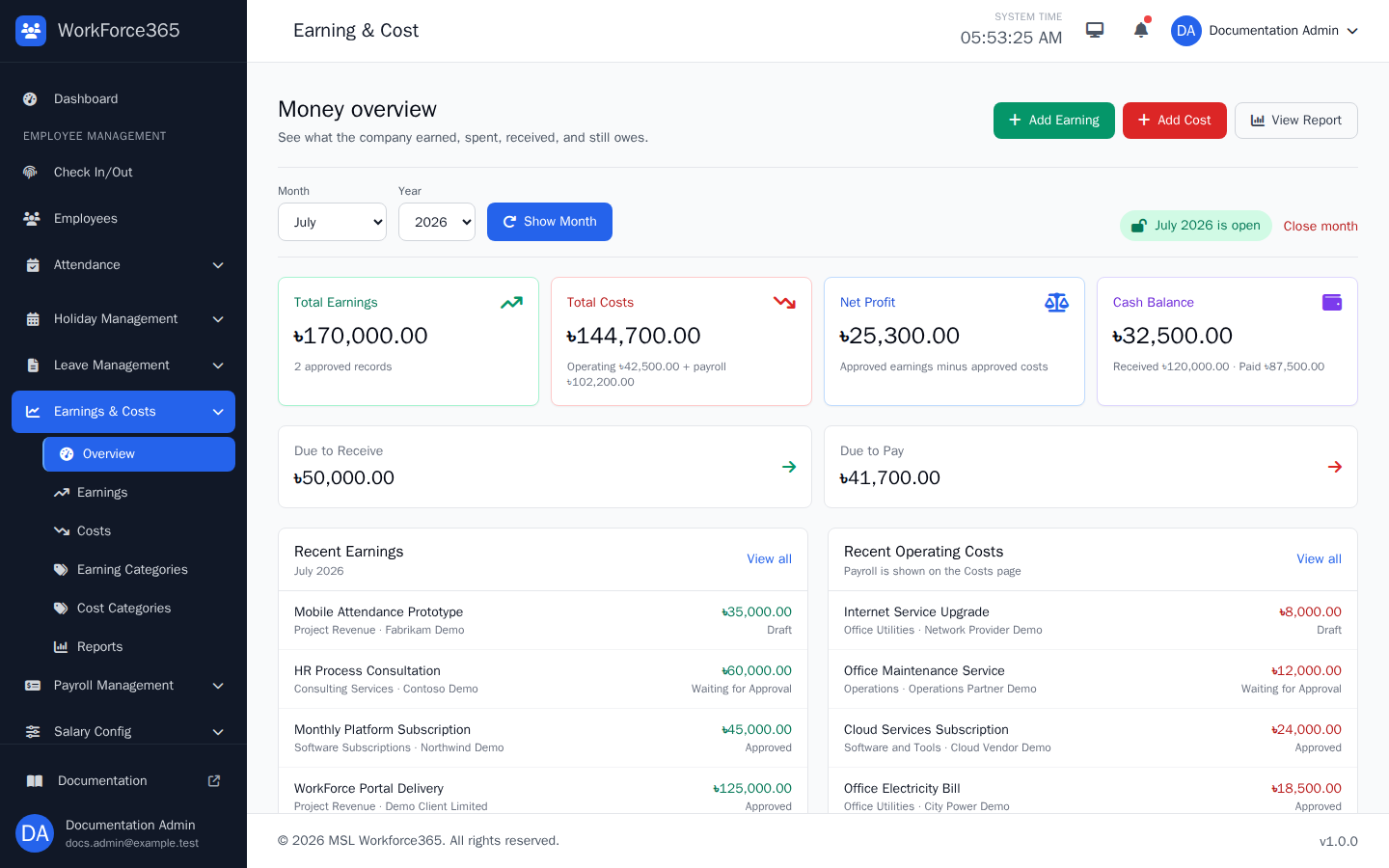
Earnings & Costs Dashboard
Select a month and year to review approved earnings, operating costs, approved payroll, profit or loss, cash received and paid, outstanding balances, and recent records. Authorized managers can also close or reopen the selected period.
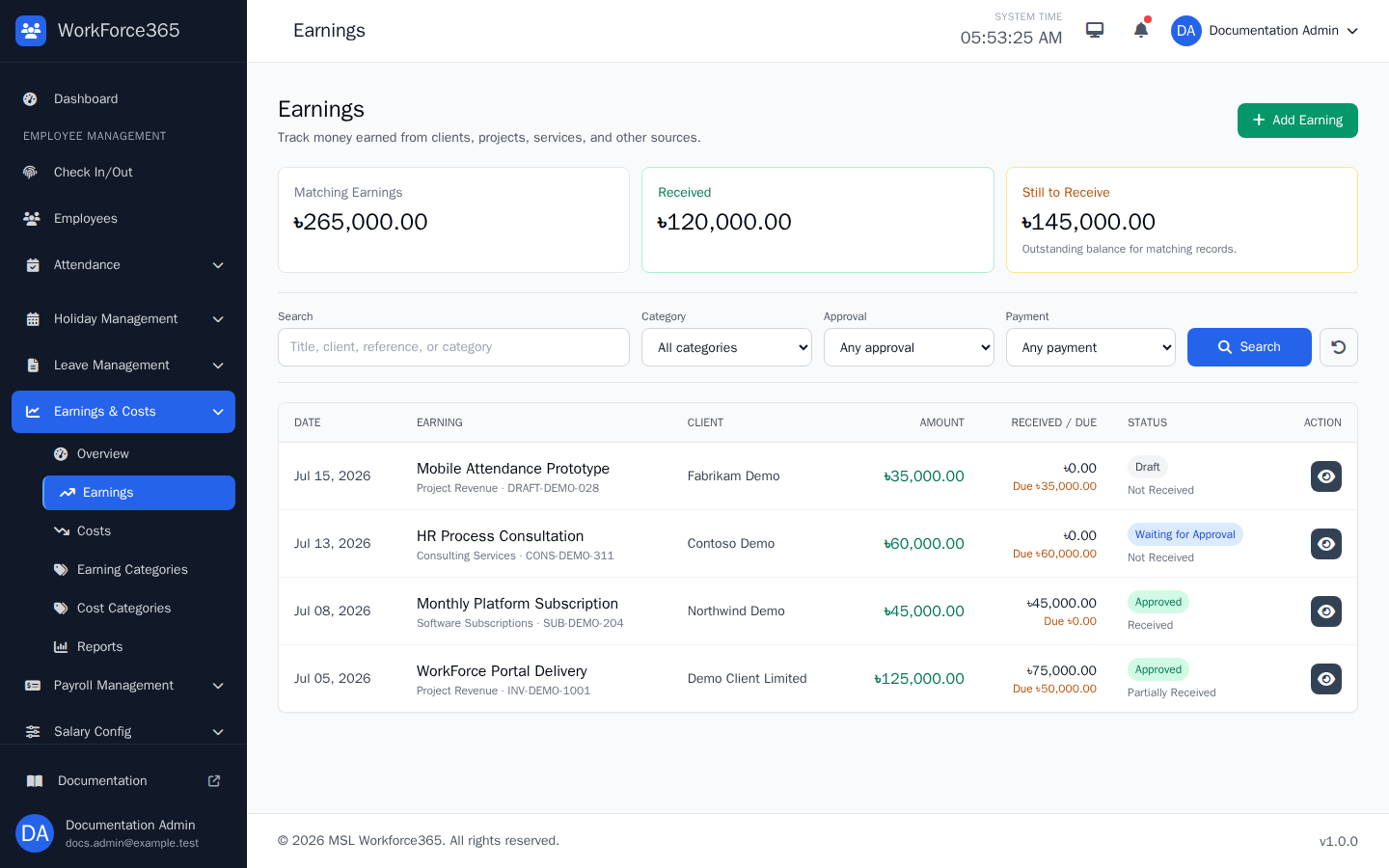
Earnings List
Search and filter earnings by category, approval, payment state, and date. The table compares total, received, and due amounts and provides a View action for each record.
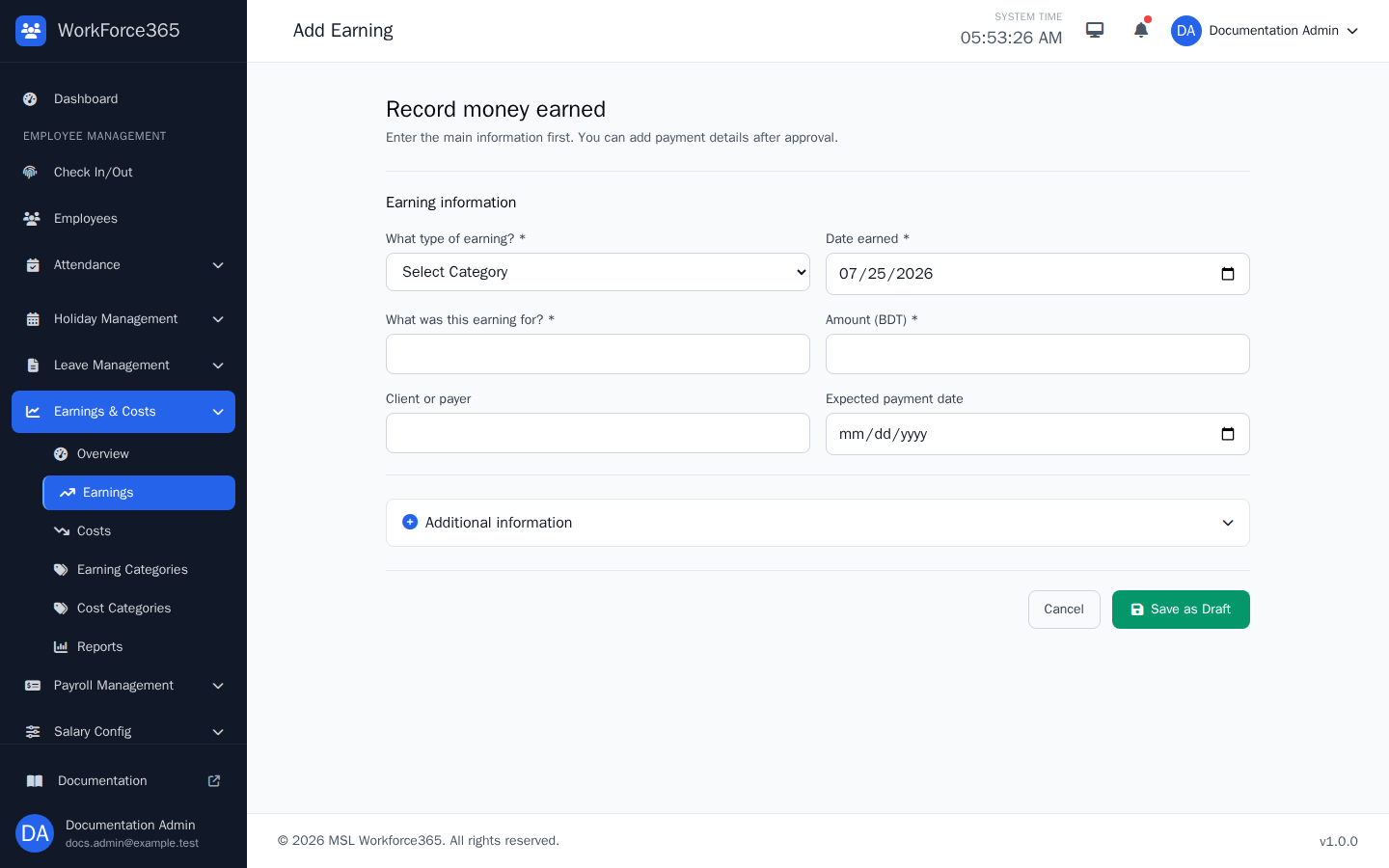
Add Earning
Record the earning category, date, title, amount, client or payer, and expected payment date. Reference, notes, and a supporting file are optional; new records are saved as Draft for review.
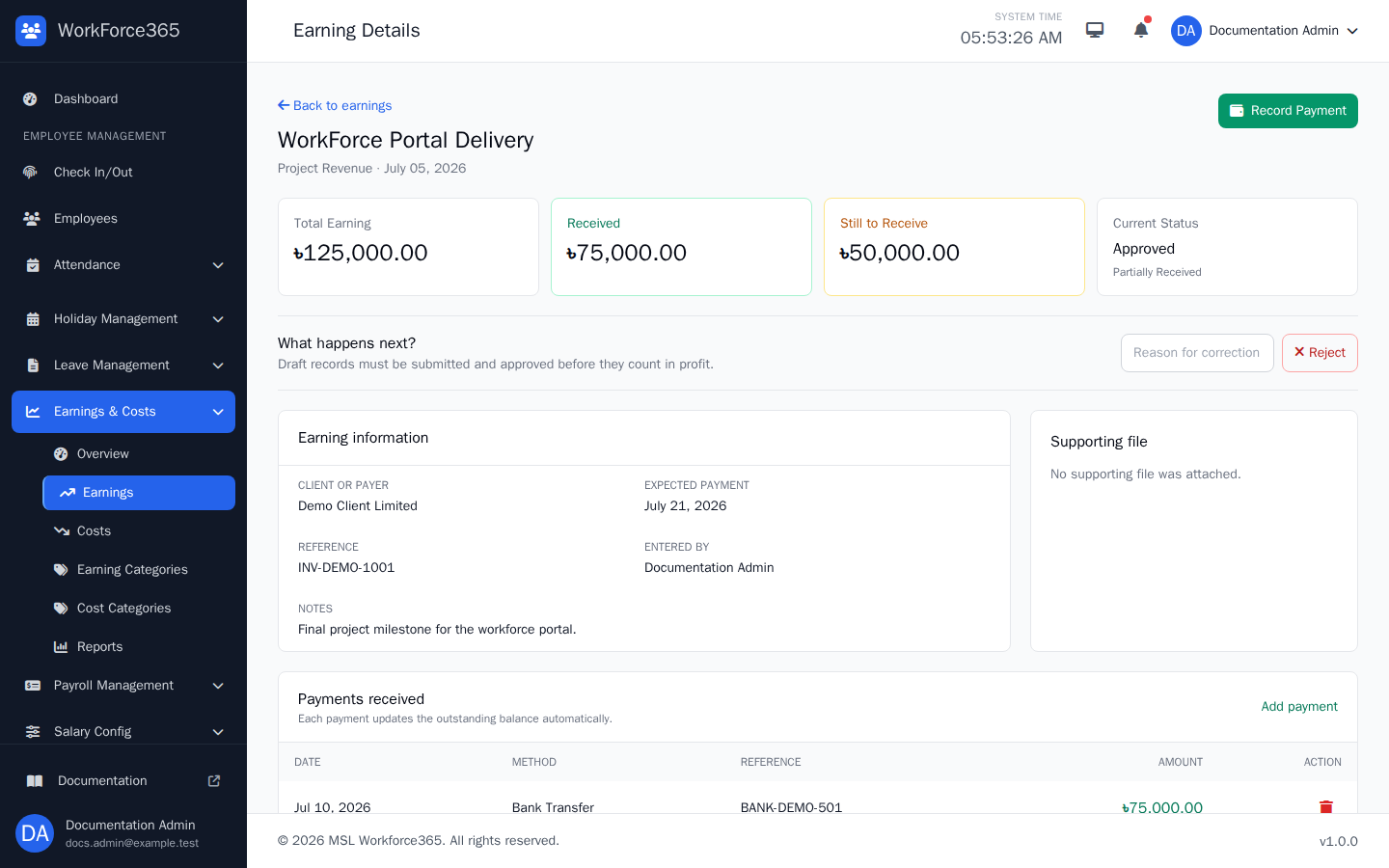
Earning Details
Review the total, received amount, due amount, approval and payment states, client information, reference, notes, attachment, and payment history. Available actions depend on status and period access.
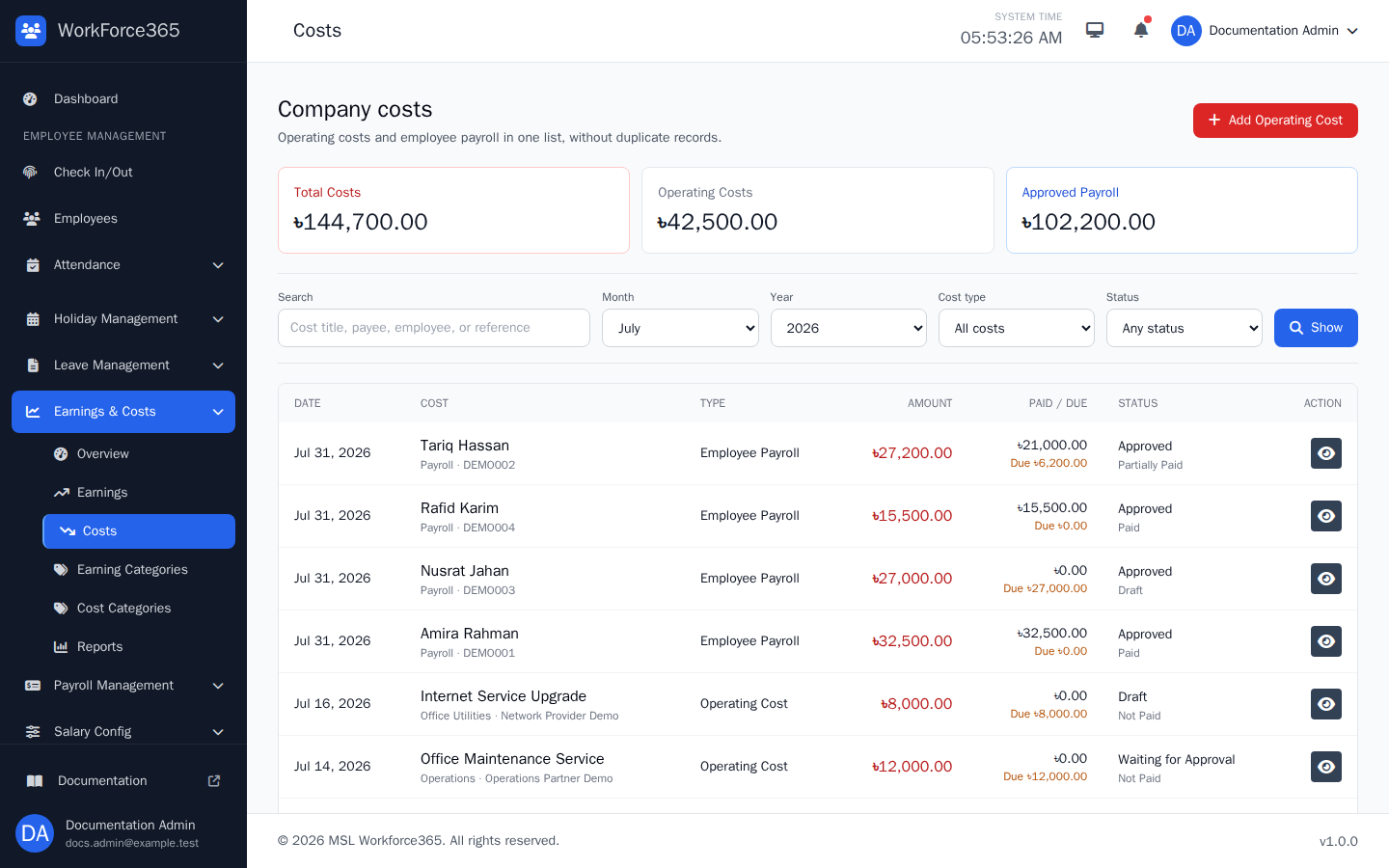
Costs List
Review operating costs and payroll together for a month. Search and filter by source and status, compare paid and due amounts, and open the underlying record when a detail action is available.
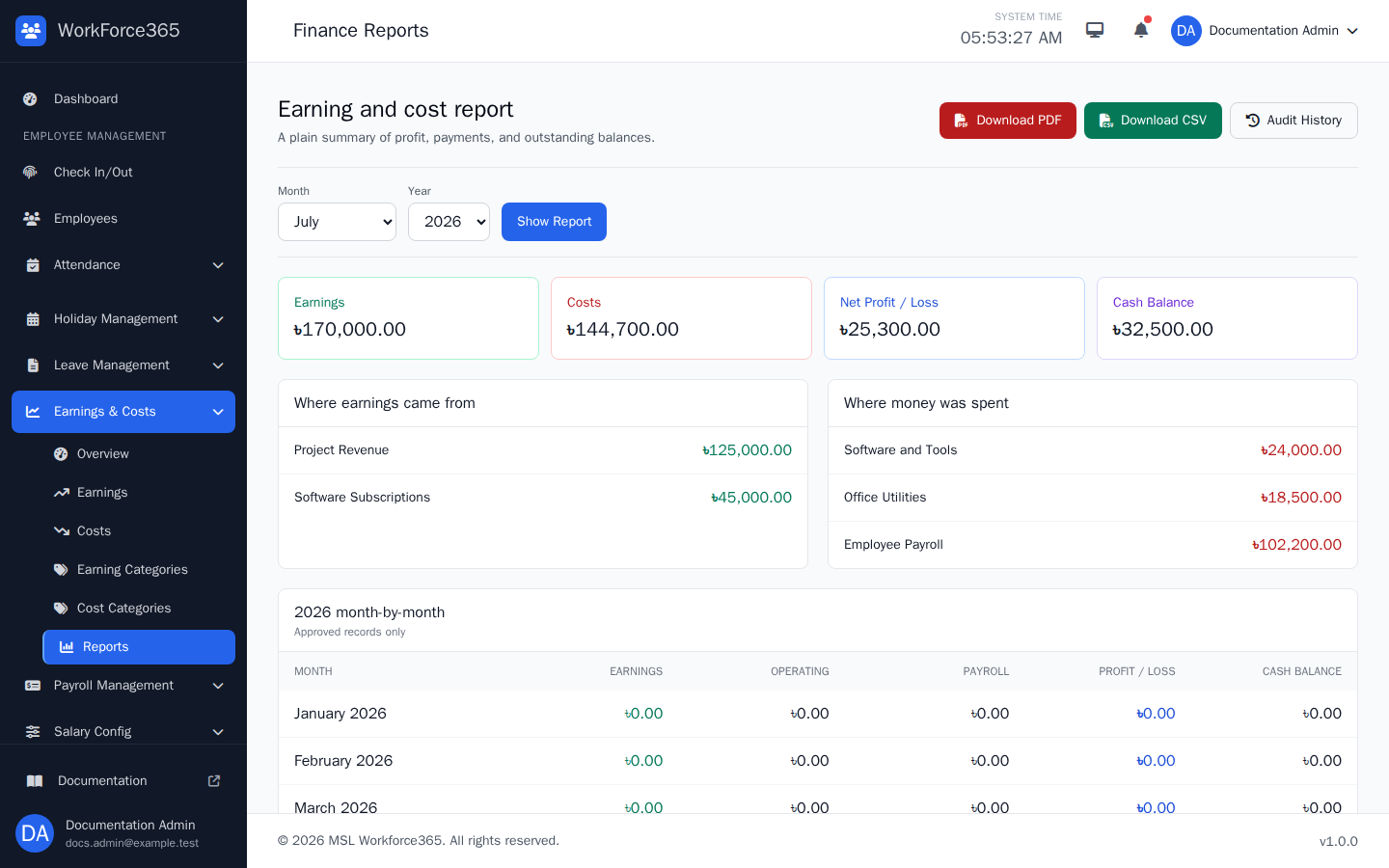
Finance Reports
Select a month and year to review earnings, operating costs, payroll, profit or loss, cash balance, category breakdowns, and yearly comparisons. Download PDF or CSV and open Audit History when permitted.
Reports, Exports, and Periods
Reports use approved records to provide reliable period totals and downloadable business summaries.
Monthly Report
Shows approved income, operating costs, payroll, profit or loss, and cash balance for the selected period.
Category Breakdown
Explains where approved earnings came from and where approved operating money was spent.
PDF and CSV
Download a professionally formatted PDF or structured CSV for the selected month with one action.
Audit and Period Control
Audit History records finance actions; closing a month protects finalized source records from changes.