On this page
Still need help?
Our support team is ready to help.
WorkForce365 Documentation
Payroll Management Documentation
Generate and approve monthly payroll, verify salary calculations, record payments, manage dues, and follow every financial movement.
Purpose and Key Features
Payroll Management converts employee salary settings and finalized attendance into a controlled monthly payment process. It helps authorized users verify calculations, approve the period, pay employees, follow outstanding salary, and preserve a financial history of every payroll action.
Monthly Calculation
Build one payroll record per employee from salary settings, attendance results, bonuses, and recoveries.
Approval Control
Move the selected month through Draft, Submitted, Approved, and period close or reopen controls.
Payments and Dues
Record full or partial salary payments and keep the paid and remaining amounts synchronized.
Traceable Records
Use payslips, payment batches, exports, the financial ledger, and the audit log to verify each movement.
Monthly Payroll Workflow
Complete the steps in order so that salary calculations, approvals, payments, and finance totals remain consistent.
- Finalize employee salary settings, performance values, attendance, leave, and the Monthly Summary for the target month.
- Select the month and year on Monthly Payroll, then use Generate Payroll to create or refresh employee records.
- Review attendance-payable salary, bonuses, advance and loan deductions, net salary, paid amount, and due amount.
- Add any authorized one-time bonus before submitting the payroll period.
- Submit the month for review; an authorized manager approves it or rejects it for correction.
- Record individual payments or prepare a payment batch from approved payable balances.
- Repay any remaining Salary Due until the original monthly payroll shows Paid with a zero due balance.
- Export the summary, payment report, payslip, or ledger, then close the completed payroll period.
Search, Filters, and Actions
The Monthly Payroll page uses focused filters and role-aware actions to keep the list easy to review.
Month and Year
Select the exact payroll period. All summary cards, records, exports, and approval controls use that period.
Employee Filter
Show all employees or isolate one person by name and employee ID.
Status Filter
Show all records or filter Draft, Partially Paid, or Paid payroll.
Search Option
There is no free-text search box on Monthly Payroll; use the Employee selector for a precise lookup.
Top Actions
Generate Payroll recalculates the month; Add Advance and Add Loan create employee recovery records.
Record Actions
Slip opens the payslip, Bonus adds an allowed bonus, and Pay records a full or partial salary payment.
Period Actions
Submit, Approve, Reject, Close, and Reopen control the monthly review and locking workflow.
Reports and Batches
Summary CSV, Payment CSV, and Batches prepare payroll information for review and payment processing.
Salary Categories and Status Badges
Salary categories explain the calculation, while badges show approval, payment, due, and batch progress.
Base and Attendance Salary
Base Salary is the configured monthly amount; Attendance Salary is the payable amount after monthly attendance rules are applied.
Performance and Bonuses
Performance-based template values are calculated through employee salary settings; approved one-time bonuses increase gross salary.
Deductions
Salary advance recovery and employee loan installments reduce the amount paid for the month.
Net, Paid, and Due
Net Salary is the final payable amount. Paid records money already issued, and Due shows the remaining balance.
Payroll Status
Draft means unpaid, Partially Paid means a balance remains, and Paid means the full net salary has been recorded.
Approval and Period Status
Draft, Submitted, Approved, or Rejected describes review; Open or Closed describes whether period actions remain available.
Salary Due Status
Open means repayment is still required; Settled means the remaining amount is zero.
Payment Batch Status
Draft is prepared, Paid is completed, and Cancelled is retained for history but is no longer processed.
Earnings, Deductions, and Company Costs
Payroll and Earnings & Costs use the same approved results for different business views.
Employee Earnings
Attendance-payable salary plus eligible performance amounts and bonuses forms gross employee earnings.
Employee Recoveries
Advance and loan deductions reduce the cash paid while remaining traceable in the Payroll Ledger.
Company Payroll Cost
Approved payroll is shown as a payroll cost in Earnings & Costs for the selected month.
Operating Expenses
Rent, utilities, subscriptions, and other non-payroll costs are recorded separately in Earnings & Costs.
Payroll Management Screens
These screenshots use synthetic documentation records and are generated from the current payroll templates. Select a screenshot to open the full-size image.
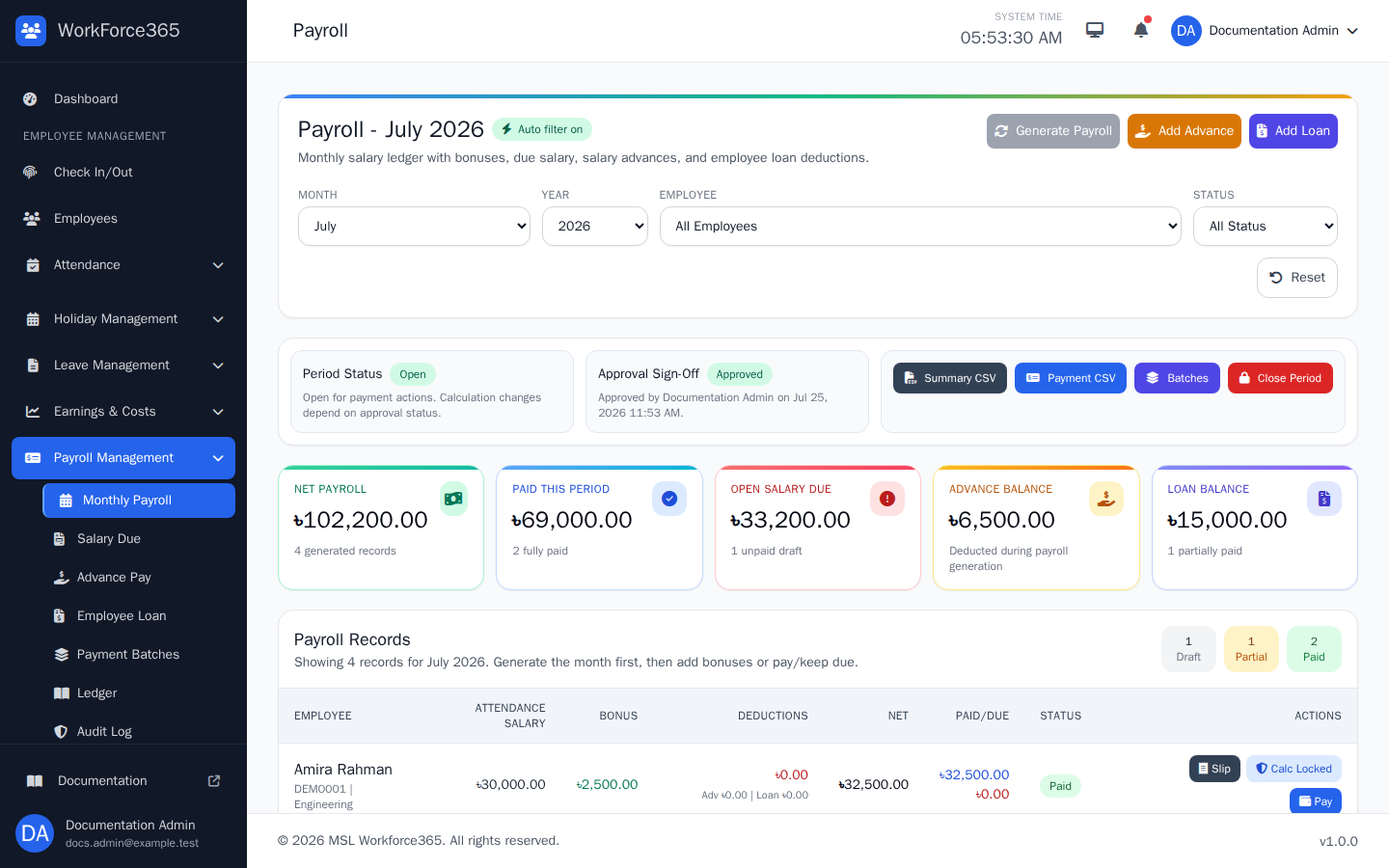
Monthly Payroll
Choose a month, year, employee, or payment status, then review the approval state, summary totals, employee calculations, paid and due amounts, and available generation, approval, payslip, bonus, and payment actions.
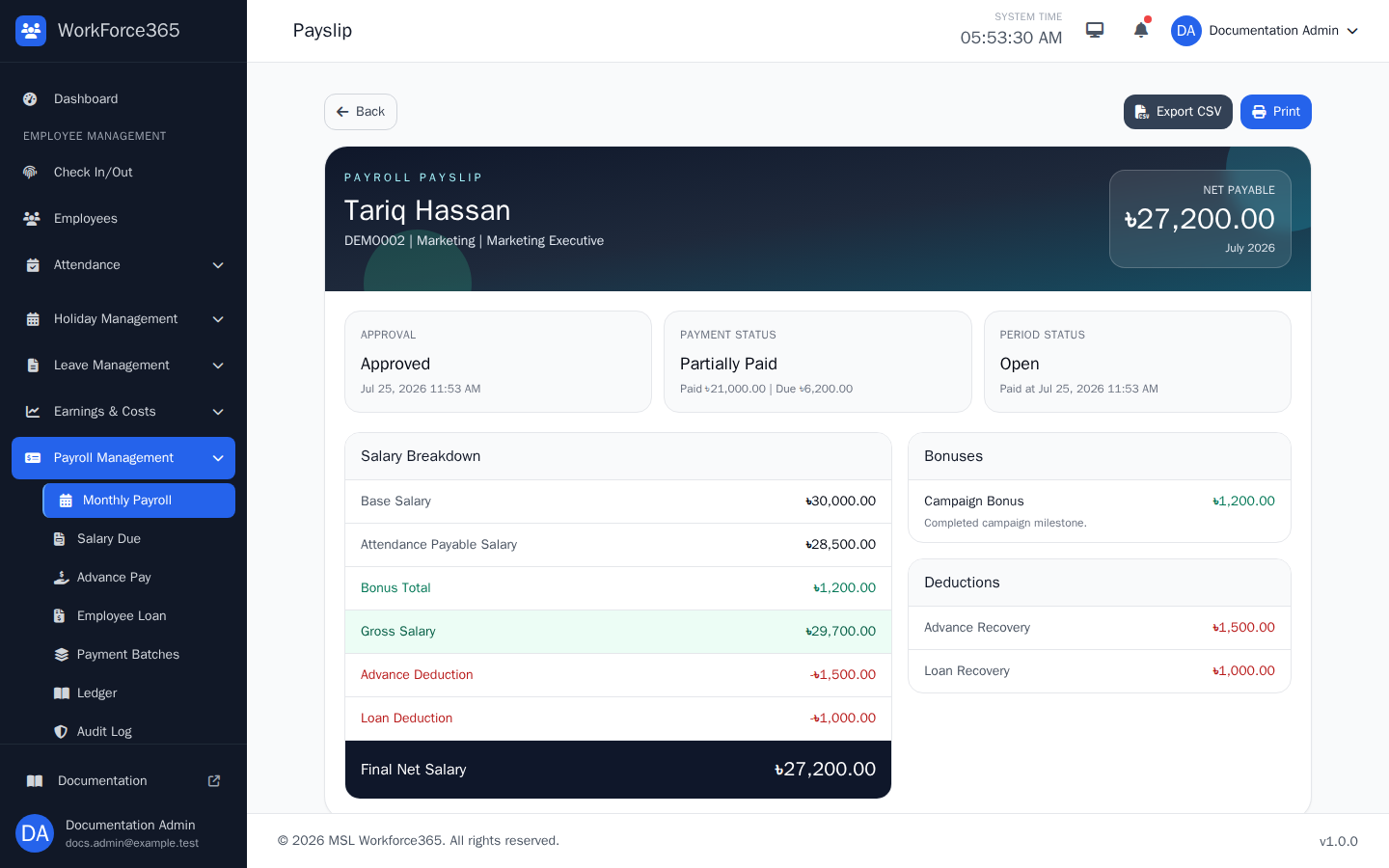
Employee Payslip
Verify the employee, period, approval, payment status, base and attendance salary, bonuses, deductions, net payable amount, and paid or due balance. Print the page or export its values to CSV.
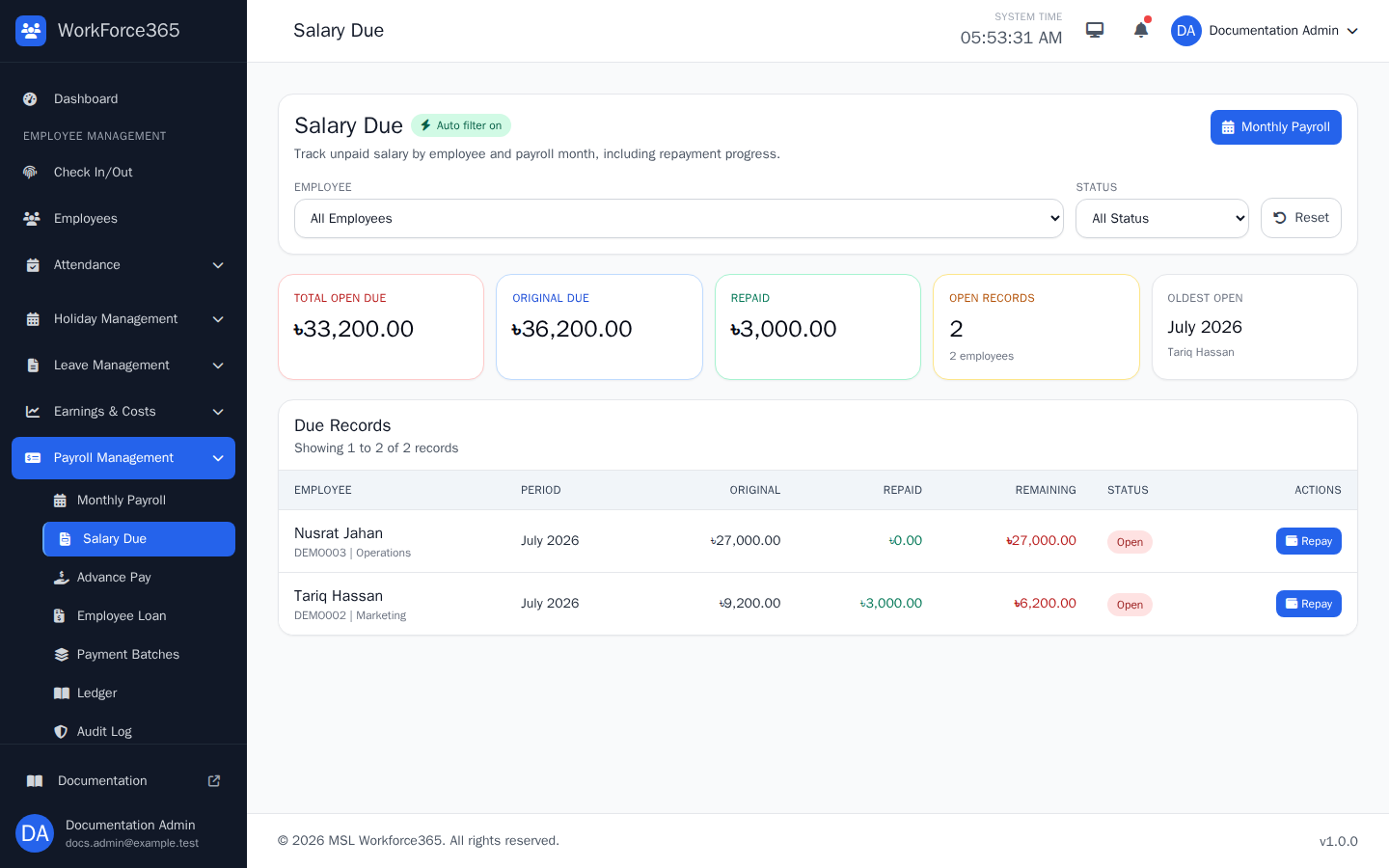
Salary Due
Filter by employee or Open and Settled status, compare original, repaid, and remaining amounts, and use Repay to record the next payment. Completing the due updates the source monthly payroll to Paid.
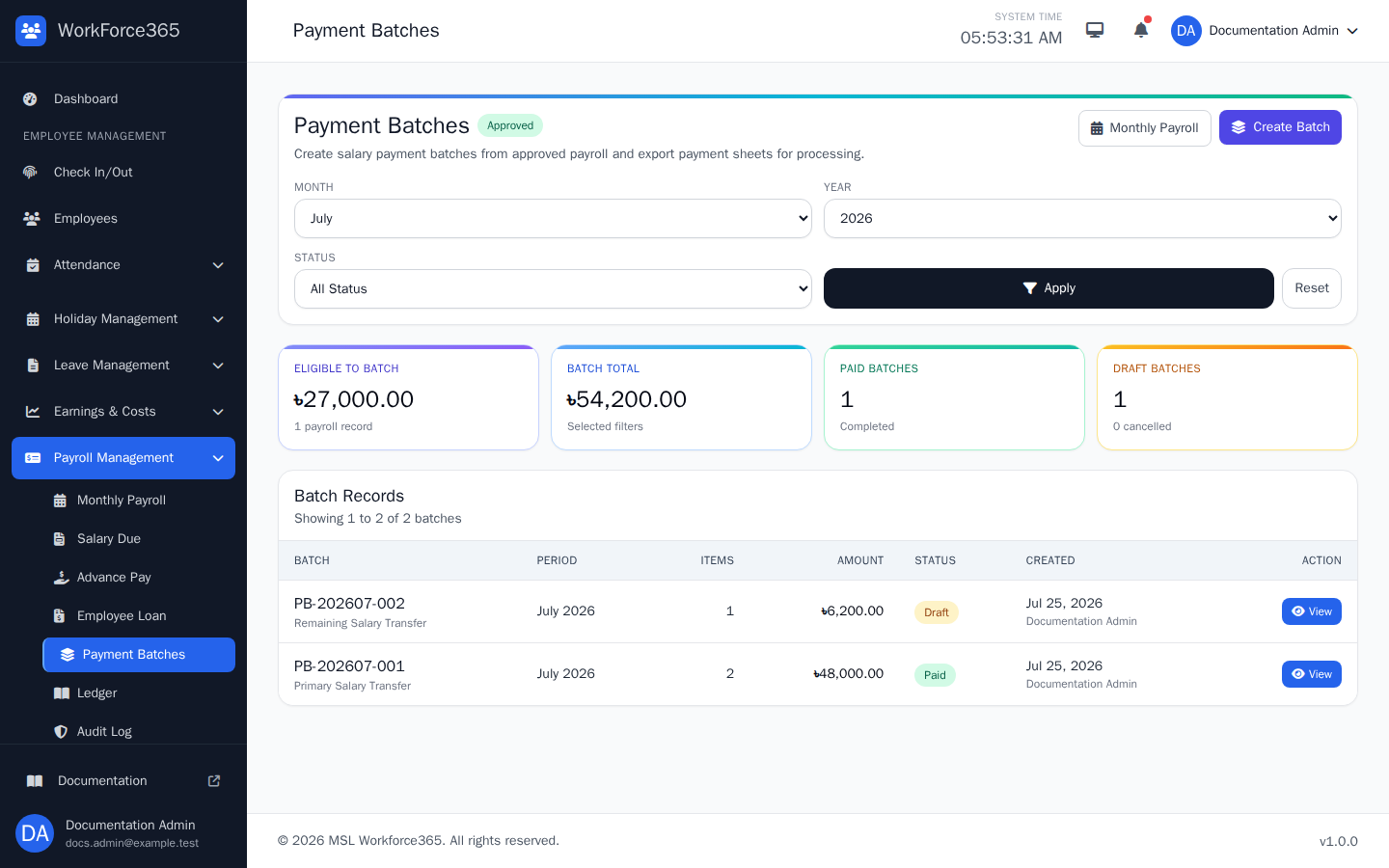
Payment Batches
Select a month, year, and batch status to review eligible salary, batch totals, item counts, and Draft, Paid, or Cancelled records. Approved payroll with a payable balance can be grouped into a new batch.
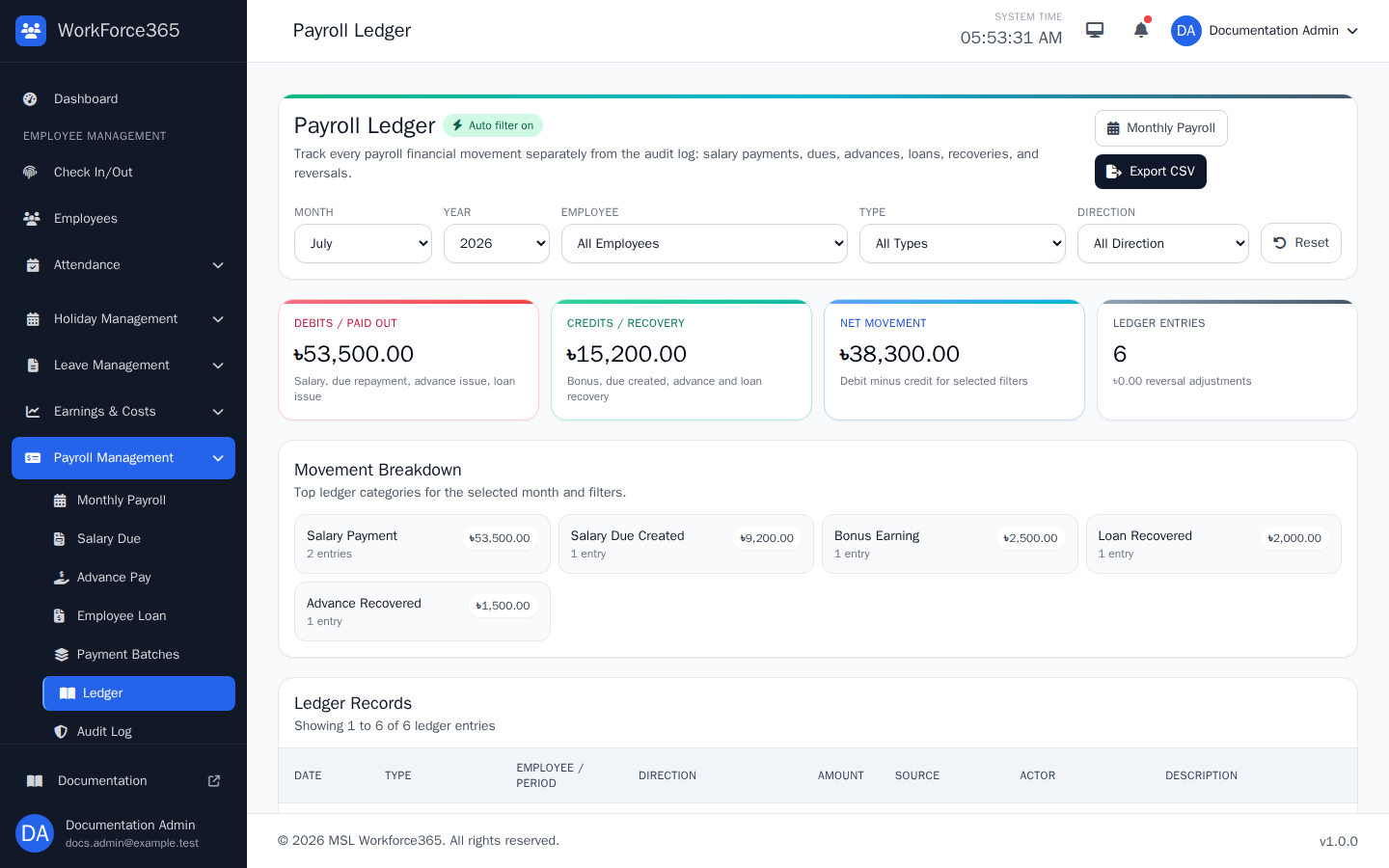
Payroll Ledger
Filter financial movements by month, year, employee, type, or debit and credit direction. Review salary payments, dues, bonuses, advances, loans, recoveries, and reversals, or export the filtered ledger to CSV.
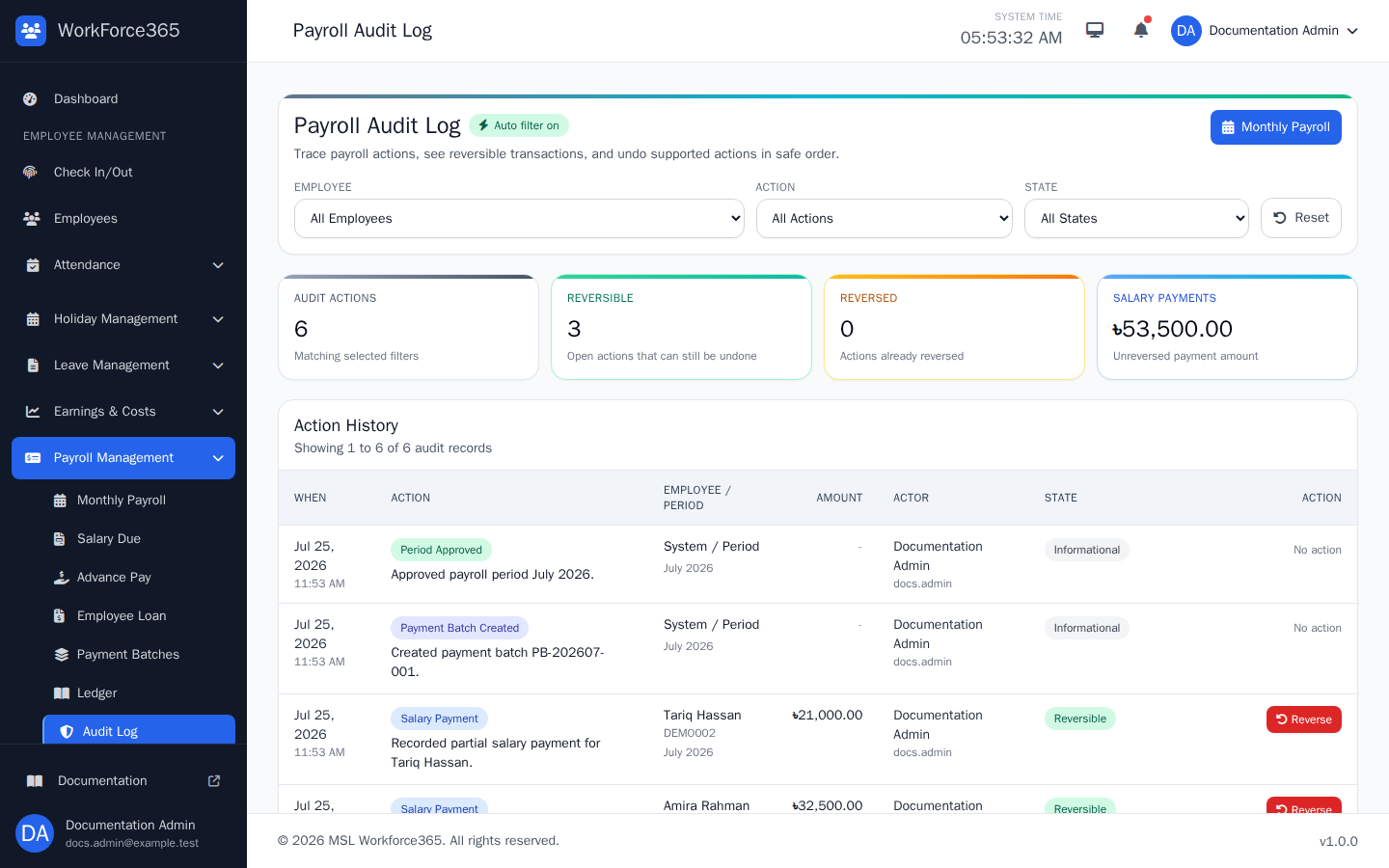
Payroll Audit Log
Filter by employee, payroll action, or Reversible, Reversed, and Informational state. Each entry records who acted, what changed, the related period or employee, and whether the action can be reversed safely.
Reports, Audit, and Screenshot Refresh
Use the output that matches the task, and keep finalized payroll traceable after payment.
Payroll Summary
Exports employee calculations, bonuses, deductions, net salary, payment state, and balances for the selected month.
Payment Report
Provides payment-focused payroll values for processing and reconciliation.
Payslip
Presents one employee's monthly calculation in a readable layout with Print and CSV actions.
Ledger and Audit
The ledger tracks money movement; the audit log tracks user actions and controlled reversals.